CI/CD Best Practices for Solo Developers and Small Teams
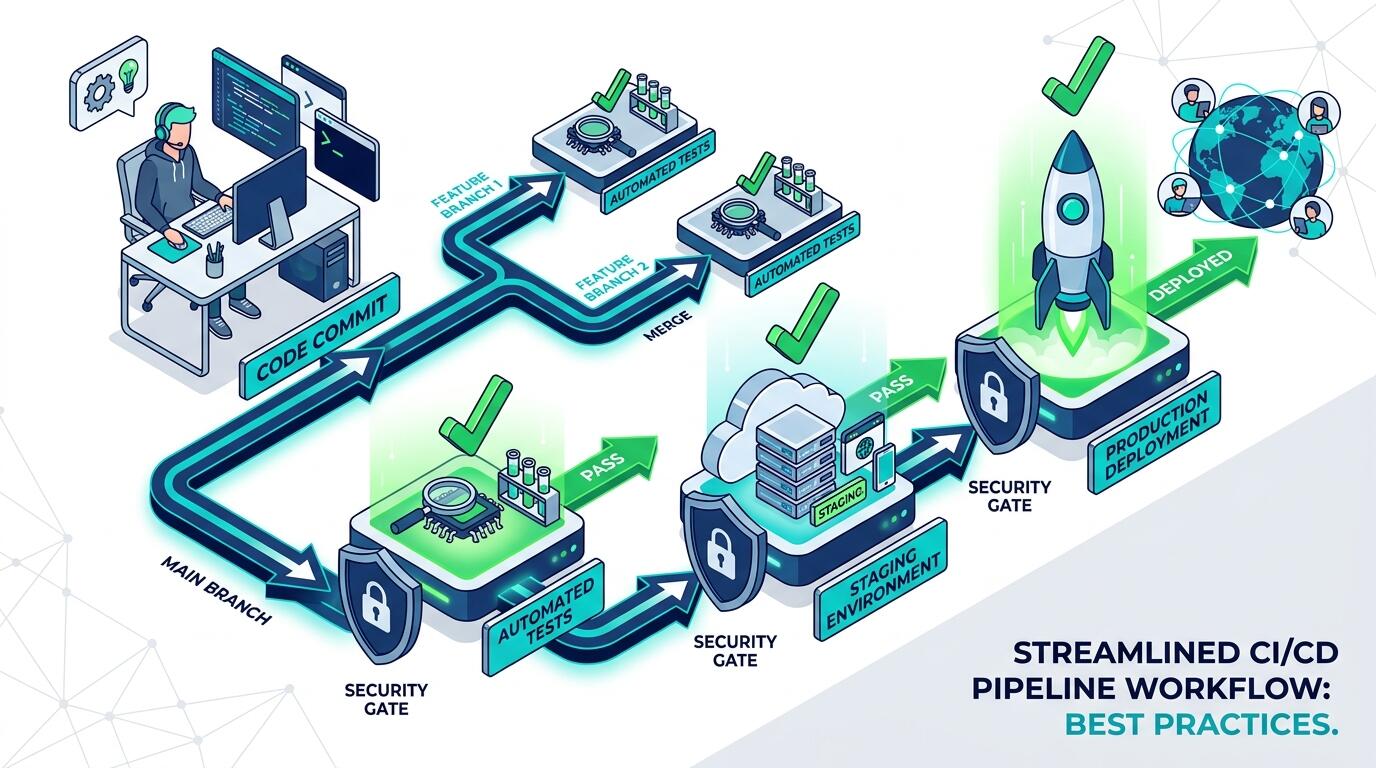
ALT: CI/CD best practices for solo developers and small engineering teams building production-ready pipelines
CI/CD Pipeline Strategies That Actually Work for Lean Engineering Teams
Key Conclusion: Continuous integration and continuous delivery (CI/CD) are not enterprise-only concerns. For solo developers and small teams, a well-designed pipeline eliminates the class of deployment disasters that kill momentum — broken builds going live, manual steps getting skipped under pressure, and rollbacks that take half a day. This article distills the practices that consistently produce reliable, fast-shipping workflows, regardless of team size, chosen tech stack, or budget constraints.
The practices below were selected based on patterns observed across real product builds — the kinds of projects where one or two engineers are responsible for everything from commit to production. Each item addresses a specific failure mode that lean teams encounter repeatedly. Work through them in order if you're starting from scratch, or use them as a diagnostic checklist if your pipeline already exists but feels fragile.
The Core CI/CD Practices Every Small Team Should Implement
Treat Your Pipeline as Code, Not Configuration
A CI/CD pipeline should be defined in version-controlled configuration files — YAML, JSON, or a domain-specific format depending on your toolchain — committed alongside your application source. When the pipeline lives only in a web UI (a common starting point with many hosted CI platforms), it becomes invisible to code review, impossible to diff, and prone to silent drift.
In practice, every change to build steps, environment variables, deployment targets, or test stages should go through the same pull-request workflow as application code. This creates a durable audit trail and lets you roll back a broken pipeline change just as you would revert a broken feature.
- Best for: Any team using GitHub Actions, GitLab CI, CircleCI, or similar YAML-driven platforms; particularly valuable when the person who set up the pipeline is not always available.
- Watch out: Secrets and credentials must never be committed as plaintext in pipeline files. Use the secret-management features native to your CI platform, and audit your configuration files for accidental credential leaks before the first commit.
Automate Every Test Stage — No Exceptions
Automated testing is the foundation of a trustworthy pipeline. A pipeline that deploys code without running tests is not a CI/CD pipeline; it is a deployment script with ceremony attached. According to Microsoft's CI/CD Pipeline Guide, the value of continuous integration comes directly from the feedback loop that automated testing creates — every commit either passes a defined quality gate or it does not.
For small teams, the practical question is which tests to automate first. Unit tests offer the fastest feedback and lowest maintenance cost. Integration tests catch the class of bugs that unit tests miss — mismatched API contracts, database schema issues, third-party service failures. End-to-end tests provide confidence that the user-facing product actually works, but they are slower and more brittle, so run them on a schedule or gated against main-branch merges rather than every commit.
- Best for: Teams shipping frequently (multiple times per week or per day) where manual QA is impractical at the required velocity.
- Watch out: A test suite that is too slow becomes a bottleneck that engineers start working around — pushing directly to main, disabling stages "temporarily." Keep the fast unit-test stage under a few minutes. Parallelize where possible.
Use Branch-Based Deployment Environments
A branch-based environment strategy maps code branches to deployment targets: a feature branch deploys to an ephemeral preview environment, the main branch deploys to staging, and tagged releases deploy to production. This pattern decouples the act of merging from the act of going live, which is a critical distinction for teams that need to review work before it reaches users.
Ephemeral preview environments — short-lived environments spun up automatically per pull request and torn down after merge — are now accessible to small teams through platforms like Vercel, Render, and Railway, without requiring infrastructure expertise. They give product managers and non-engineering stakeholders a direct URL to review a change before it merges, which compresses the feedback cycle dramatically.
- Best for: Teams building user-facing products where design, copy, or behavior needs sign-off from someone who is not reading code diffs.
- Watch out: Ephemeral environments that connect to shared databases or real third-party services can cause data corruption and unexpected charges. Use isolated test databases and stubbed external services in preview environments.
Enforce Automated Linting and Static Analysis as a Gate
Linting and static analysis are the cheapest class of automated checks a team can run. They catch formatting inconsistencies, obvious bugs, type errors, and security anti-patterns before any human reviews the code. Running them as a required status check on pull requests — blocking merge until they pass — keeps the codebase consistent without requiring a style guide discussion in every review.
For JavaScript and TypeScript projects, ESLint with appropriate rule sets handles style and common error patterns; TypeScript's own compiler is a powerful static analysis layer. For Python, Ruff (a fast linter) and mypy cover similar ground. Security-focused static analysis tools like Semgrep can surface credential exposure and injection vulnerabilities that a standard linter would miss.
- Best for: Solo developers who want an automated second opinion on every change they make; small teams where inconsistent style creates cognitive overhead in code reviews.
- Watch out: An overly strict linter configuration — especially on a legacy codebase — will generate so many failures on day one that the team disables it. Introduce rules incrementally, starting with the ones that catch real bugs rather than aesthetic preferences.
Keep Deployment Steps Atomic and Reversible
Every deployment step that cannot be reversed is a liability. Database migrations that drop columns, file system changes that overwrite configuration, or infrastructure changes that alter networking rules — any of these can turn a routine deploy into an outage that requires manual intervention to recover from.
The discipline of reversible deployments means: ship database migrations in a separate step from application code, use additive schema changes before removing old columns, deploy new code versions alongside old ones using blue-green or canary strategies, and maintain a tested rollback procedure for every deployment type. As Semaphore's analysis of CI/CD tool design notes, the distinction between platform-specific and standalone CI/CD tools often comes down to how well they support these more complex deployment patterns — a consideration worth making early before a tool choice becomes difficult to change.
- Best for: Any team deploying to production systems that serve real users, particularly when there is no dedicated on-call rotation to handle incidents at odd hours.
- Watch out: Rollback procedures that are designed but never tested are nearly as dangerous as no rollback at all. Test your rollback path on staging before you need it in production.
Build Once, Deploy the Same Artifact Everywhere
A common and costly mistake in small-team pipelines is building the application separately for each target environment — running npm run build or docker build independently for staging and production. This means staging and production are never running exactly the same code, which defeats the primary purpose of having a staging environment.
The correct pattern is build once, promote the artifact. Your CI pipeline builds a single Docker image (or compiled binary, or deployable bundle) tagged with the commit SHA. That exact artifact is what gets deployed to staging. If staging validation passes, the same artifact — same image, same SHA — is promoted to production. No rebuilds, no environment-specific compilation flags that silently differ.
This practice, while seemingly obvious, is one of the most common gaps encountered when working with teams that have grown their pipelines organically rather than designing them intentionally. If you're thinking about how this principle connects to larger architecture decisions, shipping a live product with disciplined engineering practices from day one is a theme worth exploring in depth.
- Best for: Teams using Docker or container-based deployment; anyone who has ever experienced a "works on staging, broken in production" failure caused by a build environment difference.
- Watch out: Build-once requires that environment-specific configuration — API keys, database URLs, feature flags — is injected at runtime via environment variables, not baked into the build artifact. This is a better security posture anyway, but it requires discipline to maintain.
Implement Structured Notifications and Observability Hooks
A pipeline that fails silently is a pipeline that erodes trust until no one believes the green checks mean anything. Small teams, where one person may be wearing four hats simultaneously, need pipeline failures to surface immediately and unambiguously — not buried in an email digest or a channel no one checks.
The minimum viable notification strategy: pipeline failures post to a dedicated Slack or Teams channel with a direct link to the failed run and the relevant log output. Successful production deployments post a brief summary (what deployed, from which commit, at what time). This creates a lightweight deployment log that every team member can see without querying the CI platform directly.
For teams with production services, connect deployment events to your observability stack. A deployment marker in your monitoring tool (Datadog, Grafana, or similar) lets you immediately correlate a spike in error rates with a recent deploy — which is where most post-deploy debugging time gets lost. Designing this kind of operational awareness into a pipeline from the start reflects the same philosophy behind building AI architectures that are observable and maintainable at scale.
- Best for: Teams where the person who deploys is not always the person who monitors; distributed teams across time zones where asynchronous visibility matters.
- Watch out: Alert fatigue is real. If every minor pipeline warning creates a notification, engineers will start ignoring the channel. Tune your notifications so they carry signal, not noise — failures and production events only, not every informational log line.
Define and Version Your Infrastructure as Code
Infrastructure as code (IaC) means your server configurations, cloud resource definitions, networking rules, and environment variables are declared in version-controlled files rather than configured by hand through a cloud console. For solo developers and small teams, the practical benefit is recovery time: if your production environment needs to be rebuilt — because of a provider incident, a misconfiguration, or a deliberate migration — IaC makes that a pipeline run rather than a days-long manual reconstruction.
Tools like Terraform, Pulumi, and AWS CDK serve different preferences and language backgrounds, but the principle is consistent across all of them. The pipeline should validate and apply infrastructure changes as part of the deployment workflow, not as a separate out-of-band process. Per the insights in Jonathan Hall's writing on solo DevOps practices, the discipline that keeps a single-engineer operation sustainable is the same discipline that makes a small team scalable — automate what you would otherwise have to remember.
- Best for: Teams deploying to any cloud provider (AWS, GCP, Azure, or managed alternatives like DigitalOcean App Platform or Fly.io); anyone who has ever manually clicked through a cloud console to reproduce an environment.
- Watch out: IaC tooling has a learning curve. If your team is new to it, start with the most critical, most frequently-changed infrastructure first — don't attempt to codify everything at once. Partial IaC coverage is still a significant improvement over none.
Quick Comparison at a Glance
Choosing the right practice to implement first depends on where your pipeline's weakest link currently sits. The table below maps each practice to its primary value, core strength, and most common limitation.
| Practice | Best For | Key Strength | Limitation |
|---|---|---|---|
| Pipeline as Code | All teams | Full version control and auditability of pipeline changes | Requires discipline to keep secrets out of config files |
| Automated Test Stages | Frequent-shipping teams | Catches regressions before they reach users | Slow test suites create bottlenecks that get bypassed |
| Branch-Based Environments | User-facing product teams | Decouples merge from go-live; enables stakeholder review | Preview envs connecting to shared data can cause corruption |
| Linting and Static Analysis | Solo devs and growing teams | Cheapest form of automated quality gate | Overly strict configs on legacy codebases drive disengagement |
| Atomic and Reversible Deployments | Production services with real users | Limits blast radius of any single deploy | Rollbacks are only valuable if they are tested in advance |
| Build Once, Deploy Artifact | Docker/container-based teams | Eliminates build-environment drift between stages | Requires runtime environment variable injection discipline |
| Structured Notifications | Distributed or async teams | Makes pipeline health visible without active monitoring | Poorly tuned alerts create noise and get ignored |
| Infrastructure as Code | Cloud-deployed services | Enables fast environment recovery and reproducibility | Learning curve is non-trivial for teams new to IaC tooling |
How to Choose the Right Starting Point
The most common mistake teams make when improving their CI/CD workflow is trying to implement everything at once. The result is a partially-completed overhaul that introduces friction without delivering the reliability benefits. A more effective approach is to identify the single most painful failure mode your team experiences today and address that first.
If your most common problem is broken code reaching production, prioritize automated test stages (Practice 2) and enforce them as merge gates before any other change.
If your most common problem is "it worked on staging but broke in production," the root cause is almost always a build or environment mismatch. Implement build-once artifact promotion (Practice 6) and branch-based environments (Practice 3) together.
If your most common problem is losing hours to post-deploy debugging, structured observability hooks (Practice 7) connected to a monitoring stack will return that time immediately.
If your most common problem is a single engineer holding all the deployment knowledge in their head, pipeline-as-code (Practice 1) and infrastructure as code (Practice 8) are your highest-leverage investments, because they transfer that knowledge into the codebase itself.
A common misconception worth addressing directly: CI/CD is not primarily about speed. The goal is not to deploy faster for its own sake — it is to deploy with confidence. A well-designed pipeline should make every deployment feel routine and low-stakes, because the automated checks and reversibility mechanisms have removed the primary sources of risk. Speed is a byproduct of that confidence, not the objective.
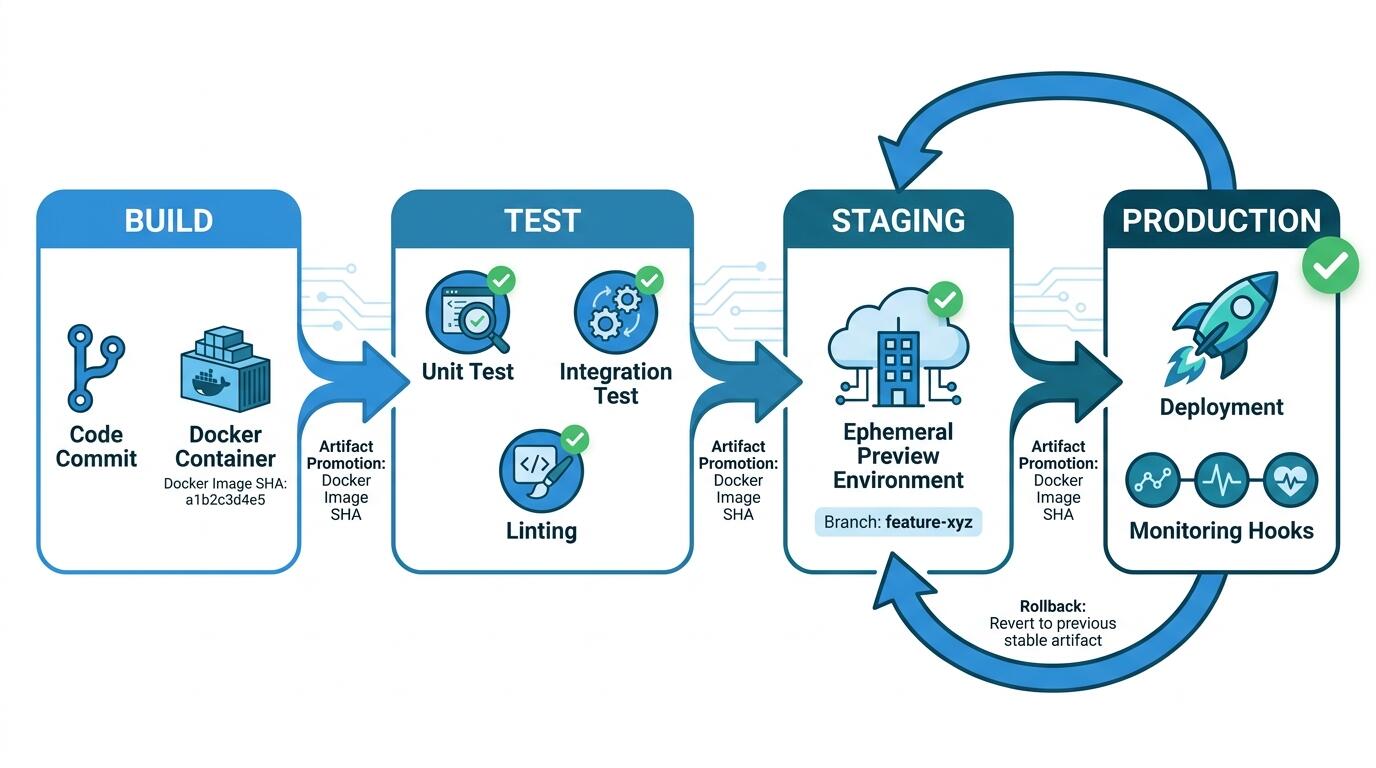
ALT: Visual diagram of a CI/CD pipeline workflow showing build, test, staging, and production deployment stages for small engineering teams
Common Questions
Q1: How do I set up a CI/CD pipeline without a dedicated DevOps engineer?
Modern CI/CD platforms like GitHub Actions, GitLab CI/CD, and CircleCI are designed to be self-serviceable by application engineers without platform specialization. Start with a single YAML file in your repository that runs your tests on every push. Add a deployment step targeting a managed platform (Vercel, Render, Fly.io, or similar) that handles infrastructure concerns for you. Layer in additional stages — linting, security scanning, staging deployments — incrementally as the team's confidence grows. The pipeline-as-code approach means every addition is reviewable and reversible.
Q2: Are ephemeral preview environments worth the setup cost for a two-person team?
For teams building user-facing products, yes — particularly when product decisions need to be validated visually before they merge. The setup cost has dropped significantly as managed hosting platforms have built this capability into their standard offering. The more important caveat is environment isolation: a preview environment that shares a production database or live API credentials is not a safe review environment. The time investment pays off when it catches a UI regression or a copy error before it ships to users, without requiring anyone to pull the branch and run it locally.
Q3: How long does it take to build a production-grade pipeline for a small team?
A minimum viable pipeline — version-controlled config, automated tests, and a single-command deployment to a managed platform — can be functional within a day for a greenfield project. A more complete setup including branch environments, artifact promotion, observability hooks, and infrastructure as code typically takes a few days of focused effort. The ongoing maintenance cost is low if the pipeline is treated as code from the start. The more relevant question is the cost of not having it: a single production incident caused by an untested deployment typically costs more time than the entire initial pipeline setup.
Final Thoughts
CI/CD for solo developers and small teams is not about replicating what large engineering organizations do — it is about identifying the specific failure modes that slow your team down or erode your confidence in deployments, and addressing them systematically.
Key Takeaways:
- Define your pipeline in version-controlled code from the start; treat pipeline changes the same way you treat application changes.
- Automate tests at every stage and enforce them as merge gates — a pipeline without automated testing is not CI/CD.
- Build once and promote the same artifact through all environments; never let staging and production run different builds.
- Design every deployment to be reversible and test your rollback procedures before you need them in production.
- Invest in observability hooks and structured notifications early; invisible pipeline failures erode trust faster than the failures themselves.
The next concrete step is to audit your current pipeline (or the absence of one) against these eight practices and identify your single highest-pain gap. Fix that gap completely before moving to the next. Incremental, deliberate improvement compounds — within a few weeks, deployment becomes the least stressful part of your engineering workflow.
Ready to ship software with the kind of engineering discipline that scales? Visit Darius to explore technical insights, real project work, and hands-on expertise in AI architecture, systems design, and full-stack engineering — and get in touch if you're building something that needs to ship with confidence.
References & Further Reading
- Microsoft. "CI/CD Pipeline Guide for Developers".
https://www.microsoft.com/en-us/software-development-companies/resources/articles/ci-cd-pipeline-guide - Semaphore. "Platform-specific CI/CD tools vs. standalone CI/CD tools".
https://semaphoreui.com/blog/platform-specific-vs-standalone-cicd - Jonathan Hall. "Solo DevOps".
https://jhall.io/posts/solo-devops/
Note: Standards and best practices evolve with tooling; check the latest official documentation for the platforms and tools referenced above.