How to Ship Your First Live AI Product in 30 Days

ALT: Engineer shipping a live AI product on a laptop within a 30-day sprint timeline
Ship Your First Live AI Product: What This Guide Will Help You Achieve
You've been tinkering with AI prototypes for weeks — maybe months. The demos look impressive in a notebook, the model responds intelligently in isolation, and your team is excited. But somehow, the gap between "working demo" and "live product real users can touch" feels enormous. You're not alone. This is one of the most common inflection points we see in teams building AI-native products: the prototype trap.
This guide is for software engineers, product managers, and technical founders who are ready to close that gap. It walks you through a pragmatic, production-oriented approach to launching your first live AI product within a 30-day window — not a polished v1.0, but a real, deployed, user-facing product that works. The philosophy here mirrors what drives the work at Darius: AI should be a native capability embedded in the product from day one, not a feature bolted on after the fact.
Before You Start: Prerequisites and Preparation for a 30-Day AI Launch
Shipping a live AI product in 30 days is achievable — but only if you walk in prepared. The biggest reason teams blow past their timelines isn't technical complexity; it's starting without clarity on scope, infrastructure, or the problem they're actually solving.
Before you write a single line of production code, you need to have the following in place.
What you need to know going in:
You should have a working familiarity with at least one major LLM API (OpenAI, Anthropic, Google Gemini, or an open-source equivalent via a hosted inference provider). You don't need to be an ML researcher — but you do need to understand prompt construction, token limits, and basic API error handling. If you're building something beyond a pure language interface (e.g., retrieval-augmented generation, tool use, or multimodal inputs), you'll want hands-on experience with vector databases or function-calling patterns.
On the product side, you need a clearly scoped problem. "AI-powered productivity tool" is not a scope. "An AI assistant that helps customer support agents draft responses from a knowledge base" is a scope. The narrower and more concrete, the better your odds of shipping in 30 days.
Time and effort expectations:
This is a focused, high-intensity sprint. Expect to treat it as a primary workstream — not a side project. For a solo founder or small team of two to three, this is a full-time commitment for the month. Larger teams can parallelize, but coordination overhead grows quickly, so keep the core shipping team lean.
✅ Checklist before starting:
- [ ] Problem statement written in one sentence, validated with at least a handful of target users
- [ ] LLM provider account set up with API access confirmed
- [ ] Cloud hosting environment selected and accessible (e.g., a serverless platform, container service, or PaaS)
- [ ] Basic observability tooling identified (logging, error tracking)
- [ ] Authentication strategy decided (even if it's just email/password or magic links to start)
- [ ] Data privacy and compliance requirements reviewed for your use case
- [ ] A definition of "done" for day 30 — what does a shipped product mean for your context?
The Step-by-Step Process to Launch a Live AI Product in 30 Days
Step 1: Lock the Problem and Define the AI's Role in the Product
The first two to three days should be spent entirely on problem definition — and specifically on defining what role AI plays in the core user experience. This sounds obvious, but a pattern we consistently see is teams that treat AI as the product rather than as a capability that serves the product.
Ask yourself: what is the user trying to accomplish, and where does AI create a step-change in their ability to do it? The answer to that question defines your AI integration point. Everything else — the UI, the data pipeline, the model choice — flows from there.
Write a one-paragraph product brief that includes: the target user, the job they're trying to do, the current friction they face, and how AI specifically removes or reduces that friction. Pin this somewhere visible. It will save you from scope creep in week three.
Tip: If you can't explain the AI's role in the product without using the word "AI," you don't have a clear enough problem definition yet. The value should be describable in terms of user outcomes.
Step 2: Choose Your AI Architecture Pattern Early
Days three through five should be spent selecting your architecture pattern — and committing to it. The most common patterns for a first live AI product are: direct LLM completion (prompt in, response out), retrieval-augmented generation (RAG) for knowledge-grounded responses, and agentic tool use for multi-step task execution.
Each pattern has a different complexity profile. Direct completion is the fastest to ship but the least powerful for knowledge-intensive use cases. RAG adds a vector store and retrieval layer, which introduces more moving parts but dramatically improves factual grounding. Agentic patterns are the most powerful but also the most fragile — they require careful orchestration and are the hardest to debug in production.
For a 30-day first launch, the strong recommendation is to start with the simplest pattern that solves the problem. You can always evolve the architecture in subsequent iterations. Choosing an agentic pattern for your first live product because it sounds impressive is one of the most reliable ways to miss your deadline.
Tip: Sketch your architecture on a whiteboard or in a simple diagram before writing code. Identify every external dependency — each one is a potential failure point in production.
Step 3: Build the Minimum Viable AI Integration
With your architecture chosen, days five through twelve are for building the core AI integration — the part of the system where user input meets the model and a useful output is returned. This is not the time to build the full product; it's the time to get the AI loop working end-to-end in a real (not notebook) environment.
Set up your backend service, wire up the LLM API, and build the simplest possible interface that lets a real human interact with the AI capability. This could be a basic web form, a Slack bot, a CLI tool — whatever gets you to real interaction fastest. The goal is to move from "it works in a notebook" to "it works in a deployed service that I can share a URL for."
At this stage, invest seriously in your prompt engineering. The quality of your prompts is often the single largest determinant of output quality, and it's the lever you have the most direct control over. Write prompts that include clear instructions, relevant context, output format specifications, and edge case handling. Test them against a range of realistic inputs before moving on.
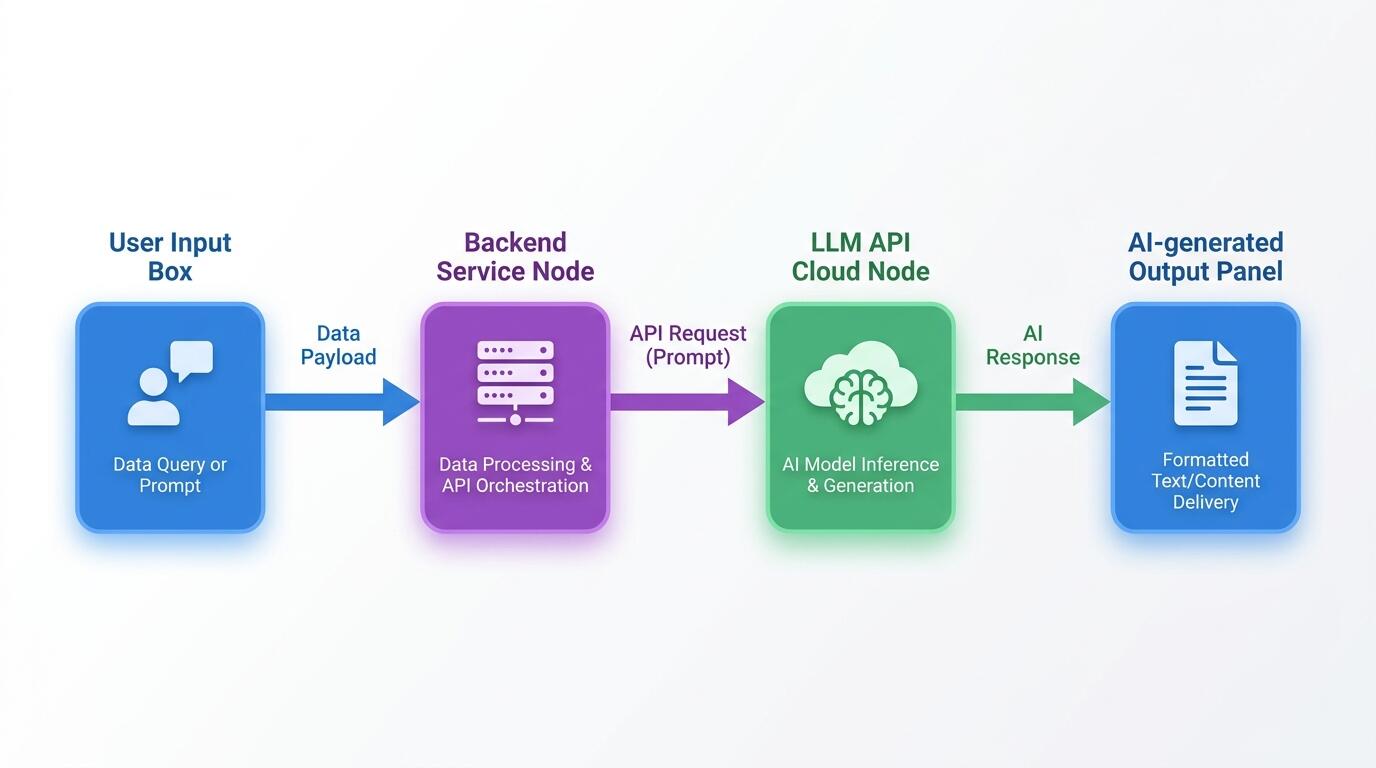
ALT: Diagram showing user input flowing through a backend service to an LLM API and returning AI-generated output for a live product
Tip: Log every LLM request and response from day one. You will need this data to debug issues, improve prompts, and understand how users are actually interacting with the AI. Skipping observability early is a debt you will pay back with interest.
Step 4: Build the Product Shell Around the AI Core
Days twelve through eighteen are for building the product experience around the AI integration you've already validated. This means authentication, basic UI, data persistence, and any integrations your users need to get value from the product.
A critical mindset shift here: the product shell should serve the AI capability, not the other way around. Design the UX to make the AI's outputs as useful and actionable as possible. Think about how users will provide input, how they'll interpret and act on AI outputs, and what happens when the AI gets something wrong — because it will.
Keep the UI ruthlessly simple. Every hour spent on UI polish in week two is an hour not spent on making the AI work reliably. Ship a functional, clean interface — not a beautiful one. Beauty can come in month two.
Tip: Build in a feedback mechanism from the start — even something as simple as a thumbs up/thumbs down on AI responses. This data is invaluable for improving the product post-launch and signals to users that you're actively iterating.
Step 5: Harden for Production — Reliability, Safety, and Cost
Days eighteen through twenty-four are for production hardening. This is the step most first-time AI product builders skip or rush, and it's where live products most commonly fail.
Production hardening for an AI product means several things. First, implement robust error handling for LLM API failures — rate limits, timeouts, and unexpected response formats are all real production events. Your product should degrade gracefully, not crash. Second, implement input validation and output filtering. Users will send unexpected inputs; models will occasionally produce outputs you don't want surfaced. Build guardrails appropriate to your use case.
Third, model your cost structure. LLM API calls are not free, and usage patterns in production often look very different from what you tested in development. Understand your cost per interaction, set up usage monitoring, and implement any necessary rate limiting or caching to keep costs predictable.
Finally, review your data handling practices. What user data are you sending to the LLM provider? Does your privacy policy cover this? For many use cases, this is a straightforward review — but skipping it entirely is a risk you don't want to take.
Tip: Run a structured "break it" session before launch. Have someone who didn't build the product try to use it in unexpected ways. AI products surface failure modes that traditional software testing doesn't catch.
Step 6: Deploy, Monitor, and Prepare for Real Users
Days twenty-four through twenty-eight are for deployment and pre-launch preparation. By this point, your product should be running in a production environment — not a local machine, not a staging environment that only you can access.
Set up your monitoring stack: at minimum, you want application error tracking, LLM response logging, and basic usage metrics. If you have a budget for it, a dedicated LLM observability tool can provide significant value — tracking things like latency, token usage, and output quality over time.
Prepare your launch communication. Even for a small initial user group, a clear explanation of what the product does, what it doesn't do, and how to give feedback sets the right expectations and reduces support burden. AI products in particular benefit from explicit expectation-setting — users who understand the model's limitations are more forgiving of its failures and more useful in providing feedback.
Tip: Do a soft launch with a small group of trusted users before opening to the broader audience. The feedback you get in the first 48 hours of real usage is worth more than any amount of internal testing.
Step 7: Launch, Iterate, and Establish Your Feedback Loop
Days twenty-eight through thirty are for launch and establishing the iteration rhythm that will carry you beyond day 30. Shipping is not the finish line — it's the starting line for learning.
On launch day, be present. Monitor your dashboards, watch for errors, and be ready to respond to user feedback quickly. The first hours of a live AI product often surface issues that no amount of pre-launch testing revealed.
More importantly, establish a clear process for turning user feedback into product improvements. What signals will you track? How will you prioritize prompt improvements versus feature additions versus infrastructure work? The teams that build great AI products over time are the ones that treat post-launch iteration as a first-class engineering discipline.
Tip: Resist the urge to add new AI capabilities in the first two weeks post-launch. Focus on making the core capability you shipped work better for the users you have. Depth before breadth.
Common Mistakes and Troubleshooting When Shipping Your First AI Product
| Symptom | Likely Cause | How to Fix |
|---|---|---|
| AI outputs are inconsistent and unpredictable in production | Prompts were only tested on a narrow set of inputs in development | Expand your prompt testing to cover edge cases; add explicit instructions for handling unexpected inputs; implement output validation |
| LLM API costs are much higher than expected | No rate limiting, caching, or token optimization in place | Audit your prompt lengths, implement response caching for repeated queries, add per-user rate limits |
| Users are confused or frustrated by AI responses | Outputs are technically correct but not formatted or framed for the user context | Redesign output formatting in prompts; add UI scaffolding to contextualize AI responses; set clearer user expectations |
| Product crashes or returns errors under real user load | Error handling for LLM API failures is incomplete | Implement retry logic with exponential backoff, graceful degradation messaging, and circuit breakers for API outages |
| Sensitive user data is being sent to the LLM provider unintentionally | Input sanitization and data handling review was skipped | Audit all data flows into the LLM API; implement input filtering; review your privacy policy and provider data handling terms |
| The 30-day deadline is approaching and the product isn't close to ready | Scope was too broad or architecture was too complex for the timeline | Cut scope aggressively to the single most valuable AI interaction; simplify the architecture; ship a narrower product that works |
Pro Tips for Better Results When Building AI-Native Products
Treat prompt engineering as a first-class engineering discipline. In our work building production AI products, the quality of prompt design is consistently one of the top three factors determining product quality — alongside model selection and data quality. Maintain your prompts in version control, document the reasoning behind design decisions, and test changes systematically.
Design for failure from the start. AI models are probabilistic systems. They will produce wrong, unexpected, or inappropriate outputs. The question is not whether this will happen, but how your product handles it when it does. Build failure handling into your UX, not just your backend.
Don't over-index on the latest model. A common misconception is that using the most powerful available model is always the right choice. In practice, a well-engineered product on a capable mid-tier model will often outperform a poorly engineered product on the most powerful model — and at significantly lower cost and latency. Choose the model that fits your use case, not the one with the best benchmark scores.
Instrument everything before you need it. The teams that iterate fastest post-launch are the ones who built observability in from the start. You can't improve what you can't measure. Log inputs, outputs, latency, and user feedback signals from day one.
Keep humans in the loop where it matters. For your first live AI product, identify the interactions where an AI error has the highest cost — to the user, to your business, or to trust in the product. In those areas, design explicit human review or confirmation steps. You can automate more aggressively as you build confidence in the system's reliability.
Questions & Answers
Q1: How do I decide which AI model to use for my first live product?
Start by defining your use case requirements: the type of input and output, the latency your users will tolerate, your cost constraints, and whether you need the model to handle specialized knowledge. Test two or three candidate models against a representative set of real inputs before committing. In practice, the best model for your product is the one that produces the most useful outputs for your specific use case — not necessarily the one with the highest general benchmark scores.
Q2: Is it realistic to ship a production-quality AI product in 30 days without a large team?
Yes — with the right scope. The key word is "live," not "complete." A solo founder or small team can absolutely ship a real, user-facing AI product in 30 days if the problem is tightly scoped, the architecture is appropriately simple, and the team resists the urge to over-engineer. The 30-day constraint is a forcing function for good product discipline: it forces you to make hard prioritization decisions early, which almost always results in a better initial product than an open-ended build would produce.
Q3: How much does it typically cost to run a live AI product in its first month?
Costs vary significantly based on your model choice, usage volume, and infrastructure setup. LLM API costs are typically the largest variable expense and scale directly with usage. Infrastructure costs for a lean deployment on a modern cloud platform can be kept modest in early stages. The most important thing is to model your cost per interaction before launch and set up monitoring so you're not surprised. Implement rate limiting and caching early — these are the most effective levers for controlling costs without degrading user experience.
Wrapping Up
Shipping your first live AI product in 30 days is not about cutting corners — it's about cutting scope intelligently and executing with discipline. The teams that succeed are the ones that resist the gravitational pull of the prototype trap and make the deliberate choice to ship something real, learn from real users, and iterate from there.
Key Takeaways:
- Scope is everything. A narrow, well-defined problem is the single most important prerequisite for a 30-day AI launch.
- Architecture decisions made early have outsized impact. Choose the simplest pattern that solves the problem; complexity can be added later.
- Production hardening is not optional. Error handling, cost management, and data privacy review must happen before launch, not after.
- Observability from day one. You cannot improve what you cannot measure — log everything from the first deployment.
- Shipping is the starting line. The real value of a 30-day launch is the feedback loop it opens, not the product itself.
Your next step: take your one-sentence problem statement and map it to the architecture pattern that fits it. If you can't do that in an hour, your problem statement isn't specific enough yet. Sharpen it, then start building.
Want to go deeper into building AI-native products that actually ship? Visit Darius's personal site at https://www.darius.wiki to explore hands-on insights, real-world AI architecture breakdowns, and the products Darius has designed and built from the ground up. Whether you're an engineer, founder, or product leader, Darius offers a rare practitioner's perspective on turning AI into a core product capability — not just a feature.
References
- Thoughtmunchies. "Shipping an AI Agent: A 30-Day PM Playbook".
https://www.thoughtmunchies.com/shipping-your-first-ai-agent-in-30-days-a-guide-for-product-managers/ - Instagram / Creator. "You can ship an AI agent MVP in 30 days. An actual ...".
https://www.instagram.com/reel/DaDJX9qNLBS/ - YouTube. "How to Start AI Dropshipping With $500 in 2026 (Step by Step)".
https://www.youtube.com/watch?v=DboDUUdAqFA
Note: Standards and best practices in AI product development evolve rapidly; please check the latest official documentation from your LLM provider and relevant regulatory bodies for the most current guidance.