Choosing the Right Vector Database for Your AI Application This Year

ALT: Engineer comparing vector database options for AI applications and semantic search systems
Choosing the Right Vector Database for Your AI Application This Year
A vector database is a specialized data store built to index and search embeddings — the numerical representations that capture the meaning of text, images, or audio rather than just their literal content. As retrieval-augmented generation, semantic search, and recommendation engines move from pilot projects into everyday production systems, the choice of vector database has quietly become one of the most consequential architecture decisions an engineering team makes this year. Get it right, and your AI application returns fast, relevant results at scale; get it wrong, and you inherit latency problems, ballooning infrastructure costs, or a migration project six months down the road.
This list distills the vector database landscape into the options we most frequently evaluate when advising engineering teams on production-ready AI systems. Each entry reflects genuine tradeoffs observed across real deployments — not theoretical benchmarks — and is selected for relevance to teams building anything from a lightweight prototype to an enterprise-grade retrieval pipeline. Use this guide as a decision framework: identify your scale, latency, and operational tolerance first, then match those constraints against the options below rather than picking whatever is trending on social media.
The Vector Database Options Worth Evaluating
Milvus
Milvus is an open-source vector database purpose-built for large-scale similarity search, designed from the ground up to handle billions of vectors across distributed clusters. It supports multiple indexing algorithms and offers strong horizontal scalability, which makes it a common choice once an AI application graduates from prototype to serious production traffic. According to Milvus's own guidance on vector database selection, the platform is optimized specifically for scenarios where both scale and query performance must hold steady under growth.
- Best for: Teams anticipating large or rapidly growing vector volumes who need a dedicated, horizontally scalable system with fine-grained control over indexing.
- Watch out: The operational overhead of running and tuning a distributed system is nontrivial; teams without dedicated infrastructure resources may find the learning curve steep.
Pinecone
Pinecone is a fully managed, cloud-native vector database designed to remove infrastructure management from the equation entirely. It handles indexing, scaling, and availability behind a simple API, which appeals to teams that want to ship a retrieval-augmented generation feature quickly without provisioning servers or tuning shards. In our work helping teams move from prototype to production, Pinecone consistently comes up as the fastest path to a working semantic search feature.
- Best for: Startups and product teams prioritizing speed to market and minimal operational burden over granular infrastructure control.
- Watch out: As a managed service, costs can scale unpredictably with usage, and you trade some architectural flexibility for convenience.
Weaviate
Weaviate is an open-source vector database with built-in support for hybrid search, combining traditional keyword-based filtering with vector similarity in a single query. This matters because many real-world applications need both semantic relevance and precise attribute filtering — for example, searching product descriptions by meaning while still filtering by price or category. Weaviate also ships with modules for common embedding models, reducing integration friction for teams new to the space.
- Best for: Applications that need hybrid search combining structured filters with semantic similarity, such as e-commerce or document search.
- Watch out: The breadth of configurable modules can overwhelm newcomers; teams should budget time to understand schema design before going live.
Qdrant
Qdrant is a vector database written in Rust, emphasizing high-performance filtering alongside vector search and a lightweight deployment footprint. It's frequently chosen by teams that care deeply about query latency and want a system that performs predictably even under complex filter conditions layered on top of similarity search. Its open-source core also makes it approachable for teams that want to self-host without committing to a heavyweight distributed architecture.
- Best for: Latency-sensitive applications that require complex payload filtering alongside vector similarity, and teams comfortable self-hosting a lean system.
- Watch out: The surrounding ecosystem and managed tooling are less mature than some longer-established competitors, so expect more hands-on configuration.
Chroma
Chroma is an open-source, developer-first vector database designed for simplicity, often used as the default embedding store when prototyping AI applications locally before scaling to production infrastructure. Its minimal setup and in-memory or lightweight persistence options make it a natural fit for early-stage experimentation. Many engineering teams we work with adopt Chroma as the first vector store in a proof of concept, then evaluate whether to migrate once real traffic patterns emerge.
- Best for: Prototyping, small-scale projects, and teams validating a retrieval-augmented generation concept before committing to production infrastructure.
- Watch out: Chroma is not designed for the scale or high-availability guarantees that production workloads with heavy concurrent traffic typically demand.
pgvector (PostgreSQL Extension)
pgvector is an open-source extension that adds vector similarity search capabilities directly to PostgreSQL, letting teams store embeddings alongside their existing relational data without introducing a separate database system. This appeals strongly to teams already running PostgreSQL in production who want to avoid the operational cost of maintaining an additional specialized store. It's a pragmatic middle ground between a dedicated vector database and doing nothing at all.
- Best for: Teams with existing PostgreSQL infrastructure who want to add vector search without introducing a new system to operate and monitor.
- Watch out: Performance at very large vector volumes typically lags behind purpose-built vector databases, so it suits moderate-scale workloads better than massive ones.
Elasticsearch / OpenSearch with Vector Search
Elasticsearch and OpenSearch are established search engines that have added vector search capabilities on top of their mature full-text search infrastructure, allowing hybrid retrieval within a single, well-known platform. Teams that already rely on Elasticsearch for logging, analytics, or full-text search often extend that same infrastructure to handle semantic search rather than introducing a new dedicated system. This reduces the number of moving parts in the overall stack, which is a meaningful operational advantage.
- Best for: Organizations with existing Elasticsearch or OpenSearch deployments looking to add semantic capabilities without a separate vector database.
- Watch out: Vector search is a bolt-on capability rather than the core design focus, so raw vector query performance may lag behind dedicated vector databases at scale.
Quick Comparison at a Glance
| Item | Best For | Key Strength | Limitation |
|---|---|---|---|
| Milvus | Large-scale, high-growth workloads | Distributed scalability | Operational complexity |
| Pinecone | Fast time-to-market, managed simplicity | Zero infrastructure management | Usage-based cost unpredictability |
| Weaviate | Hybrid semantic and attribute search | Built-in hybrid search modules | Steeper schema learning curve |
| Qdrant | Latency-sensitive filtered search | High-performance filtering | Smaller ecosystem and tooling |
| Chroma | Prototyping and early experimentation | Simple, developer-friendly setup | Not built for production scale |
| pgvector | Teams already on PostgreSQL | No new database system to operate | Limited scale ceiling |
| Elasticsearch/OpenSearch | Existing search infrastructure owners | Consolidates search and vector needs | Vector search is secondary focus |
This table is meant to be a starting filter, not a final verdict. A team running a small internal tool and a team building a customer-facing recommendation engine handling continuous high-volume queries will land in very different rows even though both are technically "adding a vector database." Cross-reference this table against your own traffic projections, existing infrastructure, and team size before committing.
How to Choose the Right Vector Database
Match your decision to your current stage of product maturity rather than the most talked-about option in the community. Early-stage teams validating a retrieval-augmented generation concept typically get the most value from Chroma or pgvector because both minimize new infrastructure to learn. Teams that have validated demand and are scaling toward production should look toward Milvus, Pinecone, Weaviate, or Qdrant depending on whether managed simplicity, hybrid filtering, or raw performance matters most.
A common misconception is that a vector database is a drop-in replacement for a traditional database — it is not. Vector databases specialize in approximate nearest neighbor search over high-dimensional embeddings, a fundamentally different query pattern than relational lookups or full-text search, and most production systems end up running a vector database alongside, not instead of, their existing data stores. This is precisely the kind of architectural decision that separates a working demo from a genuinely production-ready AI system, since the right foundation determines how gracefully your application scales once real users start querying it.
Another factor worth weighing early is team capacity. If your organization lacks dedicated infrastructure engineers, a managed option like Pinecone reduces operational risk considerably, whereas teams with strong platform engineering resources can extract more value — and often lower long-term cost — from a self-hosted option like Milvus or Qdrant. This tradeoff mirrors the broader architectural thinking outlined in the minimum viable architecture approach for first AI-powered apps, where the goal is choosing just enough infrastructure to support real usage without over-engineering for scale you haven't reached yet.
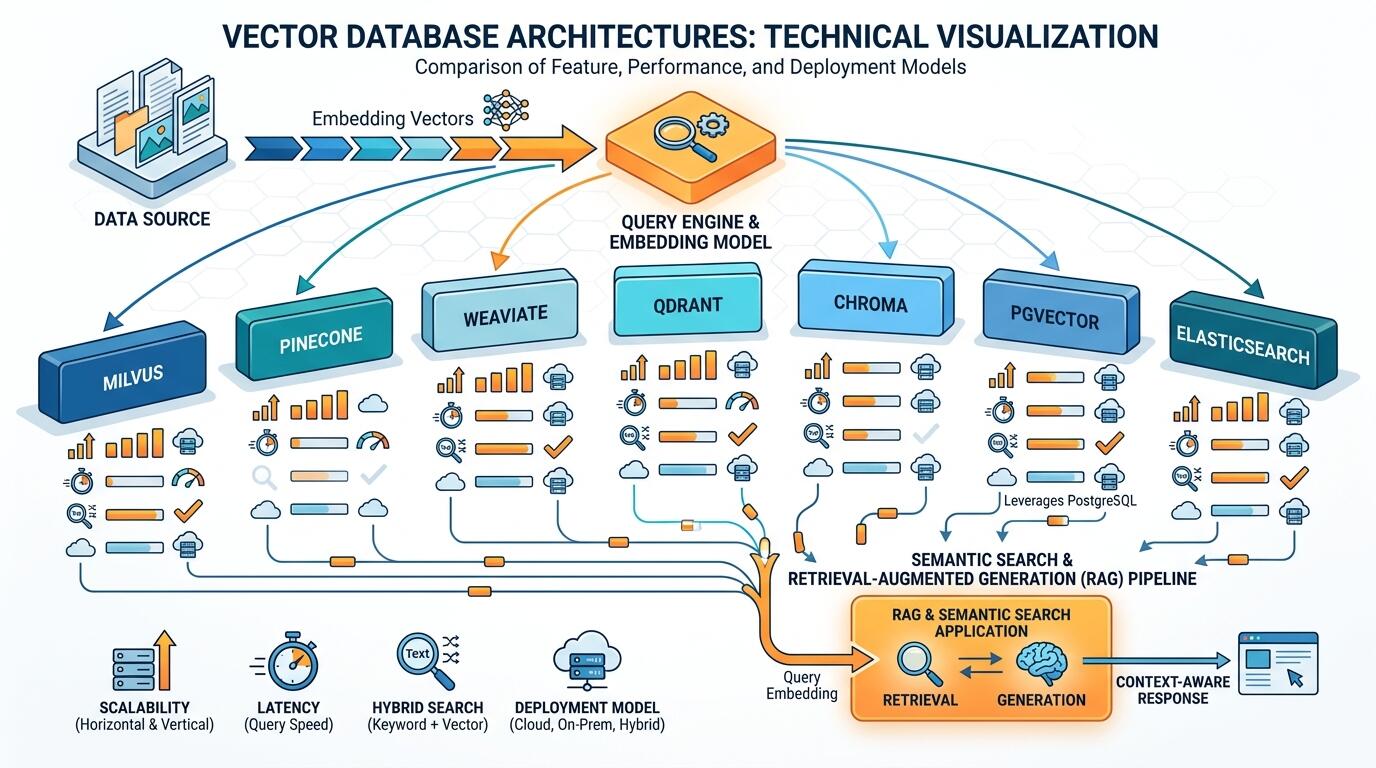
ALT: Comparison chart of vector database architectures for semantic search and retrieval-augmented generation
People Also Ask
Q1: How does a vector database differ from a traditional relational database?
A vector database indexes high-dimensional embeddings and retrieves results based on similarity, or "closeness" in meaning, rather than exact matches on structured fields. A relational database like PostgreSQL is optimized for exact-match queries, joins, and transactional consistency. Per the AWS Database Blog's overview of generative AI data stores, vector databases complement rather than replace relational systems, since most applications need both capabilities working together.
Q2: Is a dedicated vector database always necessary for AI applications?
Not always. Small-scale or early-stage applications can often rely on a vector extension like pgvector or a lightweight embedded option like Chroma before justifying the operational cost of a dedicated distributed vector database. The right time to adopt a dedicated system is when query volume, embedding count, or latency requirements outgrow what your existing infrastructure can comfortably support.
Q3: What factors most affect the cost of running a vector database in production?
Cost is driven primarily by the number of stored vectors, query throughput, and whether you choose a managed or self-hosted deployment model. Managed services like Pinecone typically charge based on usage and storage volume, while self-hosted options like Milvus or Qdrant shift cost toward infrastructure and engineering time. Teams should model expected query volume and vector count before committing to either model.
Wrapping Up
Choosing the right vector database ultimately comes down to three things: honestly assessing your current scale, matching that scale to a system's operational profile, and resisting the urge to over-provision for hypothetical future growth before it materializes. Managed options like Pinecone remove infrastructure burden for teams prioritizing speed, distributed systems like Milvus and Qdrant reward teams ready to invest in performance at scale, and simpler options like Chroma or pgvector let early-stage builders validate ideas without unnecessary complexity.
The next step is straightforward: map your application's current query volume, embedding count, and team's operational capacity against the comparison table above, then prototype with the lowest-friction option that satisfies your near-term needs. As your product matures, this same evaluation process pairs naturally with broader architectural decisions, including how your team is structured to support AI-native systems — a topic explored further in this comparison of engineering leadership roles at different growth stages.
Building a genuinely production-ready AI application takes more than picking the right database — it requires treating AI as a native capability woven throughout the architecture, not a feature bolted on at the end.
Ready to experience AI built the right way — as a native capability, not an afterthought? Explore Darius's suite of production-ready AI products, from smart cloud storage to AI-powered mock interviews and creator tools, at the Darius website. Visit today to see how Darius can help you work smarter, prepare better, and create faster with AI.
References
- Milvus. "Guide | How to Choose the Right VectorDB for Your AI Apps".
https://milvus.io/blog/choosing-the-right-vector-database-for-your-ai-apps.md - AWS Database Blog. "The role of vector databases in generative AI applications".
https://aws.amazon.com/blogs/database/the-role-of-vector-datastores-in-generative-ai-applications/ - IEEE. Official homepage.
https://www.ieee.org/
Note: Standards may be updated; please check the latest official documents or consult professional advisors.