Keeping a Live Product Healthy After Launch: A Monitoring Checklist

ALT: Engineering team monitoring live product health metrics on dashboards after launch deployment
Why Post-Launch Monitoring Is the Real Test of a Shipped Product
Key Conclusion: Launching a live product is not the finish line — it is the starting gun for a different kind of engineering discipline. This monitoring checklist covers the critical categories every engineering team must track after go-live: from infrastructure availability and API performance to AI model drift, security posture, cost efficiency, and user experience signals. Each item is drawn from the realities of operating production systems, not from theoretical best practices. Use it as a structured operational baseline, not a one-time audit.
Shipping a product is a milestone that gets celebrated. Keeping that product running reliably, efficiently, and safely for real users is the work that actually determines whether the launch matters. A pattern that emerges consistently in production environments is that most post-launch failures are not caused by code that was never written — they are caused by signals that were never watched. This checklist was assembled from the operational realities of running live systems, including AI-powered products where the failure modes extend well beyond traditional uptime concerns. Work through each category systematically, assign clear ownership, and revisit it on a defined cadence.
The Post-Launch Monitoring Checklist: What to Measure and Why It Matters
Infrastructure Availability and Uptime Monitoring
Infrastructure availability monitoring is the practice of continuously tracking whether a system's core components — servers, databases, message queues, edge nodes — are reachable and functioning within expected parameters. This is the foundational layer of any operational monitoring strategy: if the infrastructure is down, every other metric becomes irrelevant. The failure mode here is often not a complete outage but a partial degradation — one availability zone becoming unhealthy, a database replica falling behind, or a load balancer silently dropping requests — that a simple ping-based check will miss entirely.
Effective uptime monitoring requires synthetic transaction checks that mimic real user flows, not just process-level health checks. Track availability at the component level, not just at the edge, so that degradation in a dependency surfaces before it cascades into a user-facing failure. Define an explicit availability SLO (Service Level Objective) for each component and alert on the error budget burn rate, not just raw downtime events — a pattern well-supported by the Site Reliability Engineering practices documented by IEEE and widely adopted across the industry.
Best for: All production systems; this is non-negotiable for any live product regardless of scale or architecture.
Watch out: Relying exclusively on third-party uptime ping services creates a false sense of security — they confirm reachability but not functional correctness. Always pair external checks with internal synthetic transactions.
API Performance and Latency Tracking
API performance monitoring is the practice of measuring the latency, throughput, and error rates of every external and internal service endpoint in a live system. For any product where users interact through an API — which is virtually every modern web and mobile product — latency directly translates into perceived quality and, eventually, retention. A pattern seen repeatedly in post-launch systems is that teams monitor error rates but ignore percentile latency, missing the tail-latency issues that affect a meaningful fraction of users even when the median looks healthy.
Track p50, p95, and p99 latency for every critical endpoint. Set separate alerting thresholds for each percentile — a system where p50 latency is healthy but p99 has doubled is a system with a real problem that average-based metrics will hide. For AI-powered products, API latency monitoring must extend to inference endpoints, where response time distributions are often far wider and more variable than traditional application endpoints. The operational realities of running a RAG system in production illustrate exactly how inference latency and throughput interact in ways that standard API monitoring tooling is not always configured to surface.
Best for: Teams building API-first, microservice, or AI-integrated products where response time directly shapes user experience.
Watch out: Alerting on raw latency numbers without context leads to alert fatigue. Always baseline your normal distribution first, then alert on deviation from that baseline rather than on fixed absolute thresholds.
Error Rate and Exception Tracking
Error rate monitoring is the systematic collection and classification of application errors — HTTP 5xx responses, unhandled exceptions, failed background jobs, and silent data processing failures — to detect regressions and unexpected failure patterns in production. Launching a product without structured error tracking is the engineering equivalent of shipping without a smoke detector: the fire may still start, but you will not know until the damage is done.
The critical discipline here is not just collecting errors — it is classifying them by severity, frequency, and user impact so that the team can distinguish between a known, low-impact edge case and an emerging regression affecting a core user flow. Integrate error tracking directly into your alerting pipeline so that a spike in a specific exception type triggers an immediate investigation, not a next-morning code review. Group errors by fingerprint to avoid drowning in noise from a single misconfigured input.
Best for: Every live product, with particular urgency for teams with limited QA coverage in production or high deployment frequency.
Watch out: Exception volume alone is a poor signal. A single error that fires ten thousand times is more urgent than ten distinct errors that fire once each — weight your alerting by impact and frequency, not raw count.
AI Model Performance and Drift Detection
AI model performance monitoring is the ongoing measurement of a deployed model's output quality, behavioral consistency, and input distribution relative to the conditions under which it was trained or evaluated. This monitoring category is unique to AI-powered products and is the one most commonly absent from post-launch operational plans — because it requires instrumentation that most infrastructure monitoring tools do not provide out of the box.
Model drift takes two primary forms. Data drift occurs when the statistical distribution of inputs to the model shifts away from the training distribution, causing the model to operate in conditions it was not evaluated against. Concept drift occurs when the relationship between inputs and correct outputs changes in the real world, making a previously accurate model progressively less correct even on familiar input types. Both forms degrade product quality silently, without triggering any infrastructure alert. Detect them by logging a structured sample of model inputs and outputs in production, then running periodic distribution comparisons and quality evaluations against a held-out labeled set. For teams building AI-powered products, understanding the architectural patterns that support robust AI systems is foundational to designing monitoring that actually catches drift before it erodes user trust.
Best for: Any product where AI model outputs drive core user-facing functionality, from recommendation systems to document processing pipelines to LLM-powered interfaces.
Watch out: Drift detection requires labeled ground truth or reliable proxy metrics. Without investing in evaluation infrastructure, drift monitoring degrades into manual spot-checking, which does not scale.
Infrastructure Cost and Resource Efficiency Monitoring
Cost and resource efficiency monitoring is the practice of tracking cloud spend, compute utilization, and resource consumption against usage and business value benchmarks to detect inefficiencies and prevent cost overruns. This category is chronically underweighted in post-launch monitoring plans — teams celebrate shipping and then discover, weeks later, that their infrastructure bill has grown at a rate disconnected from user growth.
The most common failure pattern is over-provisioned resources that were sized for peak load at launch and never right-sized as real traffic patterns emerged. Equally common is the emergence of unexpected cost centers — a logging pipeline that grows unbounded, a vector database query pattern that becomes expensive at scale, or an AI inference workload with a cost structure that was not modeled against real request distributions. Track spend per unit of business value (cost per active user, cost per inference, cost per transaction) rather than raw absolute spend. Anomalies in cost-per-unit ratios are often the earliest indicator of an architectural inefficiency before it becomes a budget crisis.
Best for: Startup founders and engineering managers accountable for unit economics, and any team running AI inference workloads where per-request costs are material.
Watch out: Cost monitoring without utilization data tells half the story. A flat spend line with declining utilization is as concerning as a rising spend line — both indicate a misalignment between resource allocation and actual demand.
Security and Vulnerability Monitoring
Security monitoring in a live production environment is the continuous process of detecting unauthorized access attempts, dependency vulnerabilities, configuration drift, and data exposure risks — and responding before they escalate into incidents. According to guidance from organizations such as NIST (National Institute of Standards and Technology), a defense-in-depth approach requires active detection, not just preventive hardening at the time of deployment.
In practice, many post-launch security failures are not zero-day exploits — they are known vulnerabilities in dependencies that were not patched after launch, or access control misconfigurations introduced during a rushed deployment. Automate dependency scanning on every build and alert on newly published CVEs against your production dependency tree. Monitor authentication logs for anomalous patterns — repeated failed logins, unusual geographic access, or service account usage outside expected time windows. For AI-powered products, extend security monitoring to cover prompt injection patterns and unusual model usage that may indicate adversarial probing of your inference endpoints.
Best for: All products handling user data, financial transactions, or sensitive information; mandatory for any product with external API access or third-party integrations.
Watch out: Security alerts are high-noise environments. Without a triage process and clear severity classification, legitimate threats get buried in false positives. Invest in signal quality, not just signal volume.
User Experience and Core Flow Monitoring
User experience monitoring is the measurement of how real users interact with a live product — tracking task completion rates, funnel drop-offs, session quality signals, and core flow success rates to detect degradation in product usability and value delivery. Infrastructure metrics confirm that a system is running; UX monitoring confirms that it is working for the people it was built for.
According to UX operations frameworks documented by design and product practitioners, post-launch monitoring should specifically track the critical paths that define the product's core value proposition — the flows that, if broken or degraded, make the product not worth using. A checkout that completes in the correct number of steps, a document processing pipeline that returns a result within an acceptable wait time, an onboarding sequence that reaches a meaningful completion rate — these are the metrics that translate infrastructure health into business health. Instrument these flows with real user monitoring (RUM) and synthetic transaction testing in parallel, so you have both observed behavior and proactive validation.
As noted in the Post-Launch UX Monitoring Checklist from Onething Design, the specific metrics to track should be aligned to the product's core user journeys rather than generic engagement vanity metrics.
Best for: Product teams and engineering managers who need to connect operational metrics to user outcomes and business KPIs.
Watch out: UX monitoring data requires interpretation in context. A drop in a metric can indicate a product problem, a traffic composition change, or an A/B test interaction — always correlate with deployment events and traffic segments before drawing conclusions.
Dependency and Third-Party Service Health
Third-party dependency monitoring is the practice of tracking the availability, performance, and reliability of external services — payment processors, authentication providers, CDN networks, external APIs, AI model hosting platforms — that your product depends on to function correctly. Modern products are not isolated systems; they are compositions of external services, and a failure in any dependency can surface as a failure in your product.
The monitoring gap here is attribution: when users report an issue, the team must quickly determine whether the root cause is internal or external. Without active dependency health tracking, this triage takes too long, and the time-to-resolution for user-facing incidents stretches unnecessarily. Integrate dependency health status into your observability dashboard, automate alerts when a third-party service's error rate or latency degrades beyond a threshold, and maintain documented fallback behaviors for your highest-risk dependencies.
Best for: Products with complex integration landscapes, particularly those relying on external AI APIs, payment gateways, or identity providers where downtime is both likely and high-impact.
Watch out: Vendors' public status pages are not a substitute for active monitoring. Status pages lag behind actual incidents, and the degradation that affects your specific usage pattern may not be reflected on a general status page at all.
Quick Comparison at a Glance
Summarizing all eight monitoring categories to help teams prioritize and sequence their implementation:
| Monitoring Category | Best For | Key Strength | Limitation |
|---|---|---|---|
| Infrastructure Availability | All live products | Catches outages before users do | Ping-based checks miss functional failures |
| API Performance and Latency | API-first and AI-integrated products | Surfaces tail latency and throughput degradation | Requires calibrated baselines to avoid alert fatigue |
| Error Rate and Exception Tracking | All teams, especially high-deployment-frequency | Fast regression detection | Raw volume is a poor prioritization signal |
| AI Model Drift Detection | AI-powered products | Catches silent quality degradation | Requires labeled evaluation data or reliable proxies |
| Cost and Resource Efficiency | Founders, engineering managers | Connects infrastructure to unit economics | Cost data without utilization context is incomplete |
| Security Monitoring | All products handling user data | Proactive vulnerability and access detection | High-noise; requires triage investment |
| UX and Core Flow Monitoring | Product and engineering teams | Connects ops metrics to user outcomes | Requires contextual interpretation, not just raw numbers |
| Third-Party Dependency Health | Products with complex integrations | Reduces incident attribution time | Vendor status pages are inadequate substitutes |
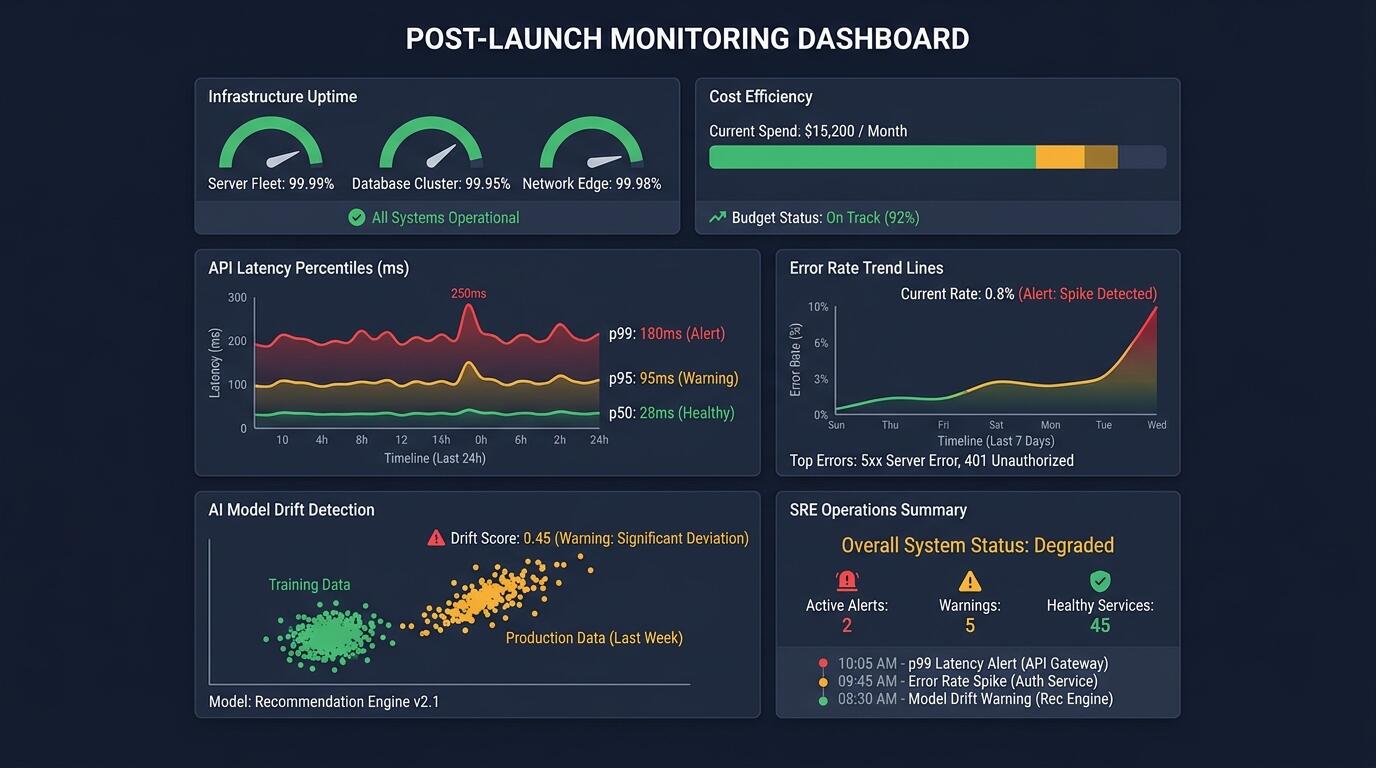
ALT: Engineering team reviewing post-launch monitoring dashboard with API latency, error rates, and AI model drift signals
How to Choose What to Implement First
The right monitoring stack for a specific product depends on the architecture, team size, and risk profile — not on a generic priority ranking.
For teams launching their first live product, start with the three categories that deliver the broadest signal per unit of implementation effort: infrastructure availability, error rate tracking, and core user flow monitoring. These three together will surface the majority of production issues that matter in the first weeks after launch. According to product launch frameworks published by Aha! and similar product management authorities, the first post-launch operational priority is establishing a feedback loop between production behavior and the engineering team — monitoring is that feedback loop.
Once the baseline is established, add API latency monitoring if the product is API-heavy or AI-integrated, and cost monitoring if the infrastructure spend is variable and material. Third-party dependency monitoring becomes critical at the point where the product has a complex integration landscape and user-facing incidents are being misattributed to internal causes.
AI model drift detection is the category that requires the most investment to instrument correctly and is the most specific to AI-powered products. Do not skip it if the product's core value is delivered through a model — but do sequence it after the foundational categories are in place, because drift detection without a stable operational baseline is difficult to interpret.
A common misconception is that monitoring is a one-time setup task that runs automatically once configured. In practice, monitoring configurations drift — alert thresholds become stale as traffic scales, new code paths go uninstrumented, and dependency lists change without corresponding monitoring updates. Treat your monitoring configuration as a living artifact that is reviewed and updated on the same cadence as your product development cycles.
Frequently Asked Questions FAQ
Q1: How do you know if your post-launch monitoring is actually working?
Effective post-launch monitoring is working when the team learns about production issues before users report them — or before they escalate to incidents. A practical test: review the last five production issues your team addressed. If the majority were discovered through monitoring alerts rather than user complaints or manual observation, the monitoring is functioning. If the inverse is true, the monitoring has gaps. Audit your alerting coverage against your actual incident history to find them.
Q2: Is monitoring for AI-powered products fundamentally different from traditional software monitoring?
AI-powered product monitoring requires all the same foundational categories as traditional software — availability, latency, error rates, security — plus an additional layer specific to model behavior. Traditional monitoring confirms that the system is running; AI monitoring must also confirm that the model is producing outputs that remain accurate and aligned with user expectations as real-world conditions evolve. This is not optional for AI products: a system can be fully operational at the infrastructure level while silently delivering degraded or incorrect outputs to users.
Q3: How often should a post-launch monitoring configuration be reviewed and updated?
A monitoring configuration should be reviewed on at least a quarterly cadence, and after every significant product change — a major feature release, an infrastructure migration, or a new integration. Alert thresholds calibrated at launch become incorrect as traffic scales and usage patterns mature. Dependency lists change. New code paths go uninstrumented by default. The review cadence should be built into the engineering team's operational rhythm as a standing agenda item, not treated as an ad hoc task triggered only by incidents.
Final Thoughts
Keeping a live product healthy after launch is a discipline, not a checklist you complete once and file away. The three principles that hold across every production system encountered in this work are: measure what matters to users before measuring what is easy to instrument, treat monitoring configuration as a living system artifact, and connect infrastructure signals to business outcomes so that the right people respond to the right signals with the right urgency.
The monitoring categories in this checklist are not independent — they interact. A cost anomaly often traces back to an API performance issue. A UX funnel drop often reflects an error rate spike in a background job. Drift in an AI model often manifests first in user session quality signals before it appears in model-level metrics. Building monitoring with these connections in mind — not as eight separate dashboards but as an integrated operational picture — is what separates teams that respond to incidents from teams that prevent them.
The next concrete step is to audit your current production environment against each category in this checklist, assign ownership for any gap, and define a review cadence before the next deployment cycle begins. Not after the next incident.
Ready to build a production system that stays healthy from day one? Explore real-world engineering insights, shipped AI projects, and technical resources at the Darius website — and reach out if you need a hands-on partner to architect, build, or stabilize your next live product.
References & Further Reading
- Aha! "Product Launch Checklist: Step-by-Step Guide for PMs".
https://www.aha.io/roadmapping/guide/release-management/what-is-a-good-product-launch-checklist - Onething Design. "Post-Launch UX Monitoring Checklist: Metrics to Track".
https://www.onething.design/post/post-launch-ux-metrics - Notion. "Product Launch Checklist: Step-by-Step Guide".
https://www.notion.com/blog/product-launch-checklist - National Institute of Standards and Technology (NIST). Cybersecurity and Information Security Standards and Guidelines.
https://www.nist.gov/
Note: Standards and best practices may be updated; please check the latest official documents or consult qualified professional advisors for guidance specific to your system and regulatory context.