The Full-Stack Developer's Guide to Integrating OpenAI and Anthropic APIs

ALT: Full-stack developer integrating OpenAI and Anthropic APIs into a production application architecture
A Full-Stack Developer's Guide to Integrating OpenAI and Anthropic APIs Into Production Apps
Most teams still treat large language model integration as a weekend experiment rather than a core engineering discipline, and that gap is exactly why so many AI features never make it past a demo. Integrating OpenAI and Anthropic APIs into a real product requires the same rigor as any other production dependency: authentication, error handling, cost control, streaming, and failover all have to work together, not just the API call itself. This guide gives full-stack developers a concrete, end-to-end path for wiring both providers into a single application so you can route intelligently, fail gracefully, and ship something users can actually rely on.
This guide is for engineers who have already played with the OpenAI API or Anthropic API in a notebook and now need to move that logic into a real backend, behind a real frontend, in front of real users. In our work building AI-native products, the difference between a prototype and a shipped feature almost never comes down to the model — it comes down to the plumbing around it.
Before You Start: Prerequisites & Preparation
Before writing a single line of integration code, get your accounts, keys, and mental model in order. Both OpenAI and Anthropic expose REST APIs with SDKs for major languages, but their request formats, streaming conventions, and error semantics differ enough that skipping preparation leads to painful rework later.
You will need active developer accounts with both OpenAI and Anthropic, each with billing configured and usage limits set at a level appropriate for testing. You should also have a backend framework already scaffolded — Node.js/Express, Python/FastAPI, or similar — since API keys must never be called directly from client-side code. A basic understanding of async/await patterns, streaming responses (Server-Sent Events or WebSockets), and environment variable management rounds out the technical baseline.
Time and effort are moderate rather than trivial: a working single-provider integration can come together in a short focused session, but a resilient dual-provider setup with fallback logic, cost tracking, and proper error boundaries takes meaningfully longer to get production-ready. Teams that rush this step tend to discover the gaps only after real users hit rate limits or malformed responses in production.
Checklist before starting:
- OpenAI API account with an active API key and billing enabled
- Anthropic API account with an active API key and billing enabled
- A backend service (not a client-side app) to hold secrets and proxy requests
- Familiarity with streaming response handling in your chosen language
- A plan for where API keys and configuration will live (environment variables, secrets manager, or vault)
Step-by-Step Instructions
Step 1: Secure your API keys and environment configuration
Create separate environment variables for your OpenAI API key and your Anthropic API key, and never hardcode either into source control. Use a secrets manager or, at minimum, a properly gitignored .env file, and rotate keys immediately if you suspect exposure. Set up distinct configuration profiles for development, staging, and production so a test key can never accidentally hit production billing.
Tip: Store a separate spending limit per environment inside each provider's dashboard — this single habit prevents a runaway test script from generating an unexpected bill.
Step 2: Install and initialize both SDKs on the backend
Install the official OpenAI SDK and Anthropic SDK for your backend language, and initialize each client once, at application startup, rather than on every request. Wrap both clients behind a thin internal interface — a shared function signature like generateCompletion(prompt, options) — so the rest of your application does not need to know which provider is underneath. This abstraction is what makes provider switching and fallback logic possible later without rewriting business logic.
Tip: Keep provider-specific parameters (like Anthropic's max_tokens requirement on every request versus OpenAI's optional equivalent) isolated inside adapter functions, not scattered across your codebase.
Step 3: Build a unified request and response schema
Define a single internal message format your application uses everywhere — typically an array of { role, content } objects — and write adapter functions that translate this format into each provider's expected request body. OpenAI and Anthropic both use a role-based conversation structure, but system prompts, message ordering, and multimodal content blocks are formatted differently between the two. Normalize the response coming back from each provider into the same internal shape (text, token usage, finish reason) before it reaches your application logic.
Tip: Building this normalization layer early is what separates a developer's guide to integrating OpenAI and Anthropic APIs in theory from one that survives an actual provider outage in production.
Step 4: Implement streaming for responsive user experiences
Enable streaming on both providers so tokens render incrementally in the UI instead of forcing users to stare at a blank screen while the full response generates. OpenAI streams via Server-Sent Events with data: chunks, while Anthropic streams via its own event-based protocol with distinct event types for message start, content deltas, and message stop. On the frontend, use the Fetch API's streaming body reader or a library like eventsource-parser to consume either stream through the same rendering logic once your backend has normalized the event format.
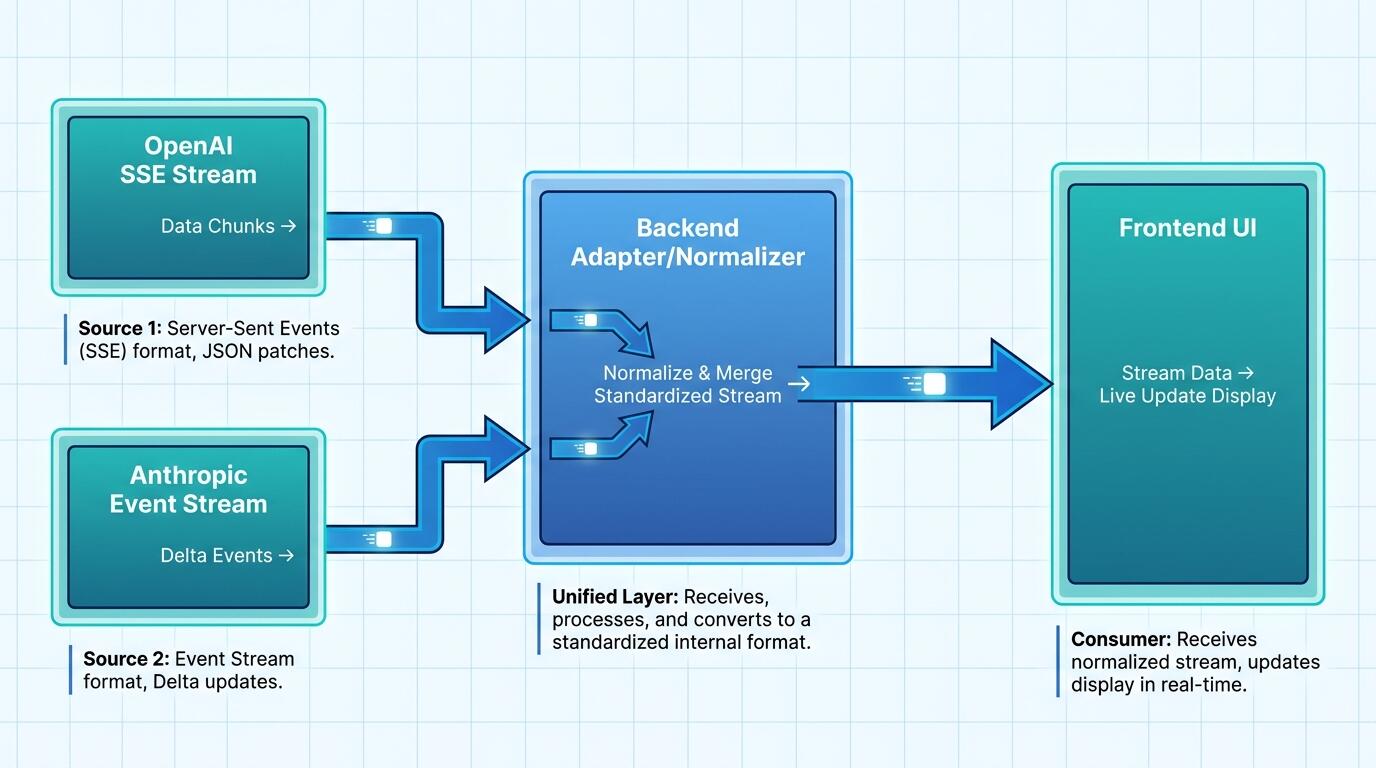
ALT: Diagram showing OpenAI and Anthropic streaming responses normalized through a backend adapter layer
Step 5: Add provider fallback and intelligent routing
Route requests to a primary provider by default, but implement automatic fallback to the secondary provider when you detect rate limiting, timeouts, or service degradation. A pattern we consistently see work well is routing based on task type — for instance, using one provider for long-context document analysis and the other for latency-sensitive conversational turns — rather than treating the choice as arbitrary. Wrap every provider call in a circuit breaker so repeated failures temporarily stop traffic to a degraded provider instead of cascading errors to end users.
Tip: Log which provider actually served each request; this data becomes essential later when you're debugging quality regressions or deciding whether to renegotiate usage tiers.
Step 6: Instrument cost tracking and rate limit handling
Track token usage and estimated cost per request, per provider, and per feature from day one, because LLM costs scale with usage in ways that are easy to underestimate during prototyping. Implement exponential backoff with jitter for rate-limit errors from both providers, and surface clear, user-facing messaging when a request must be retried or degraded to a shorter response. According to the OpenAI API documentation, rate limits vary by usage tier and model, so your retry logic needs to read response headers rather than assume fixed thresholds.
Step 7: Add observability, testing, and graceful degradation
Instrument structured logging for every API call — latency, token count, provider, error type — and set up alerting on error-rate spikes before users start complaining. Write integration tests that mock both providers' response formats, including malformed and truncated responses, since real-world API behavior is less predictable than documentation examples suggest. Build a graceful degradation path — a cached response, a simplified template answer, or an honest "service temporarily limited" message — so a provider outage never fully breaks the user-facing feature.
Tip: This is also the point where the distinction between AI prototypes and production-ready AI systems becomes concrete — prototypes skip observability; shipped products cannot.
Common Mistakes & Troubleshooting
| Symptom | Likely Cause | How to Fix |
|---|---|---|
| Requests intermittently return 429 errors under moderate load | Rate limits hit without backoff logic, or too many concurrent requests to one provider | Implement exponential backoff with jitter and read rate-limit headers from the response to pace requests dynamically |
| Streaming responses render garbled or out-of-order text on the frontend | Provider-specific stream events not normalized before reaching the UI layer | Normalize both OpenAI and Anthropic stream events into a single internal event format on the backend before forwarding to the client |
| API costs spike unexpectedly during testing | No per-environment spending limits or missing token usage tracking | Set spending caps per environment in each provider's dashboard and log token usage per request from the start |
| Anthropic requests fail with a missing parameter error that OpenAI requests do not | max_tokens or required fields differ between provider SDKs and were assumed to be optional everywhere |
Isolate provider-specific required parameters inside adapter functions rather than a shared request builder |
| Fallback to the secondary provider never triggers during an outage | Circuit breaker or failure detection logic is missing or misconfigured | Add explicit timeout and error-type detection with a circuit breaker that flips traffic to the secondary provider after a defined failure threshold |
| Responses are inconsistent in tone or structure between providers for the same prompt | System prompts and message formatting were not adapted per provider's conventions | Maintain provider-specific system prompt templates rather than reusing one prompt verbatim across both APIs |
Pro Tips for Better Results
Treat model selection as a routing decision, not a one-time architectural choice — the right provider for a summarization task may not be the right provider for a code-generation task, and hardcoding a single model everywhere is a common misconception that limits both quality and cost efficiency. A more mature pattern is to maintain a lightweight internal model registry that maps task types to preferred providers and automatically falls back when needed.
Version-pin your model identifiers explicitly rather than relying on default aliases, since provider-side model updates can silently shift output behavior in ways that break carefully tuned prompts. Log the exact model string used on every request so you can correlate quality issues with specific model versions rather than guessing.
Separate prompt templates from application code entirely, ideally in a versioned configuration store, so prompt iteration does not require a full deployment cycle. Teams that bake prompts directly into business logic lose the ability to A/B test wording changes quickly, which slows down the exact kind of iteration that improves AI feature quality over time.
Build cost attribution down to the feature level, not just the application level, because a single expensive feature can silently dominate your total API spend while looking fine in aggregate dashboards. This granularity is what lets you make informed build-versus-buy decisions on a per-feature basis rather than treating all AI usage as one undifferentiated cost center.
Finally, resist the urge to over-engineer the abstraction layer before you have shipped anything — a pattern we consistently see is teams spending excessive cycles designing the "perfect" provider-agnostic architecture instead of getting a working integration in front of real users first, which is the philosophy behind shipping a first live AI product quickly.
People Also Ask
Q1: How do I choose between the OpenAI API and the Anthropic API for a new feature?
Choice depends on task requirements rather than brand preference: OpenAI's models are frequently favored for broad tool-use ecosystems and multimodal tasks, while Anthropic's Claude models are often noted for strong performance on long-context reasoning and careful instruction-following, per comparisons like Developer's Digest's analysis of Anthropic vs OpenAI developer experience. The most reliable approach is benchmarking both against your actual use case before committing.
Q2: Is it safe to call the OpenAI or Anthropic API directly from a frontend application?
No, calling either API directly from client-side code exposes your API key to anyone inspecting network requests or browser source, creating a serious security and billing risk. Both providers' documentation explicitly recommends routing all requests through a backend service that holds the key server-side and proxies requests after applying authentication, rate limiting, and validation.
Q3: How long does it take to build a production-ready dual-provider integration?
A basic single-provider integration can be functional within a short session, but a resilient integration with fallback routing, streaming normalization, cost tracking, and observability takes considerably more sustained engineering effort. The time investment scales with how much reliability and graceful degradation the feature actually needs in production, not with the complexity of the initial API call itself.
Key Takeaways
Integrating OpenAI and Anthropic APIs successfully depends far more on the surrounding engineering — authentication, normalization, streaming, fallback, and observability — than on the API calls themselves. A unified internal schema and adapter layer lets you route between providers intelligently instead of locking your product into a single vendor's behavior and pricing.
Production readiness means treating cost tracking, rate-limit handling, and graceful degradation as first-class requirements from day one, not as afterthoughts added once users start complaining. The teams that ship durable AI features are the ones that instrument observability early and test against real provider failure modes, not just happy-path responses.
The next step is straightforward: pick one feature in your product, implement the adapter pattern described here for both providers, and measure which one actually performs better for that specific task before scaling the pattern further.
Ready to see how AI-native products are built from the ground up? Visit Darius at the Darius website to explore hands-on insights, real product case studies, and practical guidance from an Engineering Director and AI Architect shipping tools like AI cloud drives, mock interview platforms, and creator cockpits. Start building smarter, AI-first products today.
Sources
- Dev Genius. "Full Stack Developer's Guide to AI: From ChatGPT to GitHub Copilot in Daily Workflow".
https://blog.devgenius.io/full-stack-developers-guide-to-ai-from-chatgpt-to-github-copilot-in-daily-workflow-c8a745144aa9 - Developer's Digest. "Anthropic vs OpenAI: Developer Experience Compared".
https://www.developersdigest.tech/blog/anthropic-vs-openai-developer-experience - YouTube. "Build Full Stack Web App: ChatGPT + OpenAI API Integration!".
https://www.youtube.com/watch?v=lGvb-gQHw98 - Institute of Electrical and Electronics Engineers (IEEE).
https://www.ieee.org/
Note: Standards may be updated; please check the latest official documents or consult professional advisors.