Containerization and Orchestration Tips for Small Engineering Teams This Fall

ALT: Small engineering team reviewing containerization and orchestration strategies on a laptop this fall
Containerization and Orchestration Strategies Every Small Engineering Team Needs This Fall
Container orchestration is the automated process of managing, scheduling, and scaling containerized workloads across a cluster of machines — and for small engineering teams operating with limited headcount, mastering it is no longer optional. As AI-driven products grow more complex and deployment expectations rise, the gap between teams that manage containers deliberately and those that wing it has never been wider.
The practical reality is that most small teams adopt Docker quickly but stall when it comes to moving beyond basic container management into a coherent orchestration strategy. That stall is costly — it creates deployment fragility, inconsistent environments, and infrastructure debt that compounds fast.
This list was assembled from patterns consistently observed when working with lean engineering teams building production-grade systems: the items cover everything from foundational containerization hygiene to orchestration-layer decisions that have real operational consequences. Each tip is actionable, sequenced to build on the previous, and weighted toward avoiding the pitfalls that quietly sink engineering velocity. Use it as a working checklist heading into the fall deployment cycle.
Practical Containerization and Orchestration Tips for Lean Teams
Start with a Minimal, Purpose-Built Base Image
A container base image is the foundation layer from which your application image is built, and choosing it carelessly is one of the most common sources of unnecessary bloat, surface-area vulnerabilities, and slow CI pipelines. Teams frequently inherit large general-purpose images (a common example: pulling ubuntu:latest when a language-specific slim variant would suffice), then wonder why their images take minutes to build and push.
The disciplined approach is to start from the smallest image that satisfies your runtime requirements. For most backend services, that means a language-specific slim or alpine variant, or better yet a distroless base. Each reduction in image size directly shortens build times, reduces attack surface per the principle of least privilege, and lowers storage costs across your container registry. According to CircleCI's guidance on container orchestration, image hygiene at the base layer is foundational to a stable orchestration practice — smaller, predictable images make scheduling, pulling, and rolling updates faster and more reliable across the cluster.
- Best for: Teams running any microservice or API-based architecture where CI/CD speed and security posture matter.
- Watch out: Alpine-based images use musl libc instead of glibc, which can cause subtle compatibility issues with certain native binary dependencies. Test thoroughly before committing to alpine in production.
Lock Dependencies and Layer Cache Deliberately
Docker layers are cached top-to-bottom at build time. A pattern teams consistently get wrong: placing COPY . . before installing dependencies. This invalidates the dependency-install cache on every single code change, turning what should be a seconds-long rebuild into a minutes-long one.
The correct layering order — copy only your dependency manifest first (e.g., package.json, requirements.txt, go.mod), run the install step, then copy application code — means the dependency layer is only re-built when the manifest changes. On a busy team pushing multiple times a day, this optimization compounds into hours of recovered CI time each week. Pair this with explicit version pinning in your dependency manifests. Unpinned dependencies in container builds are a reliability time bomb: a transitive dependency update upstream can silently break a build on a Tuesday morning with no code changes on your end.
- Best for: Any team running containerized builds in CI, especially those iterating quickly on application logic.
- Watch out: Over-caching can mask stale dependencies. Set a scheduled job to rebuild from scratch periodically — weekly at minimum — to ensure your layer cache isn't hiding drift from your expected dependency tree.
Use Multi-Stage Builds to Separate Build and Runtime Artifacts
A multi-stage Docker build is a Dockerfile pattern that uses multiple FROM directives to separate the build environment from the final runtime image, discarding build tooling, compilers, and intermediate artifacts before the final image is assembled. Teams that skip multi-stage builds routinely ship images carrying compilers, test frameworks, and build caches into production — creating unnecessarily large, security-risky containers.
For compiled languages like Go, Rust, or Java, multi-stage builds are table stakes. The build stage compiles the binary; the final stage copies only the compiled artifact into a minimal base. For interpreted languages, multi-stage builds still pay dividends by separating dev dependencies from production runtime dependencies. The result is a smaller, cleaner production image that is faster to pull, cheaper to store, and dramatically easier to audit from a security standpoint.
- Best for: Compiled-language services, and any team prioritizing production image security and size.
- Watch out: Multi-stage builds can complicate local development workflows if developers are not careful to target the right stage during iteration. Document the intended local-build command explicitly in your project README.
Define Resource Requests and Limits for Every Container
In a Kubernetes environment — and Kubernetes is the de facto standard for container orchestration at this stage of the market — resource requests and limits are the mechanism by which the scheduler places workloads and enforces resource boundaries. A resource request is the amount of CPU or memory the scheduler guarantees to the container; a limit is the ceiling it cannot exceed.
Teams that omit resource requests and limits frequently encounter two failure modes: noisy-neighbor scenarios where one runaway container starves others on the same node, and cluster-wide resource exhaustion that causes cascading pod evictions at the worst possible time. Splunk's beginner's guide to container orchestration highlights resource governance as a core concern in any orchestration platform — the scheduler cannot make intelligent placement decisions without knowing what each workload needs. In practice, start with conservative estimates and refine using actual observed metrics from your monitoring layer. Setting requests too high wastes cluster capacity; setting limits too low causes legitimate containers to be OOM-killed under normal load.
- Best for: Any Kubernetes deployment, regardless of scale. This is not an advanced concern — it applies from day one.
- Watch out: Limits without requests is a common misconfiguration. Some schedulers treat a limit-only specification differently than a request-and-limit pair. Always set both, and ensure they are informed by profiled, not guessed, resource consumption.
Adopt a Namespace and RBAC Strategy Before You Need One
A Kubernetes namespace is a logical partition within a cluster that isolates groups of resources — deployments, services, config maps — from one another. Role-Based Access Control (RBAC) is the mechanism that governs which users or service accounts can perform which operations within those namespaces. Most small teams start with the default namespace and no RBAC policy, which works fine until it doesn't — which is usually the moment a junior engineer accidentally deletes a production deployment.
The right time to establish namespace boundaries and RBAC is before you have an incident, not after. A pragmatic starting partition for small teams is: dev, staging, and production namespaces, with RBAC policies that prevent non-administrative principals from mutating production resources directly. This is not bureaucracy — it is the minimum structural guardrail that prevents the categories of mistakes that cause 3am pages. For teams working through a broader AI system architecture review, this kind of governance groundwork is part of what an AI architecture engagement addresses at the infrastructure layer — ensuring that governance is built in, not bolted on.
- Best for: Any team with more than one engineer touching the cluster, or any team running production workloads in Kubernetes.
- Watch out: RBAC misconfiguration is subtle. Overly permissive role bindings at the cluster level can inadvertently grant broader access than intended. Audit your ClusterRoleBindings periodically and prefer namespace-scoped roles wherever possible.
Implement Liveness and Readiness Probes on Every Service
A liveness probe is a Kubernetes mechanism that determines whether a container is alive and should remain running; a readiness probe determines whether a container is ready to receive traffic. Both are defined in the pod specification and are executed by the kubelet on a configurable schedule.
Teams that skip probes are effectively flying blind during deployments. Without a readiness probe, Kubernetes will route traffic to a newly started pod before the application has finished its initialization sequence — a frequent cause of 502 errors during rolling deploys. Without a liveness probe, a deadlocked or memory-leaking process that has not crashed will continue to receive traffic indefinitely while silently failing to serve requests. Probes are the mechanism by which the orchestration layer participates in your application's health model rather than treating containers as opaque black boxes.
- Best for: Every HTTP service running in Kubernetes. There is no scenario where omitting these is the right call for a production workload.
- Watch out: Overly aggressive probe timing — specifically, a
failureThresholdthat is too low combined with a shortperiodSeconds— can cause the orchestrator to kill and restart perfectly healthy pods that are simply slow to boot. Tune probe timing against your application's actual startup and request-handling latency profile.
Use Helm or a Comparable Templating Layer for Manifest Management
Helm is a package manager and templating system for Kubernetes manifests. Without a templating layer, teams end up maintaining separate copies of nearly-identical YAML files across environments, with differences tracked informally and divergence accumulating silently. This is one of the most reliable paths to configuration drift between staging and production.
A Helm chart centralizes the structural definition of a deployment and parameterizes environment-specific values. The production deployment and the staging deployment share the same chart; only a values file differs. This model makes environment parity auditable and reduces the cognitive overhead of deploying a service to a new environment from a hours-long manual exercise to a version-controlled, repeatable operation. For teams that find Helm's full templating model heavyweight for their needs, lighter-weight alternatives such as Kustomize provide a similar environmental-override model with less abstraction overhead. The key principle is the same either way: manifest configuration must be version-controlled and environment-specific overrides must be explicit, not ad hoc.
- Best for: Any team managing more than two environments or more than three services in Kubernetes.
- Watch out: Helm's templating syntax can become difficult to reason about when over-abstracted. Resist the urge to parameterize every field — chart complexity should be proportional to actual variance across deployments. A chart that is hard to read is harder to debug than one that has some duplication.
Set Up Horizontal Pod Autoscaling Thoughtfully, Not Reflexively
Horizontal Pod Autoscaling (HPA) is a Kubernetes feature that automatically adjusts the number of pod replicas in a deployment based on observed metrics, most commonly CPU utilization. Many teams enable HPA as a default best practice without understanding the failure modes it introduces when configured carelessly.
The most common HPA misconfiguration in smaller teams is setting a CPU-based threshold without considering whether CPU is actually the right scaling signal for the workload. A queue-processing worker scales more sensibly on queue depth than on CPU; an API service with synchronous external dependencies may be I/O-bound and exhibit misleadingly low CPU even under high load. Per the guidance captured in containerization and orchestration best practices for small teams, matching the scaling signal to the actual bottleneck of the workload is the difference between autoscaling that helps and autoscaling that thrashes. Also ensure your minimum replica count is at least two for any production service — a minimum of one means a rolling deploy or a node eviction temporarily takes your service to zero.
- Best for: Stateless services with predictable load patterns and well-understood bottleneck characteristics.
- Watch out: HPA interacts with Cluster Autoscaler in ways that can cause slow scale-out if the cluster lacks pre-warmed node capacity. Understand the node provisioning latency in your environment and set HPA targets conservatively so scale-out is triggered before, not after, you are already degraded.
Build a Deployment Pipeline That Enforces Image Signing and Scanning
A secure container deployment pipeline is one that does not allow unsigned or unscanned images to reach production. This is a category of supply chain security concern that small teams routinely defer because it feels like an enterprise concern — it is not.
Image scanning tools integrated at the CI stage will catch known vulnerabilities in base image layers and application dependencies before they are promoted. Image signing ensures that only images built and signed by your CI system can be deployed to production namespaces, preventing ad hoc docker push operations from bypassing your quality gates. This is especially important for teams building AI-powered products where the model serving infrastructure is a high-value target. Teams evaluating the trade-offs between building and buying their security tooling in this area will find the build vs. buy AI infrastructure framework a useful reference for making that call systematically.
- Best for: Any team deploying to production, regardless of scale. Supply chain attacks are not size-dependent.
- Watch out: Scanning tools report vulnerabilities that may not be exploitable in your specific runtime context. Establish a triage process and severity threshold — shipping with zero open CVEs is often impractical; shipping with zero unreviewed critical CVEs is a reasonable standard.
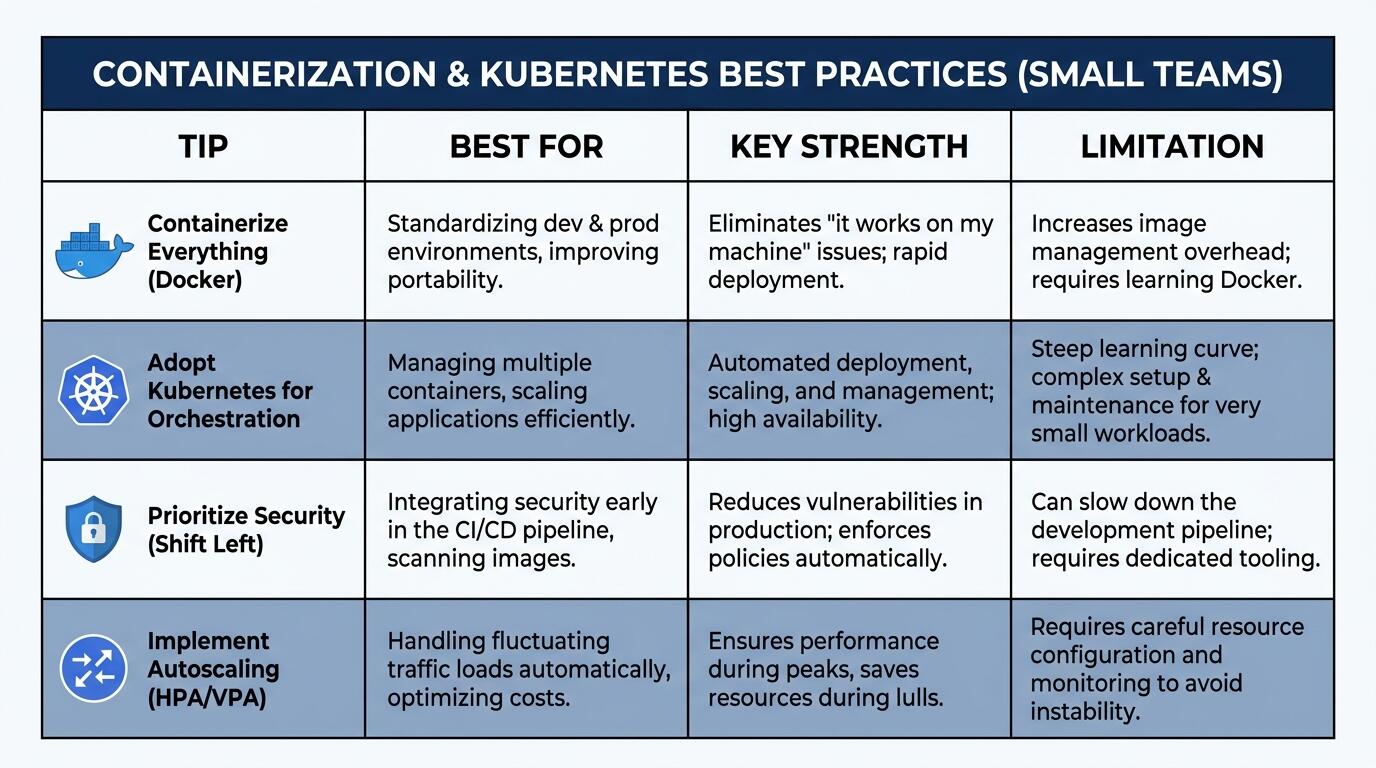
ALT: Comparison table summarizing containerization and orchestration tips for small engineering teams deploying production services this fall
Quick Comparison at a Glance
| Tip | Best For | Key Strength | Limitation |
|---|---|---|---|
| Minimal base image | All teams | Reduces attack surface and build time | Alpine musl libc compatibility risk |
| Deliberate layer caching | CI-heavy teams | Accelerates rebuild cycles significantly | Stale cache can mask dependency drift |
| Multi-stage builds | Compiled-language services | Cleaner, smaller production images | Complicates local development targeting |
| Resource requests and limits | All Kubernetes deployments | Prevents noisy-neighbor and OOM failures | Requires profiling to set accurately |
| Namespace and RBAC strategy | Multi-engineer teams | Prevents accidental production mutations | Misconfigured ClusterRoleBindings are subtle |
| Liveness and readiness probes | All HTTP services | Eliminates traffic routing to unhealthy pods | Aggressive timing causes unnecessary restarts |
| Helm/Kustomize manifest management | Multi-environment deployments | Enforces environment parity | Over-abstracted charts are hard to debug |
| Horizontal Pod Autoscaling | Stateless services | Handles load spikes automatically | Wrong scaling signal causes thrashing |
| Image signing and scanning | All production pipelines | Closes supply chain attack vectors | Zero-CVE standard is often impractical |
How to Choose the Right Approach
The right containerization and orchestration investment for a small engineering team is determined primarily by where the team is in its operational maturity curve, not by what the most sophisticated teams are doing.
If the team is still standardizing local development environments and has containers running only in CI, the highest-leverage investment is base image hygiene and layer caching. Get the fundamentals right before adding orchestration complexity. Teams that jump straight to Kubernetes without disciplined image practices end up with a complex orchestration layer running fragile, bloated containers — the worst of both worlds.
If containers are running in production but orchestration is ad hoc — perhaps via Docker Compose or a single-node Docker setup — the priority shift is toward Kubernetes adoption paired immediately with resource governance (requests, limits, probes, namespaces). Do not adopt Kubernetes without also adopting the governance practices; the orchestrator without the guardrails is dangerous.
If Kubernetes is already in use but the team is experiencing deployment instability, environment drift, or security incidents, the leverage points are Helm-based manifest management, HPA tuning, and pipeline-enforced image scanning.
A common misconception is that container orchestration is a concern for large teams or high-traffic services. In practice, the opposite is true: small teams have less margin for the classes of failure that absent orchestration hygiene reliably produces. A three-person team that loses a production environment to an accidental deletion or an unscanned vulnerable image has no bench to absorb the recovery effort. The discipline is proportionally more important at smaller scale, not less.
For teams considering how quickly they can ship a production-grade system under these constraints, the guidance in how to ship fast without sacrificing product quality addresses the trade-offs between speed and structural integrity directly.
Common Questions
Q1: How should a small team decide between Kubernetes and simpler container orchestration options?
Kubernetes is the right choice when a team anticipates running multiple services at production scale, needs fine-grained resource governance, or plans to grow the system significantly. Simpler options like Docker Compose or managed container services reduce operational overhead but offer less control. The decision should be driven by the team's operational capacity to run and maintain the orchestration platform, not by aspirational architecture goals. Managed Kubernetes services from major cloud providers substantially lower the barrier for small teams.
Q2: Are resource requests and limits in Kubernetes required, or just recommended best practice?
Resource requests and limits are strongly recommended — not enforced by default — but omitting them in production is effectively a misconfiguration. Without requests, the Kubernetes scheduler cannot make reliable placement decisions. Without limits, a misbehaving container can consume unbounded node resources and trigger cascading evictions across the cluster. Most production Kubernetes environments establish admission control policies that reject pods without resource specifications as a governance enforcement measure.
Q3: How long does it realistically take a small engineering team to establish a baseline container orchestration practice?
Establishing a baseline — disciplined image builds, resource governance, probes, and a working CI/CD pipeline pushing to Kubernetes — typically takes a team several focused sprint cycles when starting from scratch, depending on existing infrastructure familiarity and cloud provider choice. The ongoing maintenance burden is low once the foundations are in place. The time investment compounds favorably: teams that establish the baseline early avoid the significantly higher remediation cost of rearchitecting a fragile production system under pressure.
Wrapping Up
Containerization and orchestration discipline is one of the highest-leverage investments a small engineering team can make heading into a production deployment cycle. The tips above are sequenced to build on each other, and every one of them addresses a failure mode that shows up repeatedly in real systems.
Key Takeaways:
- Base image and layer cache hygiene are foundational — get these right before adding orchestration complexity.
- Resource requests, limits, and health probes are not optional in Kubernetes; they are the minimum viable governance layer.
- Namespace and RBAC boundaries prevent the class of accidental production incidents that disproportionately hurt small teams.
- Manifest templating via Helm or Kustomize is the antidote to environment configuration drift.
- HPA and image scanning require deliberate configuration; enabling them reflexively without tuning introduces new failure modes.
The most important next step is an honest audit of where your current container practice sits against these nine areas. Identify the two or three with the highest risk exposure for your specific system and address those first — prioritization beats comprehensiveness when you have a small team.
Ready to bring the same rigor to your AI architecture and systems design? Visit the Darius website to explore shipped projects, read deeper technical insights, and connect to discuss how this expertise can help you build scalable, production-ready systems faster.
Sources
- Splunk. "Container Orchestration: A Beginner's Guide".
https://www.splunk.com/en_us/blog/learn/container-orchestration.html - CircleCI. "What is container orchestration?".
https://circleci.com/blog/what-is-container-orchestration/ - Darius. "Containerization and Orchestration Best Practices for Small Teams".
https://www.darius.wiki/en/blog/technology/container-orchestration-best-practices-small-teams.html
Note: Standards and best practices in container orchestration evolve continuously; please verify against the latest official documentation from the Cloud Native Computing Foundation and your chosen orchestration platform before implementation.