aipan for Beginners: What Semantic File Search Actually Looks Like
ALT: Semantic file search interface showing AI-powered document retrieval for beginners learning aipan
What Semantic File Search Actually Means — and Why It Changes How You Work with Files
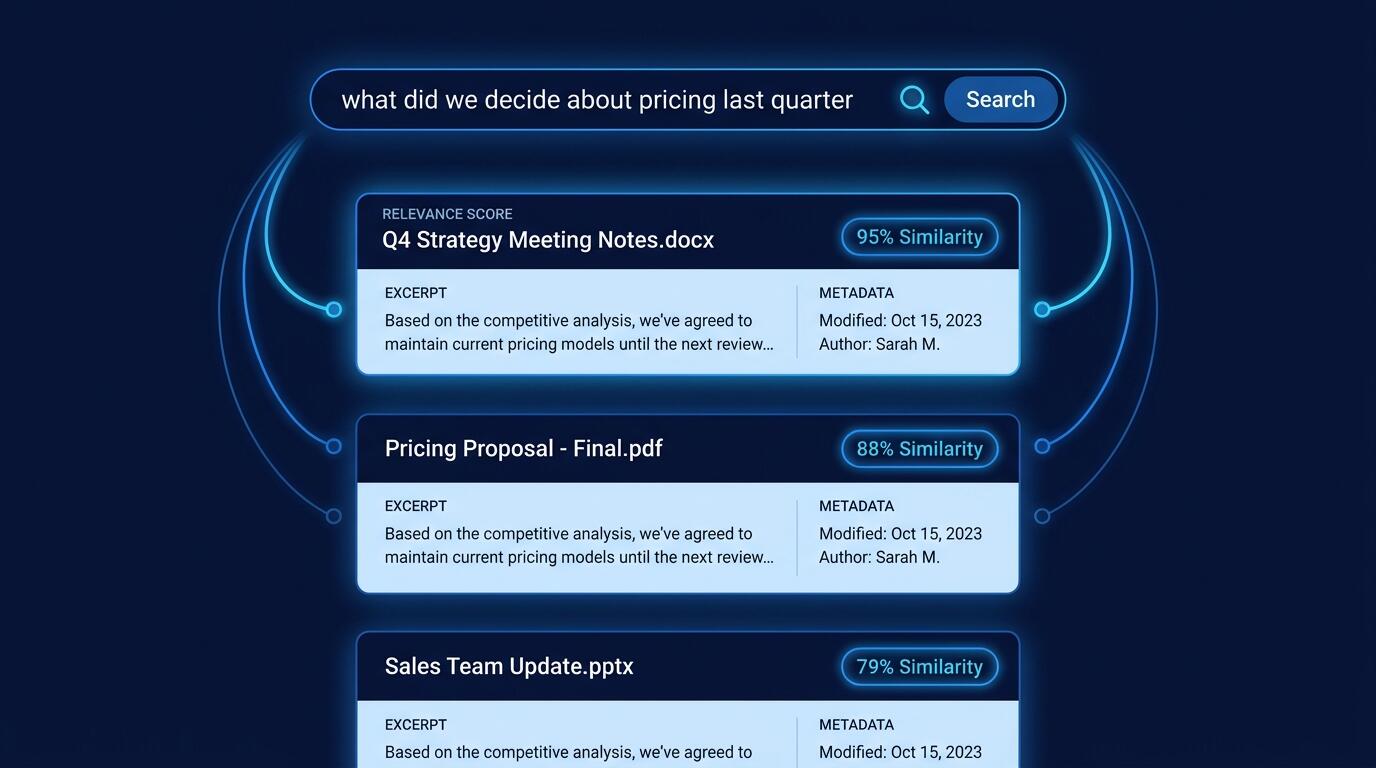
The single question most people have when they encounter semantic file search for the first time is this: how is it any different from just using Ctrl+F or a regular search bar? The honest answer is that it is categorically different — not faster at the same task, but capable of answering a different class of question entirely. Semantic file search is a retrieval approach that matches queries to documents based on meaning and conceptual similarity rather than literal keyword overlap. You can ask "what did we decide about the pricing model last quarter?" and get back the right meeting note, even if the word "pricing" never appears in the file.
This article walks through what that actually looks like in practice, using aipan — an AI-powered local file search tool — as the concrete context. We will cover how the underlying mechanism works, where it genuinely helps, where it falls short, and the specific mistakes that trip up first-time users. If you are an engineer, a technical lead, or a product manager who wants to understand semantic search well enough to make real decisions about it, this is the ground-level explanation you need.
Where Semantic File Search Fits — and Where It Does Not
Applicable Scenarios:
- Knowledge workers managing large, heterogeneous document libraries where exact keyword recall is unreliable (research notes, meeting transcripts, design docs, decision logs)
- Engineering teams looking to surface relevant prior art, internal RFCs, or architecture decisions without knowing the precise terminology used at the time of writing
- Developers building or evaluating local AI search tooling who need a reference point for what good retrieval behavior looks like
- Product managers or architects who need to query unstructured internal knowledge to inform current decisions
Not Applicable/Cautions:
- Tasks requiring deterministic, auditable retrieval — legal discovery or compliance workflows where every returned result must be explainable and reproducible benefit more from structured, indexed systems with explicit filters
- Environments with strict data-residency requirements where even a local embedding model introduces model-update supply-chain concerns that have not been evaluated
- Users expecting zero setup — semantic file search requires an indexing pass before any query can return meaningful results, and the first run has real time and compute cost
Why Traditional File Search Is a Design Limitation, Not Just a Feature Gap
Traditional file search — whether on a local desktop or inside a cloud drive — operates on exact token matching. The system looks for the string you typed, possibly with stemming or synonym expansion layered on top, but the fundamental mechanism is: does this string appear in this document? This works well when you remember exact phrasing. It breaks immediately when you do not.
The structural problem is that human memory stores meaning, not verbatim text. You remember that a document discussed a tradeoff between latency and cost, but you cannot recall whether it said "latency," "response time," or "round-trip delay." A keyword search forces you to guess the author's vocabulary. Over time, as document libraries grow, this becomes a genuine tax on organizational knowledge.
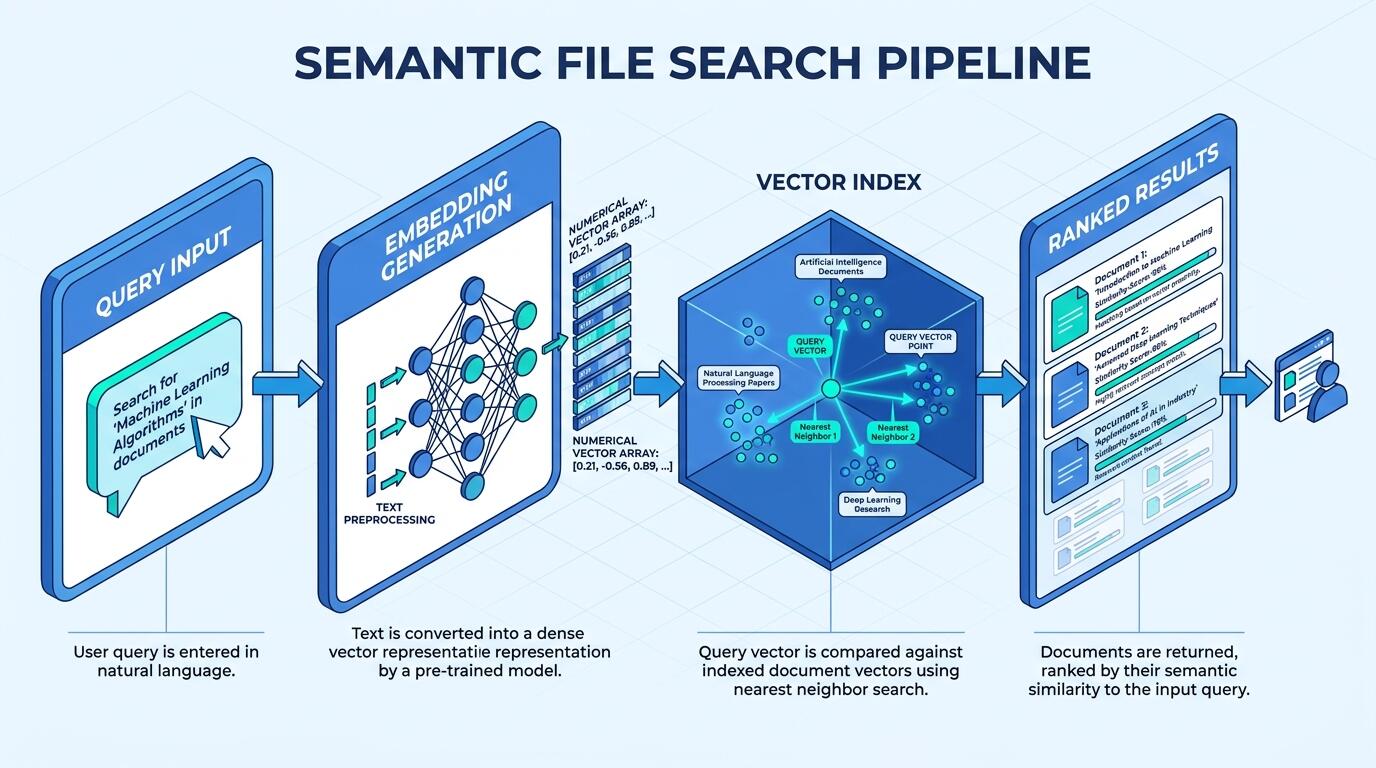
Semantic search addresses this by converting both the query and the document content into dense vector representations — numerical arrays that encode meaning in a high-dimensional space. Documents with similar meaning cluster near each other in that space. When you submit a query, the system finds documents whose vectors are closest to the query vector, not documents that share exact words. The result is retrieval that is robust to paraphrase, synonymy, and terminology drift.
Research published through academic database conference proceedings has demonstrated that semantic-aware search frameworks consistently outperform token-based retrieval on real user queries, particularly as the corpus size grows and lexical diversity increases. The practical implication for a tool like aipan is that its value compounds with the size and age of your file library — the messier and more varied the corpus, the larger the gap between semantic and keyword retrieval quality.
For teams who are already thinking about how AI-driven pipelines handle retrieval at scale, the mechanics here are closely related to what powers automated content systems. The agent pipeline behind a daily AI briefing relies on the same embedding-and-nearest-neighbor retrieval logic that aipan applies to local files — the domain differs, but the architectural pattern is identical.
Getting Started with Semantic File Search in aipan
Three-Step Quick Start
Step 1: Index your file library
Before any semantic query can run, aipan needs to convert your documents into vector embeddings and store them in a local index. Point the tool at the directory or directories you want to search. For a modest-sized corpus — a few hundred documents — expect the initial indexing pass to take several minutes; larger libraries take proportionally longer. This is a one-time cost. After the index is built, incremental updates as files change are fast. Do not skip this step or interrupt it midway; a partial index produces inconsistent retrieval quality that is difficult to diagnose later.
Step 2: Formulate a meaning-based query
Instead of typing a keyword you hope appears in the target document, describe what the document is about or what question it answers. Write queries in plain language: "rationale for switching from PostgreSQL to DynamoDB" rather than "DynamoDB migration." The embedding model responds to intent and context, not surface tokens. A pattern we consistently see with new users is over-reliance on short, keyword-style queries out of habit — the system can handle full sentences, and full sentences generally produce better results.
Step 3: Evaluate and iterate on results
Examine the top results and pay attention to which ones are genuinely relevant. If the results feel off-target, the most productive adjustment is usually to rephrase the query to add more context — not to add more keywords. If consistently poor results persist across many queries, the index may be stale or the document preprocessing (how the tool extracts text from PDFs or other binary formats) may be failing silently on certain file types. Check logs before assuming the model is at fault.
Comparing Approaches to Local Semantic File Search
Practitioners evaluating semantic file search tools generally encounter a spectrum of options, from raw DIY pipelines to packaged applications like aipan. Understanding the tradeoffs upfront prevents the common mistake of choosing based on surface features rather than operational fit.
| Comparison Dimension | DIY Embedding Pipeline | aipan (Packaged Tool) | Cloud-Based Enterprise Search |
|---|---|---|---|
| Setup complexity | High — requires model selection, chunking strategy, vector store setup | Low — preconfigured for local use | Very low — managed service |
| Data locality | Full control | Local by design | Data leaves your environment |
| Retrieval customization | Full control over chunking, model, scoring | Limited to tool's configuration options | Vendor-defined, limited access |
| Ongoing maintenance | High — model updates, index management | Handled by tool | Handled by vendor |
| Cost structure | Compute + engineering time | Tool licensing or open-source | Per-query or subscription pricing |
| Appropriate for | Teams with AI infrastructure maturity | Individual users and small teams | Organizations with budget and cloud-first posture |
The honest engineering read: if you are building a product on top of semantic retrieval, a DIY pipeline gives you the control you will eventually need. If you are trying to improve your own daily workflow with files you already have, a packaged tool like aipan is the right starting point. The build vs. buy framework for AI infrastructure offers a structured way to work through this decision for your specific context.
What the Retrieval Result Actually Tells You
A semantic search result is not a binary hit-or-miss; it is a ranked list with associated similarity scores. Understanding what those scores mean is essential for using the tool correctly and for not being misled by it.
The score represents geometric proximity in the embedding space — how close the query vector is to a document chunk's vector. A high score means the model encoded the query and the document chunk as semantically similar. It does not mean the document answers your question. It means the document talks about related concepts. This distinction matters more than most beginners expect.
Practically, this shows up in a few ways. First, a document can rank highly because it uses the same domain vocabulary even if it takes the opposite position from what you are looking for. Second, very short document chunks can match a specific phrase in your query while the surrounding context makes the chunk irrelevant. Third, if your query uses highly technical or domain-specific terms that the embedding model was not trained on extensively, the vector representation of those terms may be imprecise, and retrieval quality drops.
The mitigation for all three is the same: treat semantic search results as candidates, not answers. Read the returned excerpts in context before concluding that a document is or is not relevant. This is different from how people use keyword search, where a result is either a match or not — semantic retrieval requires a brief human judgment step that keyword search short-circuits.
Advanced Considerations for Practitioners
Chunking Strategy Is the Hidden Variable
The quality of semantic file search depends heavily on how documents are split into chunks before embedding. If chunks are too large, the vector for a chunk averages across too many topics and becomes a poor match for specific queries. If chunks are too small, important context is severed and individual chunks lose meaning. A pattern we see repeatedly: users who are dissatisfied with semantic search results have often never looked at how their tool chunks documents. aipan handles chunking internally, but understanding that it exists — and that it affects results — lets you reason about failure modes rather than treating the system as a black box.
Staleness Is a Silent Failure Mode
A semantic index is a snapshot of your files at indexing time. If files change — new documents added, existing documents edited, old documents deleted — the index becomes stale. Queries will miss new content and may return results pointing to documents that no longer exist or no longer say what the index thinks they say. Establish a habit of triggering reindexing after major file changes. Some tools support incremental or scheduled reindexing; if aipan offers this, enable it.
Misconception: Semantic Search Understands Your Files
Semantic search does not understand your files. It computes mathematical similarity between vector representations. The model that produced those representations was trained on broad text data and has no knowledge of your organization, your terminology, or the relationships between your documents. When it works well, it works because your language happens to align with patterns in the training data. When it fails — on highly specialized jargon, on abbreviations unique to your team, on documents with non-standard structure — that is the underlying reason.
ALT: Diagram of semantic file search pipeline including embedding generation, vector index, and similarity-based document retrieval for aipan beginners
Frequently Asked Questions FAQ
Q1: How does aipan handle file types that are not plain text, like PDFs or Word documents?
Semantic file search tools like aipan typically run a text extraction step before embedding. PDFs go through a parser that extracts text content; the quality of that extraction varies significantly depending on whether the PDF is text-based or image-based (scanned). Scanned documents require OCR processing, which may or may not be built into the tool. Always verify that extraction is working correctly for your most common file types — silent extraction failures produce empty or near-empty chunks that embed poorly and return nonsensical results.
Q2: Is local semantic search meaningfully private compared to cloud-based alternatives?
Local semantic search keeps your documents on your own hardware and does not transmit file contents to external servers — but privacy is not binary. The embedding model itself may have been downloaded from a third party, and model updates represent a supply-chain consideration. Additionally, if aipan or similar tools have any telemetry or analytics features, those warrant review. For most individual users and small teams, local is meaningfully more private than cloud-based alternatives. For regulated industries, a formal data classification review is still necessary.
Q3: How long does indexing take, and does it need to happen repeatedly?
Initial indexing time depends on corpus size, hardware, and the embedding model used. For typical knowledge-worker file libraries — several hundred to a few thousand documents — expect anywhere from minutes to an hour on consumer hardware. After the initial index is built, incremental updates for changed or new files are fast. Reindexing the entire corpus from scratch is generally only needed after a tool upgrade that changes the embedding model or index format. Build incremental reindexing into your routine rather than relying on manual triggers.
Final Thoughts
Semantic file search represents a genuine capability shift for anyone who works with large, unstructured document collections. The core insight — that retrieval based on meaning outperforms retrieval based on exact tokens as corpus size and lexical diversity grow — is well-supported and practically observable. aipan makes this accessible without requiring you to build an embedding pipeline from scratch.
Key Takeaways:
- Semantic search matches by meaning, not by literal keyword overlap — this is a fundamentally different retrieval mechanism, not an incremental improvement on keyword search.
- The quality of results depends on chunking strategy, index freshness, and the match between your domain vocabulary and the embedding model's training distribution.
- Treat results as ranked candidates that require a brief human judgment step — not as deterministic answers.
- Staleness is the most common silent failure mode; build reindexing into your workflow proactively.
- The gap between semantic and keyword retrieval quality grows with corpus size — the larger and older your file library, the more value semantic search delivers.
If you are evaluating whether to build a more sophisticated retrieval pipeline on top of what a packaged tool provides, the decision framework in the context of evaluating AI development tools before committing is a practical next step.
If this article gave you a clearer mental model of how semantic file search works, you will find the same level of ground-level analysis in every issue of Darius — a bilingual AI briefing written by an engineering director who runs AI products in production, not by someone summarizing other people's summaries. Each issue curates five to ten items with first-hand commentary that helps you filter industry noise into actionable judgment. Subscribe at the Darius newsletter site and read alongside thousands of practitioners who are building in the same space.
Sources & Further Reading
- Jiang et al. "Panorama: a semantic-aware application search framework." Proceedings of EDBT 2013.
https://openproceedings.org/2013/conf/edbt/JiangVLN13.pdf - AIWhispr. "Document Retrieval with Semantic Search — Introducing AIWhispr."
https://www.aiwhispr.com/post/document-retrieval-with-semantic-search-introducing-aiwhispr - adexoxo13. "pdf-semantic-search: A Streamlit app for PDF semantic search." GitHub repository.
https://github.com/adexoxo13/pdf-semantic-search - IEEE. Institute of Electrical and Electronics Engineers — standards and publications on information retrieval and natural language processing.
https://www.ieee.org/ - ACM Digital Library. Association for Computing Machinery — peer-reviewed research on information retrieval, vector databases, and semantic search systems.
https://www.acm.org/
Note: Standards and research publications may be updated; verify the latest versions through official sources or consult qualified technical advisors.