Choosing a Hosting Stack for Personal Projects That Need to Stay Live

ALT: Engineer reviewing hosting stack options for personal projects that must stay live reliably
Keeping Personal Projects Online: Why Your Hosting Stack Decision Matters More Than You Think
Choosing the right hosting stack for personal projects that need to stay live is one of those decisions that feels small at the start and enormous six months later. Whether you're maintaining a side project, a live portfolio demo, or a small production tool that real users depend on, the infrastructure underneath it is not an afterthought — it is the foundation that either earns or destroys trust. A pattern seen consistently in early-stage engineering work is that builders spend enormous energy on application code and almost no time thinking about where and how that code runs when they're not watching it.
The core conclusion of this article is direct: the right hosting stack for a personal project that needs to stay live is not the cheapest option or the trendiest one — it is the one that matches your uptime expectations, operational overhead tolerance, and likely growth trajectory. Getting that match right means understanding three things clearly: what "staying live" actually requires from an infrastructure standpoint, what the tradeoffs between different hosting models genuinely look like in practice, and where the hidden operational costs tend to surface. This article covers all three.
Who This Guide Is For — and Where It Doesn't Apply
Applicable Scenarios:
- Side projects and personal tools with real users who expect reliable availability
- Portfolio projects that serve as live demonstrations of technical capability, particularly for founders, engineers, or consultants
- Early-stage MVPs running on personal infrastructure budgets before a startup has dedicated DevOps resources
- Solo engineers or small teams maintaining one to three live services who want operational simplicity without sacrificing reliability
Not Applicable/Cautions:
- Enterprise or well-funded startup products with dedicated platform engineering teams and significant traffic — those decisions involve compliance, SLA contracting, and vendor negotiation that go well beyond personal project scope
- Projects with strict data residency or regulatory requirements that mandate specific cloud regions or certifications — consult a specialist before committing to any stack
Why "It Works on My Machine" Is the Most Expensive Phrase in Infrastructure
The reason personal projects die in production has almost nothing to do with code quality. A project that runs perfectly locally and even passes a handful of manual tests can fail in production for reasons that have no relationship to the application logic itself: a server that doesn't restart after a crash, a database connection that times out at 3 AM and nobody notices until a user complains, a TLS certificate that expired while you were busy with other work. These are infrastructure failures, not code failures.
The challenge specific to personal projects — as opposed to company-funded products — is that there is no on-call rotation, no incident response runbook, and no dedicated reliability engineer. You are all of those things, usually part-time and often asleep. That constraint shapes every hosting decision you should make.
A pattern that emerges in work with clients building personal and small-team projects is that the gap between "deployed once" and "stays live reliably" is almost entirely operational. Getting something running is a solved problem. Keeping it running without constant manual intervention requires deliberate infrastructure choices upfront. This is not a new observation — per guidance from IEEE and related software engineering bodies, operational reliability is a discipline that scales down to solo projects just as meaningfully as it does to large distributed systems.
The market for hosting options has matured significantly. Managed platform services, serverless runtimes, container orchestration primitives, and traditional virtual private servers have all become accessible to individual engineers at low or no cost at entry level. That abundance is useful, but it also creates a new problem: too many reasonable-sounding options, with tradeoffs that only become visible under load or over time.
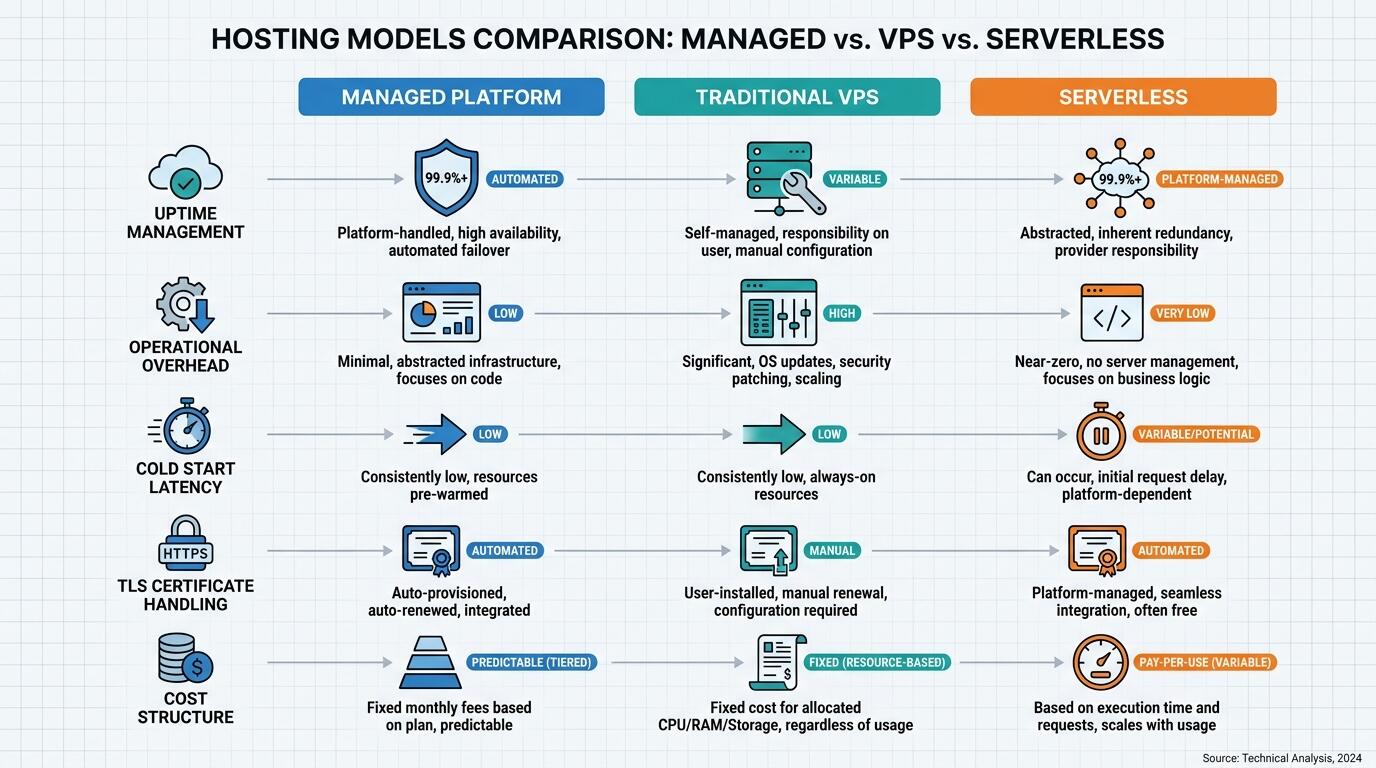
ALT: Comparison diagram showing managed platform, VPS, and serverless hosting tradeoffs for personal projects requiring continuous uptime
Building a Hosting Stack That Actually Stays Live
Three Steps to Get Your Project Reliably Hosted
Step 1: Define What "Staying Live" Means for This Project
Before touching any infrastructure, write down — literally write it down — what acceptable availability looks like for your specific project. A portfolio site that a recruiter might visit should never return a 502. A personal analytics dashboard that only you use can tolerate a five-minute restart window at 2 AM. A payment-integrated tool that serves paying customers, even a handful, needs real uptime monitoring and automated restart behavior. Clarity here takes fifteen minutes and prevents weeks of avoidable rework.
Step 2: Match Your Uptime Requirement to a Hosting Model
Once you know what "live" means, you can map it to a category of hosting. Managed platforms handle process supervision, automatic restarts, and certificate renewal for you — at the cost of some configurability and potentially higher per-unit pricing at scale. A traditional VPS gives you full control but makes you responsible for every layer of that operational stack yourself. Serverless functions eliminate server management entirely but introduce cold start latency and execution time constraints that may not suit your architecture. Choose the model that matches your tolerance for operational overhead, not just your current budget.
Step 3: Add the Minimum Viable Observability Layer
A project is not "live" if you are the last to know when it goes down. Before you consider a project production-ready, connect it to at least one external uptime monitor that checks your endpoint from outside your hosting provider's network, configure basic alerting to notify you within minutes of a failure, and ensure your process manager or platform restarts the application automatically on crash. These three things — external monitoring, alerting, and auto-restart — form the operational floor below which no personal project should run if it has real users depending on it.
Comparing the Main Hosting Models for Personal Projects
Choosing between hosting approaches involves genuine tradeoffs, not a clear winner. The right comparison axis is not just cost — it is the combination of uptime reliability, operational overhead, scalability ceiling, and how much time you want to spend managing infrastructure instead of building product. The table below organizes the most common hosting models across dimensions that matter for personal projects that need to stay live.
| Comparison Dimension | Managed Platform (e.g., Fly.io, Railway, Render) | Traditional VPS (e.g., DigitalOcean Droplet, Linode) | Serverless (e.g., Cloudflare Workers, Vercel Edge) |
|---|---|---|---|
| Uptime management | Platform handles process supervision and restarts | Manual; requires configuring process manager (e.g., systemd, PM2) | High by default; handled by provider infrastructure |
| Operational overhead | Low to moderate | High — you own the OS, patching, and process management | Very low for stateless workloads |
| Cold start / latency | Minimal if always-on tier | No cold starts; consistent latency | Cold start latency possible depending on runtime and tier |
| Certificate (TLS) management | Automatic on most platforms | Manual unless configured with a tool like Certbot | Automatic |
| Scaling ceiling | Moderate; scales with plan | Limited by instance size unless load balanced manually | High for stateless; limited for stateful workloads |
| Cost at low traffic | Free tiers available; predictable low cost | Fixed monthly cost regardless of traffic | Free tiers with usage-based pricing above threshold |
| Best fit | Projects needing reliable uptime with minimal ops work | Engineers comfortable with Linux ops who want full control | Stateless APIs, edge functions, frontend deployments |
Digging Into Each Hosting Model
Managed Platforms: The Right Default for Most Personal Projects
A managed platform is a hosting service that abstracts away operating system management, process supervision, and often certificate management — leaving you responsible only for your application code and its configuration. For personal projects that need to stay live without constant manual intervention, managed platforms represent the most practical default choice for most engineers.
The key operational advantage is automatic process management. If your application crashes at 2 AM, the platform restarts it without your involvement. TLS certificates renew without you scheduling a cron job or remembering an expiration date. Health checks are configurable and built into the deployment pipeline on most platforms. This is the operational baseline that a personal project needs to qualify as genuinely "live" rather than "deployed."
The tradeoff is real: managed platforms introduce an abstraction layer that can complicate debugging when something goes wrong at the infrastructure level. You also accept that you are partially dependent on the platform provider's own reliability and pricing decisions. In work with clients who maintain small but important side projects, a recurring observation is that the time saved by not managing a VPS manually far outweighs the occasional friction of working within a platform's constraints.
Traditional VPS: Full Control at Full Operational Cost
A Virtual Private Server (VPS) is a virtualized server instance you rent from a cloud provider, giving you root access to a Linux environment that you configure entirely yourself. A VPS is the right choice when you need specific system-level control, custom networking configurations, or want to run multiple services on a single instance to minimize cost.
The operational cost of a VPS is not in the monthly fee — it is in the time you spend managing it. Keeping a VPS reliable requires configuring a process manager like systemd or PM2 to restart your application on failure, setting up log rotation, managing firewall rules, keeping the OS patched against security vulnerabilities, and renewing TLS certificates on a schedule. None of these tasks is individually complex, but together they represent a meaningful ongoing time commitment.
A VPS is a reasonable choice for engineers who genuinely enjoy system administration or who have very specific requirements that managed platforms cannot meet. It is a poor choice when your real goal is to keep a project live with minimal distraction from building — because the administration overhead scales with the number of services you run, not with your interest in managing them.
Serverless: Excellent for the Right Workload, Problematic for the Wrong One
Serverless computing is a model where your code runs in response to events (typically HTTP requests) on infrastructure managed entirely by the provider, with no persistent server process to maintain. Serverless is genuinely excellent for stateless workloads: APIs that don't maintain in-memory state, webhook handlers, scheduled data processing jobs, and frontend deployments are all strong serverless fits.
The constraint that catches engineers is statefulness. If your personal project maintains a WebSocket connection, runs a background job continuously, or needs to hold data in memory between requests, serverless is the wrong model — not because it is technically impossible to work around, but because the workarounds introduce complexity that defeats the operational simplicity that made serverless attractive in the first place.
Latency from cold starts — the delay that occurs when a serverless function runs for the first time after a period of inactivity — is a real concern for user-facing projects. On always-on or high-traffic services this is negligible, but on a personal project that sees intermittent traffic, a user's first request after a quiet period may experience a noticeable delay. Some providers allow you to configure minimum instance counts to eliminate cold starts, usually at additional cost.
Database and Persistence: The Layer Most Engineers Undersize
A hosting stack is not just the compute layer. Personal projects that stay live need a persistence story that is as operationally sound as the application itself. A common failure pattern is engineers who deploy a well-configured application server and then connect it to a database running on the same VPS instance with no automated backups — a configuration that makes data loss a matter of when, not if.
Managed database services are the right choice for personal projects where data matters. They handle automated backups, failover, connection pooling, and often encryption at rest and in transit. The cost premium over running your own database is modest at personal project scale, and the operational risk reduction is significant. For projects where data persistence is critical, this is not a place to optimize for cost.
Advanced Considerations: When Standard Hosting Advice Breaks Down
Projects That Mix Stateful and Stateless Workloads
Many real personal projects are not purely one architectural pattern. A project might use a serverless edge deployment for its frontend and public API, while requiring a persistent background worker for data ingestion or scheduled processing. In this case, a hybrid stack — serverless for the stateless surface, a managed container or small VPS for the persistent worker — is often the right answer. The common mistake is trying to force the entire project into one hosting model for the sake of simplicity, then fighting that model's constraints.
Free Tier Reliability: Not Always What It Appears
Free hosting tiers from managed platforms are useful for prototyping, but several popular providers put free-tier services to sleep after a period of inactivity — meaning your "live" project returns a slow cold start to anyone who visits after a quiet stretch. For a project that needs to stay genuinely live, confirm explicitly whether the tier you are using maintains always-on compute. If it doesn't, either upgrade to a paid tier or consider an external uptime monitoring service that pings your endpoint frequently enough to prevent sleep — though this is a workaround, not a solution.
Common Misconception: More Infrastructure Means More Reliability
A consistent misconception among engineers new to running personal projects in production is that adding more infrastructure — multiple servers, complex load balancers, redundant databases — makes a project more reliable. For personal projects, the opposite is often true. Complexity is the enemy of reliability when the person managing the system is also the person building the product and doing everything else. The goal is the minimum infrastructure that meets your uptime requirements with the lowest operational overhead, not the most sophisticated architecture you can assemble. If you're thinking through build-versus-buy decisions at a deeper level, revisiting the build vs. buy framework for AI infrastructure offers a useful lens that applies equally well to hosting decisions.
Common Questions
Q1: How do I know if my personal project needs a paid hosting tier?
A project needs a paid hosting tier when it has real users whose experience matters to you, when data loss would be a meaningful problem, or when free-tier sleep behavior would make the project appear unreliable to visitors. Free tiers are appropriate for experimentation and development. Once a project has even a small real-user base — or serves as a live portfolio demonstration of your technical capability — the cost of a basic paid tier is almost always worth the reliability and control it provides.
Q2: Is a VPS a better choice than a managed platform for long-running personal projects?
A VPS is better than a managed platform only if you need system-level control that the managed platform cannot provide, or if the economics at your specific scale make the VPS clearly more cost-effective. For most personal projects, a managed platform delivers better operational reliability with less time investment. Engineers who choose a VPS for cost reasons often discover the operational overhead costs them more in time than the monthly savings justify — particularly when a project needs to stay consistently live without manual intervention. For guidance on shipping projects reliably without accumulating technical debt, how to ship fast without sacrificing product quality covers the practical tradeoffs well.
Q3: What does proper uptime monitoring for a personal project actually cost?
External uptime monitoring is available from multiple providers at no cost for basic configurations — monitoring one to a handful of endpoints at one-to-five-minute intervals is well within free tier limits on most services. Alerting via email is typically included. SMS or phone alerting may require a paid plan. The operational time cost of setting up monitoring is measured in minutes, not hours, and the benefit — knowing within minutes when a project goes down rather than hearing about it from a user — is worth far more than any monetary cost. According to IEEE software reliability principles, observability is a first-class system property, not an optional addition.
Final Thoughts
The decision of how to host a personal project that needs to stay live comes down to three practical principles. First, define your actual uptime requirement before selecting infrastructure — the answer shapes every other decision. Second, match your operational overhead tolerance to your hosting model honestly; a VPS is not inherently more professional than a managed platform, and managing one poorly is worse than not managing one at all. Third, treat observability — monitoring, alerting, auto-restart — as a non-negotiable floor, not a future enhancement.
The pattern seen consistently in engineering work at the director level is that the projects which stay live and continue earning trust over time are not the ones with the most sophisticated infrastructure. They are the ones where the builder made deliberate, well-matched choices early and didn't have to revisit those choices constantly. That discipline — matching infrastructure decisions to actual requirements rather than aspirational ones — is what separates a project that quietly delivers value from one that quietly goes dark.
Your next step is simple: for each project you currently have deployed or plan to deploy, write down its actual uptime requirement, the operational overhead you are genuinely willing to accept, and whether your current or planned hosting model matches both. If it doesn't match, now is the right time to change it — before a user finds out the hard way.
If this framing resonated with you, explore more engineering breakdowns and real-world infrastructure thinking at the Darius wiki. Whether you're architecting an AI system, navigating a complex stack decision, or turning an idea into a live product, the hands-on experience of an Engineering Director and AI Architect is there when you need it.
Sources & Citations
- IEEE. "IEEE Standards for Software and Systems Engineering — Reliability and Quality Assurance."
https://www.ieee.org/ - Internet Engineering Task Force (IETF). "RFC Standards for TLS and Internet Security Protocols."
https://www.ietf.org/ - National Institute of Standards and Technology (NIST). "Cloud Computing Standards and Guidelines."
https://www.nist.gov/ - Linux Foundation. "Open Source Infrastructure, DevOps, and Cloud Native Computing Resources."
https://www.linuxfoundation.org/
Note: Standards and platform capabilities evolve — verify current specifications directly with each provider or standards body before making infrastructure commitments.