Best Rendering Software Options for Technical and Design-Led Teams in 2026
ALT: Best rendering software options for technical and design-led teams to evaluate in 2026
Rendering Software in 2026: Which Tools Actually Serve Technical and Design-Led Teams?
The single question teams ask most often at the intersection of engineering and design is this: which rendering software will keep us productive without forcing us to choose between technical control and visual quality? The answer depends heavily on your team's composition, your pipeline requirements, and whether your priority is real-time feedback, photorealistic output, or scalable automation.
This list was assembled from a practitioner's vantage point — shaped by the kinds of decisions that surface repeatedly when working with engineering directors, CTOs, and senior product teams building complex, production-grade systems. Each tool below was evaluated on four dimensions: workflow fit for technically minded users, output quality relative to use case, integration depth with modern pipelines, and the reality of what it takes to get value from day one. This is not a roundup of every tool on the market; it is a focused guide for teams who need to make a defensible choice and move quickly.
The Best Rendering Software Options for Technical and Design-Led Teams in 2026
Blender (Cycles & EEVEE)
Blender is a free, open-source 3D creation suite that includes two distinct rendering engines: Cycles, a physically based path tracer, and EEVEE, a real-time rasterization engine. Blender's dual-engine approach is what makes it genuinely relevant for technical teams — you can prototype visually in EEVEE at near-instant frame rates and switch to Cycles for final, photorealistic output without leaving the application. Its Python API and node-based material system make it scriptable and automatable in ways that proprietary tools rarely match.
Best for: Engineering teams that need full pipeline control, open-source flexibility, or the ability to integrate rendering into CI/CD workflows through scripted batch jobs.
Watch out: Blender's learning curve is real, particularly for teams whose background is primarily software engineering rather than 3D graphics. EEVEE output, while fast, requires manual setup to approximate physically accurate lighting behavior.
V-Ray (by Chaos Group)
V-Ray is a production-grade rendering engine developed by Chaos Group, widely used in architectural visualization, product design, and visual effects. It operates as a plugin across major host applications including 3ds Max, Maya, SketchUp, and Rhino, which makes it a strong choice for teams already embedded in those ecosystems. V-Ray's rendering core is built on physically based light simulation, and its GPU acceleration mode can significantly shorten iteration cycles on capable hardware.
Best for: Architecture, engineering, and construction (AEC) firms and product design teams that work inside established DCC (digital content creation) application pipelines and need consistent, client-ready photorealistic output.
Watch out: V-Ray licensing is subscription-based and adds cost on top of the host application. Teams building greenfield pipelines may find the dependency chain — DCC app plus plugin — more overhead than they need.
Unreal Engine (Lumen & Path Tracing)
Unreal Engine is a real-time 3D engine developed by Epic Games, originally built for game development but now widely adopted for architectural visualization, product configurators, virtual production, and interactive experiences. Lumen is Unreal's fully dynamic global illumination system, which provides real-time lighting updates without pre-baked lightmaps. For teams that need higher fidelity, Unreal also includes a hardware-accelerated path tracer for cinematic-quality offline renders within the same environment.
According to Epic Games' developer documentation, Lumen is designed to scale from lower-end hardware to high-end workstations, making it accessible across varied team configurations. This dual-mode rendering capability — real-time for iteration, path-traced for delivery — is a pattern we consistently find useful when working with product teams that need fast design review cycles alongside polished final assets.
Best for: Teams building interactive experiences, real-time configurators, or virtual production pipelines where rendering must respond dynamically to user input or camera movement.
Watch out: Unreal Engine has a steep onboarding cost for teams without game development or real-time 3D backgrounds. Its asset pipeline and project structure differ significantly from traditional DCC workflows.
Cinema 4D (Redshift Integration)
Cinema 4D is a professional 3D modeling, animation, and rendering application developed by Maxon. It is known for its approachable interface relative to Maya or Houdini, and its deep integration with Redshift — a GPU-accelerated production renderer that Maxon acquired — makes it a strong pairing for motion graphics and product visualization teams. The combination offers fast GPU-based path tracing with a well-documented node-based material workflow.
Best for: Motion design studios, product marketing teams, and creative technologists who need high-quality output with a shorter learning curve than Maya-based pipelines.
Watch out: Cinema 4D's ecosystem, while excellent for motion graphics, is less dominant in engineering-heavy or simulation-intensive contexts. Teams working primarily with CAD data may find the import workflow from engineering file formats less streamlined than in dedicated AEC tools.
KeyShot
KeyShot is a standalone rendering and animation tool developed by Luxion, built specifically around ease of use for product visualization. Its defining characteristic is a physically accurate rendering engine that updates in real time as you adjust materials, lighting, and camera positions. KeyShot is widely used in industrial design and product development because it accepts a broad range of 3D file formats directly, removing the need for complex scene setup.
Best for: Industrial designers, product managers, and engineering teams that need to generate high-quality product renders quickly — often as part of a hardware development or go-to-market workflow — without deep 3D expertise.
Watch out: KeyShot is a specialized tool. It excels at product visualization but is not designed for complex scene building, character animation, or architectural environments. Teams that outgrow its scope will need to migrate assets to a more capable pipeline.
NVIDIA Omniverse
NVIDIA Omniverse is a real-time collaborative 3D simulation and rendering platform built by NVIDIA on top of the Universal Scene Description (USD) standard, an open file format and scene composition framework originally developed by Pixar. Omniverse is designed for teams that need multiple applications — Maya, Blender, Revit, and others — to share and edit the same scene simultaneously. Its rendering component, powered by NVIDIA RTX technology, delivers real-time path-traced results on compatible hardware.
For technical teams evaluating how rendering fits into larger AI or simulation pipelines, this is worth noting: Omniverse exposes Python APIs and supports integration with machine learning frameworks, which opens pathways for synthetic data generation and AI-assisted content workflows. This kind of architecture thinking — where rendering becomes a data production tool rather than just a visual output step — is something we explore directly in work on AI system architecture patterns that CTOs should evaluate when planning scalable infrastructure.
Best for: Enterprise engineering and design teams running multi-application pipelines, simulation-heavy workflows, or AI training data generation at scale — particularly teams with NVIDIA GPU infrastructure.
Watch out: Omniverse's hardware requirements are meaningful: NVIDIA RTX GPUs are effectively required for real-time path tracing. Teams without that hardware investment will not experience the platform as intended.
Houdini (Karma Renderer)
Houdini is a procedural 3D application developed by SideFX, with a technical reputation built in visual effects and simulation. Karma is Houdini's native rendering engine — available in a CPU path-traced mode and an XPU mode that distributes computation across CPU and GPU. Houdini's procedural, node-based approach to geometry, simulation, and rendering makes it the tool of choice for teams that need to generate complex, data-driven scenes programmatically rather than by hand.
Best for: Technical directors, VFX teams, and engineering teams that need to generate complex geometry or simulations procedurally — including teams building synthetic data pipelines for machine learning training datasets.
Watch out: Houdini has one of the steepest learning curves in this list. It is a specialist tool, and without a technical artist or TD (technical director) on the team, onboarding costs can be significant.
Enscape
Enscape is a real-time rendering and virtual reality plugin for architectural design applications, primarily Revit, SketchUp, Rhino, ArchiCAD, and Vectorworks. It renders the native model geometry directly, without requiring asset export or scene rebuilding, and updates in real time as changes are made in the host application. Enscape is purpose-built for AEC workflows and is used heavily by architectural firms for client presentations, design reviews, and VR walkthroughs.
Best for: Architecture and interior design teams working in standard AEC authoring tools who need fast, presentable visualizations without building a separate rendering pipeline.
Watch out: Enscape output, while impressive for its speed and ease, sits below the photorealistic ceiling of path-traced offline renderers like V-Ray or Cycles. Teams producing campaign-quality imagery will likely need a secondary pipeline.
D5 Render
D5 Render is a real-time rendering application that uses GPU-accelerated ray tracing to provide interactive, high-quality visualization. It accepts a wide range of 3D file formats and operates as both a standalone application and a plugin for SketchUp and Rhino. D5 Render has gained traction among AEC and interior design teams as a fast, accessible alternative to more complex offline rendering pipelines, with particular strength in its real-time material and lighting workflow.
Best for: Small to mid-sized architecture and interior design teams looking for a modern, GPU-accelerated real-time renderer with a lower technical barrier than Unreal Engine.
Watch out: D5 Render is a newer entrant in the market, and its ecosystem — asset libraries, community resources, plugin coverage — is still maturing relative to established tools like V-Ray or Enscape.
Quick Comparison at a Glance
Selecting the right tool is rarely about finding the "best" in isolation — it is about finding the best fit for your team's existing skills, hardware, pipeline, and output requirements. The table below maps each tool to its primary context.
| Tool | Best For | Key Strength | Limitation |
|---|---|---|---|
| Blender (Cycles/EEVEE) | Open-source pipeline control | Fully scriptable, dual-engine, free | Steep curve for non-3D engineers |
| V-Ray | AEC and product design in DCC apps | Production-proven photorealism | License cost stacked on DCC app |
| Unreal Engine | Real-time and interactive experiences | Dynamic global illumination, path tracing | High onboarding cost for non-game teams |
| Cinema 4D + Redshift | Motion graphics, product marketing | Approachable interface, fast GPU rendering | Less suited to heavy engineering data |
| KeyShot | Industrial design and product renders | Fastest time-to-render for product viz | Scope limited to product visualization |
| NVIDIA Omniverse | Multi-app pipelines, AI/simulation | USD-based collaboration, RTX path tracing | Requires NVIDIA RTX hardware |
| Houdini (Karma) | Procedural and simulation-heavy VFX | Data-driven scene generation | Very high learning curve |
| Enscape | AEC native model visualization | Zero export workflow, live model sync | Below path-traced quality ceiling |
| D5 Render | Small AEC and interior design teams | Fast GPU ray tracing, accessible UX | Maturing ecosystem |
How to Choose the Right Rendering Tool for Your Team
The most common misconception about choosing rendering software is that visual quality alone should drive the decision. In practice, a pattern we consistently see is that teams select based on benchmark imagery and then spend months fighting a tool that does not integrate with how they actually work. The right question is not "which produces the best image?" but "which fits where we are in our pipeline without creating new bottlenecks?"
Use this framing to guide your decision:
If your team is primarily software engineers building AI-powered products or simulation systems, Blender's scripting API or NVIDIA Omniverse's Python layer and USD foundation will give you the programmatic control you need. Rendering, in these contexts, often becomes a data production step — generating synthetic training images or validation visualizations — rather than a creative deliverable. Teams thinking through how rendering fits a broader AI infrastructure should review the build vs. buy decision framework for AI infrastructure to clarify where rendering tooling sits in the make-or-buy calculus.
If your team is architecture or interior design-led with an established DCC workflow, the decision typically narrows to whether you prioritize speed (Enscape, D5 Render) or final image quality (V-Ray). Most mature AEC firms run both: a real-time option for design iteration and a path-traced option for final deliverables.
If you are building interactive products — configurators, virtual tours, real-time design tools — Unreal Engine is the most capable platform, but commit to the onboarding cost with clear eyes. Under-resourced Unreal projects consistently stall.
If your team is in product design or industrial design, KeyShot offers the fastest path from CAD geometry to presentation-quality imagery. Cinema 4D with Redshift is the natural next step when animation or more complex scene control is required.
According to IEEE guidance on software evaluation frameworks, the criteria for selecting technical tools should account for integration complexity, maintainability, and team skill adjacency — not just raw capability benchmarks. That principle applies directly here: the most powerful renderer is the one your team can actually operate within a real delivery timeline.
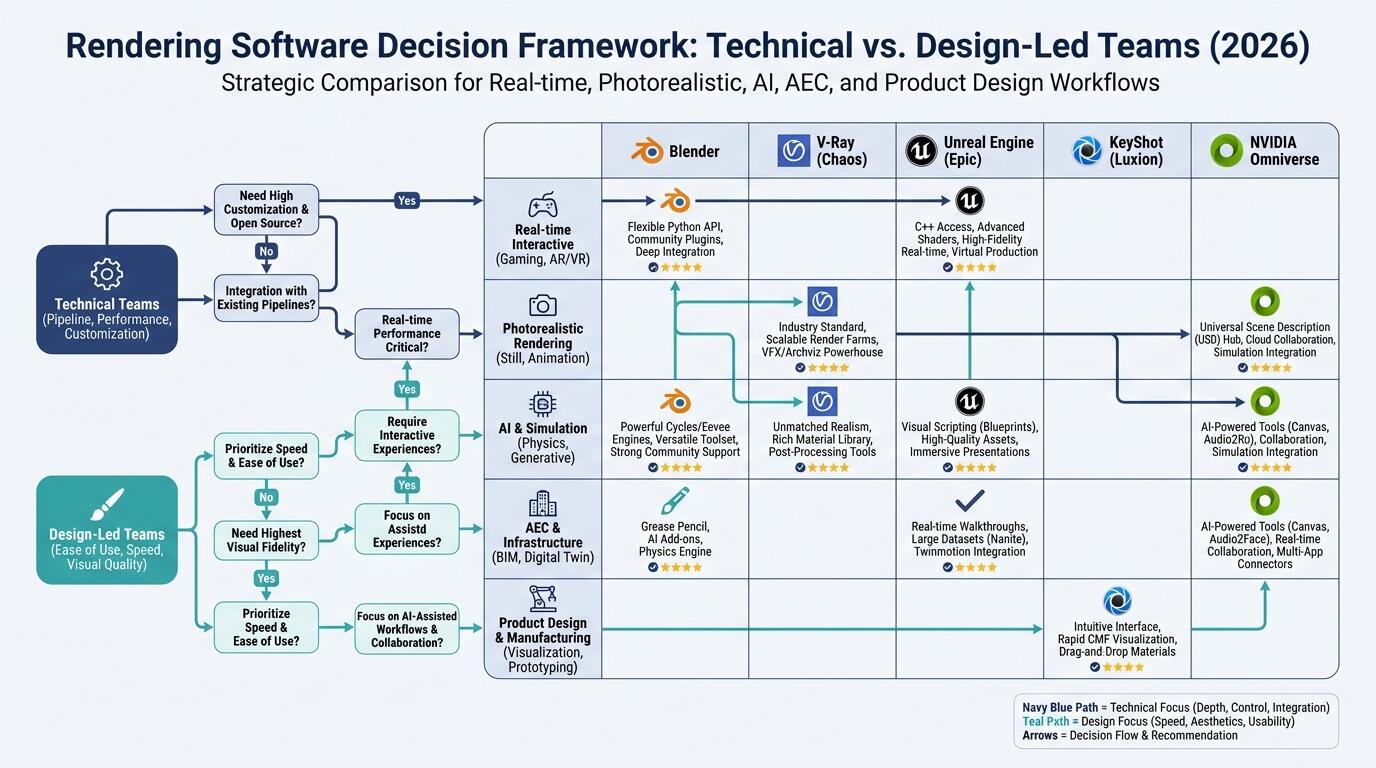
ALT: Decision framework comparing rendering software options for technical teams and design-led workflows in 2026
Common Questions
Q1: How do rendering pipelines integrate with AI and machine learning workflows?
Rendering pipelines integrate with AI workflows primarily through synthetic data generation — using rendering engines to produce labeled training images at scale — and through real-time visualization of AI model outputs. Platforms like NVIDIA Omniverse expose APIs that connect rendering directly to machine learning frameworks. Blender's Python scripting layer also enables batch rendering for dataset generation. For teams building AI-powered products, rendering can be a core data infrastructure component, not just a visual output step.
Q2: Is GPU-accelerated rendering always better than CPU rendering for production teams?
GPU-accelerated rendering is faster for interactive iteration and is the practical choice for most real-time workflows, but CPU rendering retains advantages in stability, memory capacity for large scenes, and reproducibility across hardware configurations. Production studios frequently use GPU for look development and CPU render farms for final frames where scene complexity exceeds GPU VRAM limits. The right choice depends on scene complexity, available hardware, and whether render consistency across a distributed farm is a priority.
Q3: How long does it typically take a technical team to become productive with a new rendering tool?
Onboarding time varies significantly by tool and team background. KeyShot and Enscape are typically productive within days for teams with basic 3D literacy. Blender, V-Ray, and Cinema 4D generally require weeks of structured learning before consistent, quality output is achievable. Unreal Engine and Houdini represent the longest onboarding — often months before a team without prior experience reaches production competence. Factoring onboarding time into tool selection is as important as evaluating feature sets, particularly for teams operating under tight delivery schedules.
Summary
Choosing the right rendering software in 2026 is a systems decision, not just a creative one. Three principles should anchor the process.
First, match the tool to the team's existing skill base. The most technically capable renderer delivers no value if your team cannot operate it within a real project timeline. Second, treat rendering as infrastructure when it serves data or AI pipelines — this changes the evaluation criteria entirely, shifting emphasis toward scriptability, API access, and format compatibility over visual quality benchmarks alone. Third, plan for a two-tier pipeline if your work spans both design iteration and final delivery: fast real-time tools for the former, path-traced renderers for the latter.
The teams that ship well-rendered, production-quality work consistently are not always the ones with the most powerful tools — they are the ones who made a clear, early tool decision and built workflow discipline around it.
If you are in the process of evaluating your rendering stack as part of a broader technical architecture decision, the same rigor applies as to any infrastructure choice. Start with your pipeline requirements, work backward to tool capabilities, and validate against team skill and delivery timeline before committing.
Explore technical insights on architecture, AI systems, and product delivery on the Darius website — built for engineers and founders who need practical guidance, not theoretical frameworks.
Sources & Further Reading
- IEEE Computer Society. "Software and Systems Engineering Standards".
https://www.ieee.org - Pixar Animation Studios / Academy Software Foundation. "Universal Scene Description (USD) — Open Standard Documentation".
https://www.aswf.io - NVIDIA Corporation. "NVIDIA Omniverse Platform — Developer Resources and Technical Documentation".
https://www.nvidia.com
Note: Standards and platform documentation may be updated; please check the latest official documents or consult professional advisors before making procurement or architecture decisions.