Best Mobile App Development Frameworks for Teams New to Cross-Platform Builds
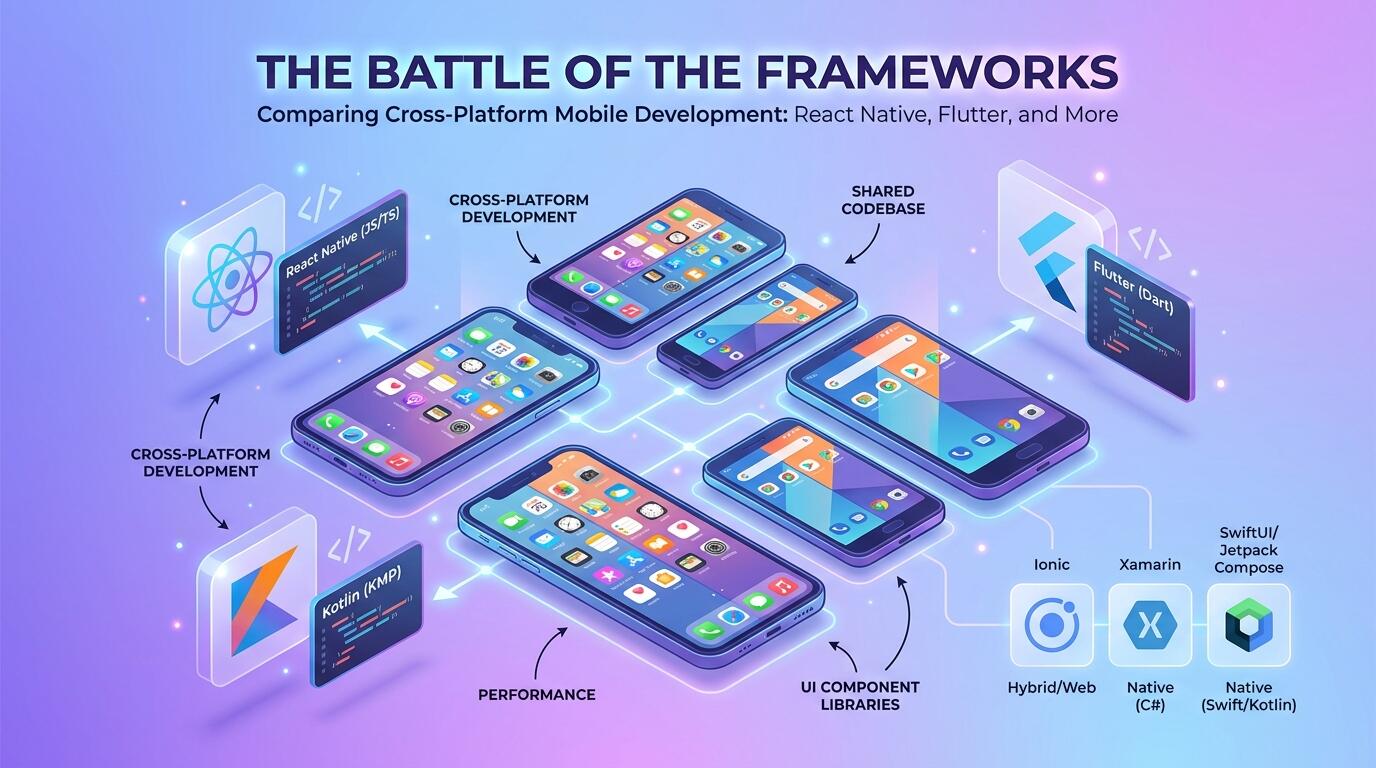
ALT: Best mobile app development frameworks for teams new to cross-platform builds in 2024
Choosing the Right Cross-Platform Framework When Your Team Is Starting Fresh
What is the single most consequential technical decision a team makes when entering cross-platform mobile development for the first time? It is choosing the right framework before writing a single line of shared code — because that decision will shape your architecture, your hiring pipeline, your debugging experience, and ultimately your time to ship.
Cross-platform mobile development is the practice of writing one shared codebase that produces native or near-native applications for both iOS and Android simultaneously. For teams that have historically built only for one platform, or that are making their first foray into mobile entirely, the learning curve can feel steep. The market now offers a handful of mature frameworks — each with its own philosophy, community, and trade-offs — and picking the wrong one can cost months of rework.
This list was assembled from patterns we consistently observe working with early-stage teams, product leaders navigating platform decisions, and engineering organizations evaluating where to invest their mobile capabilities. Each framework was evaluated on four criteria that matter most to newcomers: learning curve, community and documentation quality, performance ceiling, and long-term viability. The goal is not to declare a universal winner but to map each option to the team context where it delivers the most leverage.
The Best Cross-Platform Mobile Frameworks for New Teams
React Native: The Pragmatic On-Ramp for JavaScript Teams
React Native is an open-source framework created by Meta (Facebook) that allows developers to build mobile applications using JavaScript and React — a component-based UI library that many web developers already know. React Native renders UI components through a JavaScript bridge to native platform APIs, which means the result feels and behaves like a genuinely native application on both iOS and Android.
For teams with an existing JavaScript or TypeScript background, React Native shortens the ramp dramatically. You are not learning a new language; you are learning a new rendering target. The ecosystem is enormous: a rich library of community packages, strong tooling integration with Expo (a managed workflow that abstracts away much of the iOS and Android build configuration), and clear upgrade paths backed by Meta's continued investment.
In practice, teams new to cross-platform builds often underestimate how much of the complexity in mobile development is not the language — it is the native module integrations, the build systems, and the platform-specific edge cases. React Native with Expo handles a significant portion of that friction out of the box, letting a small team focus on product logic rather than build configuration.
Best for: JavaScript or TypeScript teams moving from web to mobile, or startups that need to ship quickly to both platforms without hiring platform-specialist engineers.
Watch out: The JavaScript bridge architecture, while improved significantly with the New Architecture (Fabric renderer and JSI), can still introduce performance constraints in computationally intensive scenarios like real-time graphics or heavy list animations. Teams should profile early rather than assume parity with fully native implementations.
Flutter: The Performance-First Choice with a Gentle Learning Curve
Flutter is Google's open-source UI toolkit that uses the Dart programming language to compile to native ARM code and renders its own UI directly to a canvas — it does not rely on platform widgets at all. Flutter is a framework that delivers highly consistent, pixel-perfect interfaces across iOS, Android, web, and desktop from a single codebase.
The performance story is Flutter's strongest selling point for newcomers who are worried about cross-platform compromises. Because Flutter draws its own widgets rather than wrapping native ones, it avoids the bridge overhead that older cross-platform architectures suffered from. The visual result is extremely consistent across platforms, which is particularly valuable for design-driven products where pixel precision matters.
Dart is a language that many engineers have not used before, but it is a well-typed, modern language with syntax that feels familiar to anyone who has written Java, Kotlin, Swift, or TypeScript. Teams that have piloted Flutter consistently report that developers are productive within a few weeks. Google backs Flutter with strong documentation, and the community around it has grown substantially in recent years, according to reports from the Kotlin Multiplatform and cross-platform community.
Best for: Teams building visually rich, design-intensive applications where cross-platform UI consistency is a hard requirement, and who are comfortable learning Dart.
Watch out: Flutter's custom rendering engine, while a performance advantage, means the app's widgets do not automatically inherit platform UI updates from Apple or Google. Maintaining native look-and-feel for platform-specific interactions (accessibility behavior, system fonts, native navigation patterns) requires deliberate extra work.
Kotlin Multiplatform: The Shared-Logic Approach for Mature Android Teams
Kotlin Multiplatform (KMP) is a technology from JetBrains that enables sharing Kotlin code — particularly business logic, networking, and data layers — across iOS and Android while keeping the native UI layer separate on each platform. According to the Kotlin documentation on cross-platform frameworks, KMP is increasingly being adopted as a pragmatic middle ground between full native development and fully shared UI frameworks.
The key philosophical difference of KMP is that it does not try to abstract the UI. You write native SwiftUI or UIKit on iOS and Jetpack Compose on Android — what you share is the underlying logic. For teams already invested in Android with Kotlin, adding KMP to share logic with an iOS counterpart team is a lower-risk, incremental approach rather than a wholesale architectural change.
This makes KMP less of a "start from scratch" framework and more of a "bridge" strategy. It is one of the most architecturally honest options available: you get code sharing where it genuinely makes sense (business rules, API clients, data models) while preserving the full expressiveness of each platform's native UI toolkit.
Best for: Android-first teams with Kotlin expertise that are extending to iOS, or organizations with separate iOS and Android engineers who want to eliminate duplication in shared business logic without enforcing a common UI framework.
Watch out: KMP is not a single-engineer, single-codebase solution in the way Flutter or React Native are. It generally assumes you have (or will have) platform-specific UI engineers for each side. For very small teams building both platforms with one person, the overhead of maintaining separate UI implementations can negate the efficiency gains.
Expo (Managed Workflow): The Fastest Path from Idea to App Store
Expo is a platform and managed workflow built on top of React Native that abstracts away the native build configuration, over-the-air update infrastructure, and many of the platform-specific integrations that slow new teams down. Expo is not a separate framework from React Native — it is a curated set of tools and libraries that makes React Native dramatically more accessible.
For teams that are genuinely new to mobile development, not just new to cross-platform, Expo's managed workflow can compress weeks of environment setup and native configuration into a single command. Expo Go, the companion app, allows developers to test their application on a real device instantly without going through the iOS or Android build process at all during early development.
The Expo SDK provides a well-maintained set of APIs covering camera, location, notifications, file system, and dozens of other device capabilities — all with consistent cross-platform behavior and strong documentation. This is a pattern we consistently see with early-stage startup teams: by starting with Expo, they can validate their mobile product idea with real users before investing in the complexity of a fully custom native build configuration. This approach aligns naturally with validating a product idea with real customers before building — getting something real in front of users as early as possible is almost always more valuable than perfecting the infrastructure first.
Best for: Non-mobile-native engineering teams, solo founders building an MVP, or organizations that want to ship a React Native application to the App Store without dedicating an engineer to native build systems.
Watch out: Expo's managed workflow imposes constraints on which native modules you can use. If your product requires a highly specialized native library not available in the Expo SDK, you will eventually need to "eject" to a bare workflow, which reintroduces the native configuration complexity Expo was hiding. Plan for this transition if your roadmap involves deep hardware integrations.
Capacitor: The Mobile Bridge for Existing Web Teams
Capacitor is an open-source runtime created by the Ionic team that allows web applications — built with any modern JavaScript framework (React, Vue, Angular, or plain HTML/CSS/JS) — to run as native iOS and Android applications by wrapping them in a native WebView. Capacitor is a cross-platform runtime that provides a consistent, plugin-based API for accessing native device capabilities from a web codebase.
The distinguishing characteristic of Capacitor is its audience: it is designed for teams that already have a web application and want to extend it to mobile with minimal architectural disruption. If you have an existing React or Angular web app, Capacitor allows you to ship it to the App Store and Google Play without rewriting it in a mobile-first framework.
Capacitor replaced Cordova (PhoneGap) as the modern standard for this approach. It has a clean plugin architecture, first-class support for Progressive Web Apps, and tight integration with the Ionic UI component library — though using Ionic components is optional, not required.
Best for: Web development teams that need mobile distribution quickly and whose application's functionality does not depend on native UI performance or platform-specific interactions.
Watch out: WebView-based applications have a performance ceiling that native-rendered frameworks do not. Animations, complex gestures, and hardware-intensive features can feel noticeably less responsive compared to Flutter or React Native applications. User expectations for mobile app performance have risen significantly, so this trade-off deserves honest assessment during framework selection.
Xamarin / .NET MAUI: The Enterprise Path for .NET Teams
.NET MAUI (Multi-platform App UI) is Microsoft's open-source framework for building native cross-platform applications using C# and the .NET ecosystem. It is the evolution of Xamarin, which Microsoft acquired and has continued to develop under the .NET umbrella. .NET MAUI compiles to native controls on each platform, meaning the resulting UI uses actual iOS and Android widgets rather than a custom rendering engine.
For organizations whose engineering teams are deeply invested in C# — enterprise teams building line-of-business applications, teams with significant backend logic in .NET, or shops that standardize on Microsoft's toolchain — .NET MAUI provides a natural extension path to mobile without requiring a language or paradigm change.
The enterprise tooling story is strong: Visual Studio integration, first-class support for Azure services, and compatibility with existing .NET libraries make it a credible choice for organizations where platform standardization is a priority. Per the general assessment published by cross-platform framework analysts such as those at LeanCode, .NET MAUI is a particularly compelling option for enterprise teams already in the Microsoft ecosystem.
Best for: Enterprise engineering teams with significant C# investment, or organizations building internal mobile tools that need to share logic with existing .NET services.
Watch out: The mobile developer community around .NET MAUI, while active, is smaller than those around Flutter and React Native. Finding community packages, third-party integrations, and mobile-specific expertise can require more effort. Teams building consumer-facing products where community velocity and third-party library breadth matter should weigh this carefully.
NativeScript: The Direct-to-Native Option for JavaScript Purists
NativeScript is an open-source framework that lets developers build truly native iOS and Android applications using JavaScript, TypeScript, or Angular — without a WebView and without a JavaScript bridge in the traditional sense. NativeScript is a runtime that maps JavaScript calls directly to native platform APIs, giving developers direct access to the full native API surface of each platform from JavaScript.
NativeScript's distinguishing characteristic is its access model. Unlike React Native (which abstracts native components through a bridge) or Capacitor (which wraps web content in a WebView), NativeScript provides direct bindings to the native iOS and Android APIs. This means any capability that exists on the native platform is accessible from JavaScript, without waiting for a framework-maintained plugin.
For teams that need deep native API access but want to stay in the JavaScript ecosystem, NativeScript occupies a specific and often underappreciated niche. It is worth evaluating when the product's requirements include native integrations that popular frameworks do not yet expose.
Best for: JavaScript teams with specific requirements for deep native API access that go beyond what standard framework plugin ecosystems offer.
Watch out: NativeScript's community is smaller and its ecosystem of third-party plugins is narrower than React Native's. The debugging experience, while functional, requires some native platform familiarity to troubleshoot effectively. Teams should factor in a steeper initial debugging investment.
Quick Comparison at a Glance
The following table summarizes each framework's primary fit, its strongest technical characteristic, and the limitation that matters most for teams making their first cross-platform decision.
| Framework | Best For | Key Strength | Limitation |
|---|---|---|---|
| React Native | JavaScript/TypeScript teams moving to mobile | Largest ecosystem, Expo integration, fast iteration | Bridge performance ceiling in intensive scenarios |
| Flutter | Design-intensive apps requiring UI consistency | Custom renderer, high performance, consistent visuals | Custom widgets require extra work for native platform feel |
| Kotlin Multiplatform | Android-first teams extending to iOS | Share logic without sacrificing native UI | Requires platform-specific UI engineers for each side |
| Expo (Managed) | Non-mobile teams shipping MVPs fast | Fastest time-to-app-store, zero native config | Managed workflow limits advanced native module access |
| Capacitor | Web teams extending to mobile distribution | Reuse existing web codebase entirely | WebView performance ceiling; not suitable for animation-heavy apps |
| .NET MAUI | Enterprise .NET/C# teams | Native controls, deep Microsoft ecosystem integration | Smaller community; fewer mobile-first third-party libraries |
| NativeScript | JavaScript teams needing deep native API access | Direct native API bindings without a WebView | Smaller ecosystem; debugging requires native platform familiarity |
How to Choose the Right Cross-Platform Framework
The framework decision maps most reliably to three variables: your team's existing language expertise, your product's performance requirements, and the depth of native platform integration your roadmap demands.
If your team writes JavaScript or TypeScript daily, the React Native and Expo path is almost always the fastest route to a working, production-quality mobile application. The ecosystem density, the available hiring pool, and the volume of community knowledge available when you hit obstacles are significant practical advantages that compound over time.
If your product is design-led — a consumer application where animations, transitions, and pixel precision are core to the user experience — Flutter's custom rendering engine earns its learning curve. The upfront investment in Dart pays dividends in a visual quality that is difficult to match with WebView-based approaches.
If you are an Android team that has shipped production Kotlin and your organization is staffing up iOS capability, Kotlin Multiplatform is the architecturally honest choice. You share what should be shared — logic — and own what should be owned — platform UI — rather than forcing a single abstraction layer over fundamentally different UI paradigms.
A common misconception worth correcting: many teams assume that "cross-platform" means sacrificing performance for convenience. That was more true five years ago than it is today. React Native's New Architecture, Flutter's compiled rendering, and KMP's native compilation have all substantially narrowed the gap with fully native development for the majority of use cases. The performance story in 2024 is more nuanced — and more favorable for cross-platform — than the conventional wisdom from the Cordova era.
When evaluating frameworks in the early phase of a project, it is also worth applying a similar rigor to any tooling investment — thinking through not just the initial fit but the long-term architectural implications. The same discipline that guides AI system design decisions for early-stage startups on a lean budget applies here: choose the option that gives you the most options to change your mind later, not the one that sounds most impressive in a slide deck.
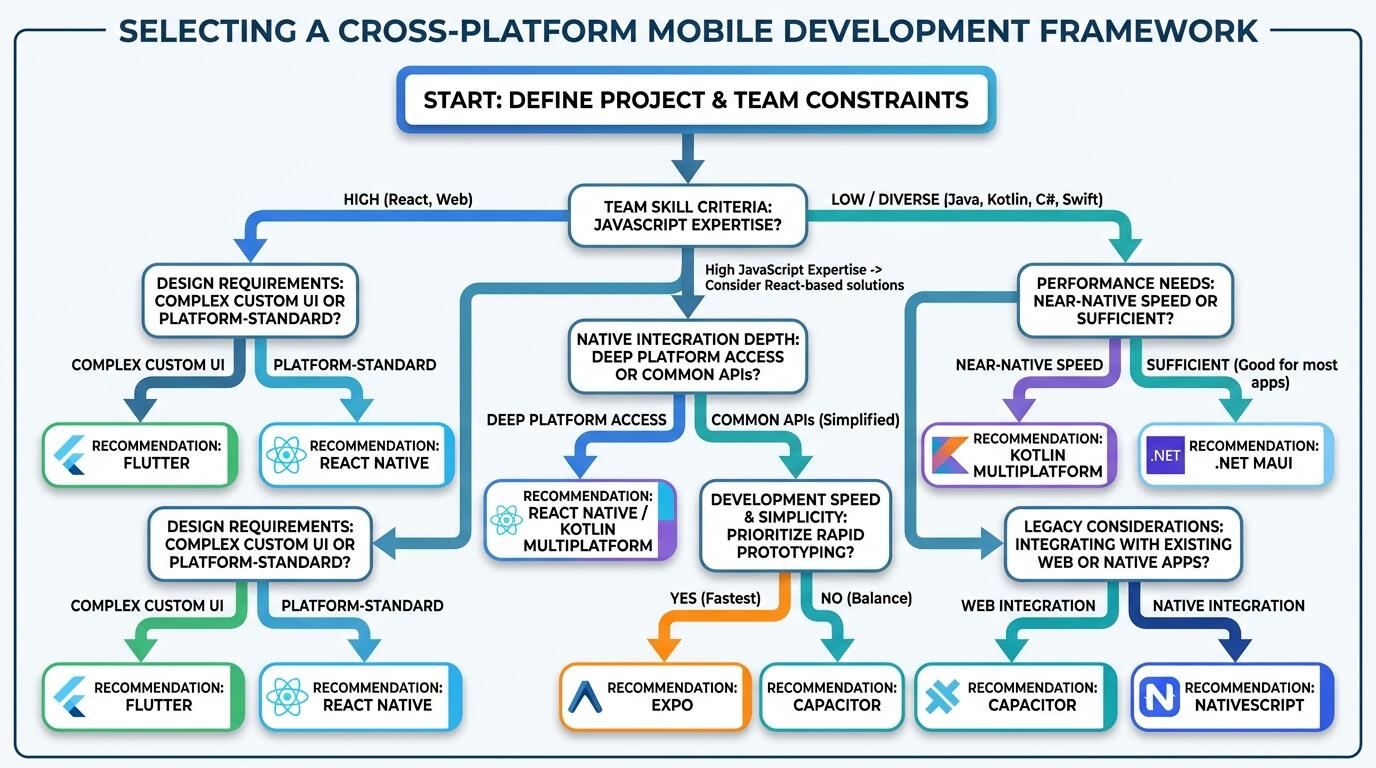
ALT: Decision guide for choosing the best cross-platform mobile development framework based on team expertise, product performance needs, and native integration depth for new teams
Questions & Answers
Q1: How does a team with no mobile experience get started with cross-platform development?
The most practical first step is to assess your team's existing language stack before evaluating any framework. If your engineers write JavaScript, start with Expo's managed workflow on top of React Native — it removes the native build configuration entirely so your team can focus on learning mobile development patterns rather than iOS and Android toolchains. From there, graduate to a bare workflow as your product requirements demand it. The goal at the start is shipping, not perfection.
Q2: Is Flutter better than React Native for new cross-platform projects?
Flutter and React Native are both strong choices, and neither is categorically better — the right answer depends on your team's language background and product requirements. Flutter is better for design-intensive applications where UI consistency across platforms is a hard requirement and your team is comfortable with Dart. React Native is better when your team already knows JavaScript, when you need the largest possible ecosystem of community packages, or when you want Expo's managed workflow to accelerate early development. The gap in raw performance between the two has narrowed considerably with React Native's New Architecture.
Q3: How long does it typically take a team to ship a cross-platform app using these frameworks?
Timeline depends heavily on the product's scope, the team's mobile familiarity, and the framework chosen. In our work with clients, teams using Expo's managed React Native workflow with experienced JavaScript developers have shipped functional MVP builds to both stores in a matter of weeks rather than months. Teams learning a new language (Dart for Flutter, C# for .NET MAUI) should plan for an initial productivity dip of several weeks while the team reaches working fluency. Estimating cross-platform builds as forty to sixty percent faster than maintaining two separate native codebases is a commonly cited benchmark, though actual results vary significantly by team and product complexity.
Final Thoughts
Choosing a cross-platform mobile framework is not a decision to make by committee consensus or by following whichever technology is trending on social media this quarter. It is an architectural decision that should be grounded in three honest assessments: what your team already knows, what your product genuinely requires from the mobile platform, and how much investment in framework-specific knowledge your organization can sustain over the long term.
The frameworks covered in this guide — React Native, Flutter, Kotlin Multiplatform, Expo, Capacitor, .NET MAUI, and NativeScript — each represent a legitimate, production-proven approach to cross-platform builds. None of them are experiments. All of them have live applications in the App Store and Google Play with millions of users. The question is not which one is "best" in isolation; it is which one fits your specific team context.
Three principles are worth carrying forward: start with what your team already knows to minimize the number of unknowns you are solving simultaneously; evaluate performance requirements against your actual product use cases rather than theoretical benchmarks; and plan your native integration roadmap before locking into a managed workflow that may constrain you later.
The teams that succeed with cross-platform development are not the ones that pick the objectively superior technology. They are the ones that pick a technology with clear eyes, build a disciplined architecture around it, and ship.
Ready to move from framework decision to a product that actually ships? Visit the Darius website to explore real-world technical insights, shipped project case studies, and deep-dives into full-stack and AI architecture — then reach out to start building something production-ready.
Sources & Citations
- Kotlin Foundation / JetBrains. "The Seven Most Popular Cross-Platform App Development Frameworks".
https://kotlinlang.org/docs/multiplatform/cross-platform-frameworks.html - LeanCode. "6 Cross-Platform Mobile App Development Frameworks".
https://leancode.co/blog/cross-platform-mobile-app-development-frameworks - Appinventiv. "Top Cross-Platform App Development Frameworks in 2026".
https://appinventiv.com/blog/cross-platform-app-frameworks/ - IEEE (Institute of Electrical and Electronics Engineers). Standards and publications on software engineering and mobile platform architecture.
https://www.ieee.org/ - Google Developers. Official documentation and resources for Flutter and Android development.
https://developers.google.com/
Note: Standards and framework documentation may be updated; check the latest official publications or consult professional advisors before making architectural commitments.