How I Built Semantic File Search Into a Personal Cloud Drive

ALT: Engineer building semantic file search into a personal cloud drive using embeddings and vector search
What It Actually Takes to Add Semantic File Search to a Cloud Drive You Own
The question every builder eventually asks after setting up a personal cloud drive is: why does search still feel so dumb? You know the file exists. You roughly remember what it says. But unless you recall the exact filename or a literal phrase from the document, the search box returns nothing useful. Keyword search — the default in virtually every self-hosted storage system — matches tokens, not meaning. Semantic file search solves this by converting documents into vector embeddings and retrieving results based on conceptual similarity rather than string overlap.
This article documents the decisions I made, the pitfalls I hit, and the architecture that actually worked when I added semantic search to a personal cloud drive. The components covered here were chosen because they represent the real decision points: embedding strategy, chunking logic, vector store selection, re-ranking, and the quiet failure modes that only surface after your index grows past a few thousand files. If you are building or evaluating a similar system, use this as a decision map rather than a step-by-step tutorial.
The Core Components: From Raw Files to Meaningful Retrieval
Semantic file search over a personal cloud drive works by converting document content into dense vector representations, storing them in a vector index, and retrieving the most semantically similar chunks when a query arrives. Each component in this pipeline is a real engineering decision — getting any one of them wrong degrades the entire system.
Text Extraction and Document Ingestion
Text extraction is the unglamorous first step that determines the ceiling of your entire retrieval system. If the extracted text is garbled, your embeddings will encode garbage, and no amount of clever retrieval will recover from that.
In practice, PDF extraction is the worst offender. PDFs are a presentation format, not a document format. Two-column layouts, scanned images embedded as pages, and footnotes interleaved with body text all produce extraction artifacts. For pure-text PDFs, libraries like PyMuPDF generally outperform pdfminer on layout preservation. For scanned documents, you need an OCR step — and OCR quality varies enormously by language, font, and scan resolution.
For Office documents (DOCX, PPTX, XLSX), the extraction is usually cleaner, but watch for embedded tables in DOCX files: they often serialize as a flat block of whitespace-separated values with no structural signal. Spreadsheets are particularly tricky — a single cell may contain a date, a number, or a multi-line note, and naive row-by-row extraction loses column context entirely.
- Best for: Anyone ingesting a heterogeneous document library (PDFs, Office files, Markdown, text files) from a personal drive or NAS
- Watch out: OCR pipelines add significant latency and cost at ingestion time. Separate scanned documents into a dedicated queue and process them asynchronously rather than blocking the main ingestion path.
Chunking Strategy
Chunking is the decision that most practitioners underestimate. A chunk is the unit of text that gets embedded and retrieved — its size and boundary logic directly determine whether your retrieval is precise or noisy.
Fixed-size character chunking (e.g., 512 characters with 64-character overlap) is the most common starting point and almost always the wrong long-term choice. It splits sentences mid-thought, severs paragraph context, and produces chunks that are semantically incomplete. The retrieved snippet looks relevant to the query but lacks enough context for a reader (or a downstream LLM) to actually use it.
Sentence-boundary chunking is better but still insufficient for structured documents. A more durable approach is semantic chunking: detect topic shifts in the text (using embedding cosine similarity between successive sentences) and split at boundaries where meaning shifts rather than at fixed intervals. For structured documents like reports with headers, use the document hierarchy — chunk at the section level first, then sub-chunk long sections.
Regardless of chunking strategy, always store the chunk's position in the source document (page number, section header, paragraph index) as metadata. This metadata is essential for surfacing the result location to the user and for filtering during retrieval.
- Best for: Document libraries with mixed content types — research papers, project notes, meeting transcripts, and reference guides all have different natural chunk boundaries
- Watch out: Chunk-level retrieval with no context injection produces snippets that confuse downstream consumers. Always retrieve the surrounding chunks (a "context window" around the matched chunk) before presenting or processing results.
Embedding Model Selection
An embedding model is a neural network that converts a text passage into a fixed-length dense vector, such that semantically similar passages produce geometrically close vectors. Model selection here is a meaningful engineering trade-off, not a commodity choice.
Closed-source API embeddings (such as those from OpenAI or Cohere) offer strong multilingual performance and require no infrastructure to serve. The trade-off is latency per call, cost at scale, and a hard dependency on an external provider. For a personal cloud drive processing thousands of files, the per-token cost is manageable — but any re-indexing event (model change, chunking strategy update) multiplies that cost by your entire corpus size.
Open-source embedding models (the BAAI/BGE series, E5, and similar models from the MTEB leaderboard) can be self-hosted on a machine with even a modest GPU and deliver competitive retrieval quality. For a personal or small-team cloud drive, self-hosting an embedding model eliminates per-query cost entirely and removes the external API dependency. The operational cost is inference infrastructure — worth it once your query volume is non-trivial.
One underappreciated pitfall: embedding models have a context window limit, commonly 512 tokens. Chunks longer than this limit are silently truncated at inference time in many libraries — the embedding is computed on a partial input, and no error is raised. Audit your chunk length distribution against your model's actual context window before indexing at scale.
- Best for: Self-hosted setups where long-term cost predictability matters, or where document content is sensitive and should not leave the local environment
- Watch out: Do not mix embeddings from different models in the same vector index. A model change requires full re-indexing — plan for this operationally before you have 50,000 files in the index.
Vector Store Selection
A vector store is a database optimized for approximate nearest-neighbor (ANN) search over high-dimensional embedding vectors. Choosing the right one for a personal cloud drive involves a different calculus than for a production SaaS product.
For a single-machine personal setup, lightweight options like Chroma or Qdrant running as a local process are operationally appropriate. Both support metadata filtering (allowing you to restrict search to a specific folder, file type, or date range) and persist their index to disk. Qdrant in particular supports payload filtering that runs before the vector search, not after — which keeps search fast even as the index grows.
For setups that live in a cloud object storage environment, some providers now offer vector search as a built-in capability on top of existing storage infrastructure. Alibaba Cloud's Object Storage Service, for instance, documents vector retrieval capabilities as part of its storage layer — a useful reference point if your drive is already hosted in that ecosystem. The IONOS AI Model Hub documents a semantic file search implementation that runs directly against cloud-stored documents, which shows how managed providers are beginning to absorb this functionality into storage primitives rather than requiring a separate vector database.
PostgreSQL with the pgvector extension is a pragmatic choice if you already run a Postgres instance and want to avoid operating a second database. It handles moderate-scale personal libraries well, supports hybrid search (combining vector similarity with SQL filters), and benefits from the operational maturity of Postgres itself.
- Best for: Developers who want metadata-filtered retrieval ("find files similar to this query, but only in my /projects folder") without operating multiple infrastructure components
- Watch out: ANN indexes (HNSW, IVF) are built at index time. Adding new documents incrementally is supported, but index quality degrades if you add documents in very small batches. Batch your ingestion or schedule periodic index rebuilds.
Hybrid Search: Combining Semantic and Keyword Signals
Hybrid search is a retrieval approach that combines vector similarity scores with traditional keyword (BM25) scores, producing a fused ranking. It is not an optional optimization — it is the correct default for a general-purpose document search system.
Pure semantic search misses exact matches. If a user queries a document by its precise title, a contract number, or a specific technical term, keyword search will find it more reliably than vector search. Pure keyword search, conversely, fails when the user's phrasing differs from the document's vocabulary. Hybrid search captures both signals.
Reciprocal Rank Fusion (RRF) is the standard algorithm for combining ranked lists from two retrievers without needing to normalize their scores onto a shared scale. It is simple to implement, robust to score distribution differences, and performs well in practice. DataHub's semantic search configuration documentation describes how hybrid ranking is structured in a production retrieval system — a useful architectural reference for understanding how BM25 and vector scores are merged in practice.
- Best for: Any document library where users issue both precise lookups (exact filenames, IDs, dates) and conceptual queries ("the draft about Q3 pricing strategy")
- Watch out: Tuning the weight between BM25 and vector scores is dataset-specific. A fixed 50/50 blend is a reasonable starting point, but expect to adjust it once you have real query logs to evaluate against.
Re-Ranking
Re-ranking is a second retrieval stage that applies a more expensive, more accurate scoring model to the top-k candidates returned by the initial ANN search. It corrects the ranking errors that approximate retrieval inevitably introduces.
Cross-encoder re-rankers score each (query, chunk) pair independently — unlike bi-encoder embedding models, which encode query and document separately, cross-encoders can attend to both simultaneously and produce more accurate relevance judgments. The cost is that they cannot be pre-computed: every query requires a forward pass over each candidate. This is acceptable when applied only to the top 20–50 candidates returned by the first stage.
For a personal cloud drive, a lightweight open-source cross-encoder (such as models from the sentence-transformers library fine-tuned on MS MARCO) delivers meaningful ranking improvements at low latency on CPU hardware. The latency budget for a personal tool is generous compared to a production API — even 200–500ms for re-ranking is unnoticeable in an interactive search interface.
- Best for: Users who need result quality to be consistently high even when query phrasing is ambiguous or when the top ANN candidates are borderline
- Watch out: Re-ranking does not expand the candidate set — it only reorders what the first stage retrieved. If the correct document was not in the top-k candidates, re-ranking will not surface it. Tune your first-stage recall (higher k, broader ANN search) before optimizing re-ranking.
Metadata Filtering and Faceted Navigation
Metadata filtering is the ability to constrain a semantic search query to a subset of documents based on structured attributes — file type, folder path, modification date, author, or custom tags. It transforms a flat retrieval system into something that feels like a real file system interface.
The implementation decision is whether metadata filtering runs before or after the vector search. Pre-filtering (applying the filter before the ANN search) is faster and ensures the result set respects the constraint exactly, but it reduces the pool of candidate vectors and can degrade recall if the filtered subset is small. Post-filtering (retrieving a large k, then filtering) can miss constraints when the filtered set is sparse.
In practice, pre-filtering with a modest over-retrieval factor (retrieving 2x–3x your target k and then filtering) is a reliable middle ground. Qdrant's payload filtering model implements this pattern well and is worth reviewing as a reference implementation.
- Best for: Drive owners with organized folder structures who want to issue queries like "find meeting notes from last quarter related to the acquisition"
- Watch out: Metadata quality depends on consistent tagging and folder hygiene. A semantic search system that surfaces irrelevant results because folder-level metadata is inconsistent erodes user trust quickly — fix your taxonomy before relying on it as a filter dimension.
Index Maintenance and Re-Indexing Strategy
Index maintenance is the operational concern that most prototypes ignore and most production systems eventually regret. A personal cloud drive is a living document collection — files are added, modified, renamed, and deleted continuously.
The naive approach — full re-index on a cron schedule — works at small scale and has the virtue of simplicity. At a few thousand files, a nightly full re-index is operationally acceptable. Beyond that, incremental indexing (tracking file modification timestamps and indexing only changed documents) becomes necessary to keep ingestion time bounded.
Deletion is the subtler problem. Most vector stores do not garbage-collect stale embeddings automatically. A deleted file leaves orphaned vectors in the index that will continue to appear in search results. Implement an explicit deletion hook that removes the corresponding vectors when a file is deleted or moved. Maintain a mapping table (file identifier to vector IDs) to make this lookup efficient.
- Best for: Any deployment intended to remain useful over months or years — which is most personal drive setups
- Watch out: Schema migrations (changing chunk size, switching embedding models) require full re-indexing. Design your ingestion pipeline so that re-indexing can run in parallel against a shadow index and cut over atomically, rather than taking the search system offline during migration.
Quick Comparison at a Glance
| Component | Best For | Key Strength | Limitation |
|---|---|---|---|
| Text Extraction | Heterogeneous file libraries | Determines embedding input quality | OCR adds latency; PDF layout is fragile |
| Chunking Strategy | Structured document retrieval | Controls precision of retrieved context | Fixed-size chunking loses semantic boundaries |
| Embedding Model | Encoding semantic meaning | Enables concept-level similarity | Context window truncation is a silent failure mode |
| Vector Store | ANN retrieval at scale | Fast nearest-neighbor lookup with filtering | Incremental indexing can degrade index quality |
| Hybrid Search | Mixed query types (exact + conceptual) | Captures both keyword and semantic signals | BM25/vector weight ratio requires tuning |
| Re-Ranking | High-precision result quality | Cross-encoder accuracy over ANN candidates | Does not expand candidate set; latency at scale |
| Metadata Filtering | Folder- and type-scoped queries | Constrains retrieval to relevant subsets | Depends on consistent metadata hygiene |
| Index Maintenance | Long-lived, evolving document libraries | Keeps index current with file system changes | Deletion and schema migration require explicit handling |
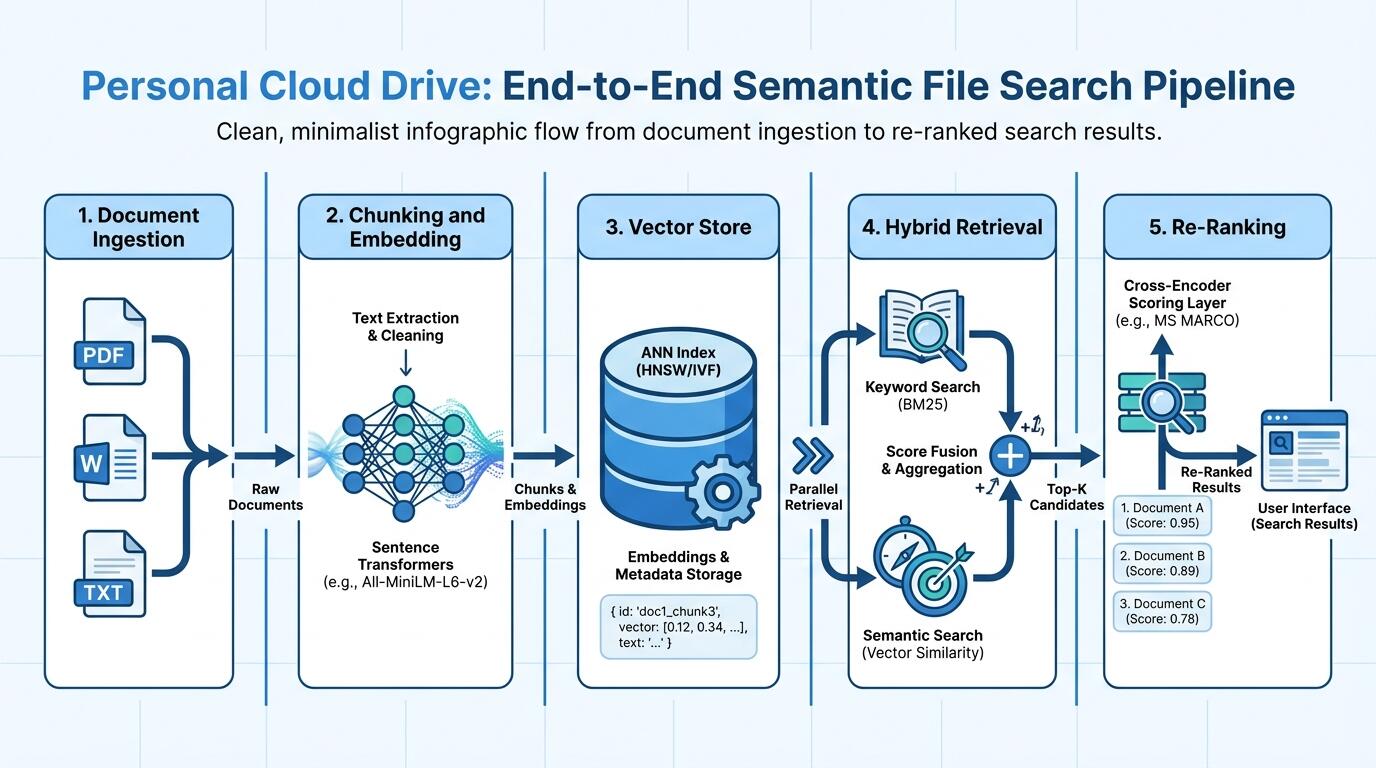
ALT: Diagram showing the end-to-end semantic file search pipeline: ingestion, embedding, vector store, hybrid retrieval, and re-ranking for a personal cloud drive
How to Choose the Right Architecture for Your Drive
The right architecture depends on your document volume, query patterns, and operational tolerance — not on which components are most technically impressive.
If your library is under a few thousand files and your primary use case is personal retrieval, start with the simplest stack that works: a local embedding model, Chroma or Qdrant as a local vector store, and no re-ranking stage. The marginal accuracy gain from re-ranking at this scale rarely justifies the added complexity. Add hybrid search early — the BM25 side is nearly free to implement and meaningfully improves exact-match recall.
If your library is growing toward tens of thousands of files or you are building this as a shared team tool, the operational concerns dominate. Incremental indexing, a robust deletion hook, and a shadow-index migration strategy become mandatory, not optional. At this scale, choosing a vector store with strong metadata filtering support (Qdrant's payload filtering model or pgvector's SQL predicate pushdown) pays off in both query speed and result relevance.
A common misconception is that semantic search replaces keyword search entirely. It does not. Keyword search handles exact lookups that users rely on daily — finding a file by its known name, locating a specific contract number, or retrieving a document tagged with a precise term. Removing keyword search in favor of pure vector retrieval degrades these workflows. Hybrid search is not a compromise; it is the architecturally correct default.
For teams building and iterating on AI products — including the retrieval systems described here — tracking the state of the art across embedding models, vector store capabilities, and retrieval techniques is itself an ongoing operational task. The Darius newsletter covers exactly this space from a practitioner perspective, which is where many of the implementation patterns referenced in this article first surfaced for me.
People Also Ask
Q1: How do I handle file types that are not plain text in a semantic search system?
Non-text files — PDFs, PPTX, DOCX, images — require an extraction step before embedding. For PDFs, libraries like PyMuPDF handle text PDFs; scanned PDFs need OCR. Office formats have dedicated parsers. The key principle: extraction quality sets the ceiling for retrieval quality. Invest in robust extraction logic early, and route file types to appropriate extractors rather than applying a single parser universally. IONOS's documentation on intelligent document search describes how managed systems handle multi-format ingestion at the infrastructure level.
Q2: Is it safe to send personal documents to a hosted embedding API?
Hosted embedding APIs process your document content on external servers. For most personal files — notes, project documents, reference materials — this is an acceptable trade-off in exchange for model quality and zero infrastructure overhead. For sensitive documents (legal, financial, medical), self-hosting an open-source embedding model ensures content never leaves your environment. The sentence-transformers ecosystem offers a range of models suitable for self-hosted personal deployments without meaningful quality sacrifice for most English-language content.
Q3: How long does it take to build a functional semantic search system for a personal drive?
A functional prototype — extraction, chunking, embedding, local vector store, and a basic query interface — can be assembled in a focused weekend, assuming familiarity with Python and basic ML tooling. A production-quality system with hybrid search, metadata filtering, incremental indexing, and a deletion-safe architecture typically requires several weeks of iteration, particularly around index maintenance edge cases. The time investment is dominated by operational robustness, not the core retrieval logic.
Final Thoughts
Building semantic file search into a personal cloud drive is a genuinely tractable engineering project — the tooling has matured to the point where the hard parts are operational, not algorithmic. Three points are worth carrying forward.
First, extraction quality is the real bottleneck. Vector search and re-ranking cannot compensate for corrupted or incomplete input text. Invest in robust document parsing before optimizing retrieval.
Second, hybrid search is not optional. Purely semantic retrieval breaks exact-match use cases that users depend on. BM25 and vector retrieval are complementary signals; fuse them from the start rather than retrofitting the combination later.
Third, index maintenance is where projects fail silently. Stale vectors from deleted files, silent truncation of oversized chunks, and schema migrations without a shadow-index strategy all degrade the system over time without obvious error signals. Build deletion hooks and migration tooling before you need them.
The next practical step is to run a small-scale proof of concept on a representative sample of your actual file library — not a toy dataset. Real documents surface extraction failures, metadata gaps, and query patterns that generic benchmarks miss entirely.
If this article gave you useful signal, subscribe to Darius — a bilingual AI newsletter written by an engineering director who runs three AI products in production. Each issue delivers 5–10 carefully selected AI developments with hands-on technical analysis you can use directly in engineering decisions. Every assessment is grounded in real users, real data, and real costs — delivered to your inbox.
Sources & Citations
- Alibaba Cloud. "Object Storage Service: Vector Search — Vector Retrieval".
https://www.alibabacloud.com/help/en/oss/user-guide/vector-retrieval/ - DataHub. "Semantic Search Configuration".
https://docs.datahub.com/docs/how-to/semantic-search-configuration - IONOS. "Intelligent Document Search with AI — Semantic File Search".
https://docs.ionos.com/cloud/ai/ai-model-hub/how-tos/semantic-file-search - IEEE. "IEEE Xplore — Standards and Research on Information Retrieval and Neural Embedding Systems".
https://www.ieee.org/