How to Build a Production RAG System That Actually Works

ALT: Engineer building a production RAG system architecture with retrieval, embeddings, and LLM pipeline
How to Build a Production RAG System That Actually Works
RAG, or retrieval-augmented generation, is an architecture pattern that combines a search-and-retrieval step with a large language model so answers are grounded in real, current data instead of relying purely on what the model memorized during training. Most teams that attempt this get a working demo in a short time, then watch it fall apart under real user traffic, messy documents, and edge-case queries. This guide walks through how to build a production RAG system that actually works, moving past the tutorial-stage prototype into something reliable enough to ship.
This is written for software engineers, AI practitioners, and startup builders who have already seen a basic RAG demo and now need it to survive contact with real users. In our work architecting AI-native products, a pattern we consistently see is that teams treat retrieval as a bolt-on feature rather than a core system component — and that decision is exactly why so many RAG deployments stall before launch.
Before You Start: Prerequisites & Preparation
A production RAG system is not a weekend side project bolted onto an existing app — it is a data pipeline, a search system, and an LLM orchestration layer that all need to work together under real load. Before writing any retrieval code, you need clarity on what data you are indexing, who is asking questions, and what "correct" looks like for your domain. Skipping this groundwork is the single most common reason production RAG projects miss their launch window.
You should have a working knowledge of how embeddings represent text as vectors, some familiarity with at least one vector database or search engine, and access to a representative sample of the documents your system will actually serve in production — not just a handful of clean PDFs. You will also need a way to measure answer quality, whether that's a labeled evaluation set or a panel of domain experts willing to review outputs. Expect the initial build to take meaningfully longer than a basic demo, since document parsing, chunking strategy, and evaluation loops each require iteration.
Checklist before starting:
- A representative, messy sample of your real production documents (not just clean test files)
- A vector database or hybrid search infrastructure decision already scoped
- An evaluation dataset or expert reviewers available to judge answer quality
- Clear latency and cost budgets agreed upon with stakeholders before development begins
Step-by-Step Instructions
Step 1: Define the Retrieval Scope and Success Criteria
Start by writing down, in plain language, the exact questions your RAG system must answer and the exact sources it is allowed to draw from. This single step prevents the most expensive mistake in RAG development: building a generic retrieval layer over a use case that actually needed a narrow, highly tuned one. Document what counts as a correct, complete, and safe answer before any code is written.
Tip: Create ten to twenty real example questions from actual users or stakeholders now — you will reuse these as your first evaluation set later, and having them early keeps the whole team anchored to the actual goal instead of a generic notion of "search."
Step 2: Build a Document Ingestion Pipeline That Handles Real-World Mess
Design your ingestion pipeline to parse, clean, and chunk documents in whatever format they actually arrive in — PDFs with tables, scanned images, Slack exports, HTML pages with navigation clutter, and inconsistent formatting. Chunking, the process of splitting long documents into smaller retrievable pieces, needs to preserve semantic coherence rather than cutting text at arbitrary character counts. According to guidance summarized in "Building RAG Systems: From Zero to Hero" on Dev.to, naive fixed-length chunking is one of the most common early failure points in RAG pipelines because it fragments ideas mid-thought and degrades retrieval quality.
- Normalize formatting and strip boilerplate (headers, footers, navigation) before chunking
- Preserve metadata such as source, section title, and timestamp alongside each chunk
- Test chunk boundaries against real documents, not just sample text
Tip: Store the original source document alongside every chunk so you can trace any answer back to its origin — this traceability becomes critical later during debugging and compliance review.
Step 3: Choose and Tune Your Retrieval Strategy
Select a retrieval approach that combines dense vector search with traditional keyword or lexical search, a pattern generally called hybrid search. Pure vector similarity search alone frequently misses exact-match queries like product codes, names, or numeric identifiers that keyword search handles naturally. Per the analysis in "How to build production-ready RAG systems" from The Neural Maze, hybrid retrieval consistently outperforms single-method approaches once systems face varied, real-world query patterns.
- Test both dense and sparse retrieval independently before combining them
- Tune the number of retrieved chunks (commonly called top-k) against your evaluation set rather than guessing
- Add a reranking step, where a secondary model reorders retrieved chunks by relevance before they reach the language model
Tip: Do not assume more retrieved chunks means better answers — feeding too much irrelevant context to the language model dilutes its attention and often produces worse, more generic responses.
Step 4: Engineer the Prompt and Context Assembly Layer
Design the prompt template that assembles retrieved chunks, the user's question, and any system instructions into a single, well-structured input for the language model. This layer determines whether the model treats retrieved content as authoritative grounding or as loosely-related background noise. Be explicit in your instructions that the model should answer only from provided context and should state clearly when it cannot find an answer, rather than guessing.
- Clearly label each retrieved chunk with its source in the prompt structure
- Instruct the model explicitly to decline answering when retrieved context is insufficient
- Keep prompt templates version-controlled just like application code
Tip: Add a lightweight instruction telling the model to cite which chunk supported each claim — this single change makes your system's outputs auditable and dramatically easier to debug when answers go wrong.
Step 5: Add Evaluation, Guardrails, and Observability
Build an evaluation loop that scores retrieval accuracy and answer quality separately, since a system can retrieve the right documents but still generate a poor answer, or vice versa. Layer in guardrails that catch hallucinations, unsafe outputs, or answers that drift outside your defined scope from Step 1. Instrument logging that captures every query, every retrieved chunk, and every generated answer so you can trace failures after the fact.
- Track retrieval precision (are the right chunks coming back) separately from answer faithfulness (does the answer match the retrieved context)
- Set up automated regression tests using your evaluation set so future changes don't silently degrade quality
- Log latency and token cost per query alongside quality metrics
Tip: Treat evaluation as a living system, not a one-time check — a pattern we consistently see in production-grade AI products is that teams that keep evaluation running continuously catch quality regressions before users ever notice them.
Step 6: Optimize for Latency, Cost, and Scale
Profile every stage of the pipeline — embedding generation, vector search, reranking, and generation — to find where latency actually accumulates, since it is rarely where teams first assume. Cache frequent queries and their retrieved chunks where appropriate, and consider smaller, faster models for reranking while reserving your most capable model for final generation. According to the guidance in "Building RAG Systems That Actually Work" on Medium, moving from a naive to a production-grade RAG architecture almost always requires this kind of staged model selection to balance quality against cost and speed.
- Benchmark end-to-end latency under realistic concurrent load, not just single-query tests
- Right-size your vector database index for your actual data volume rather than over-provisioning early
- Separate expensive operations (like reranking) so they can be scaled or disabled independently
Tip: Set a hard latency budget per pipeline stage before optimizing — without one, it's easy to over-engineer the wrong component while a slower one goes unnoticed.
Step 7: Ship, Monitor, and Iterate in Production
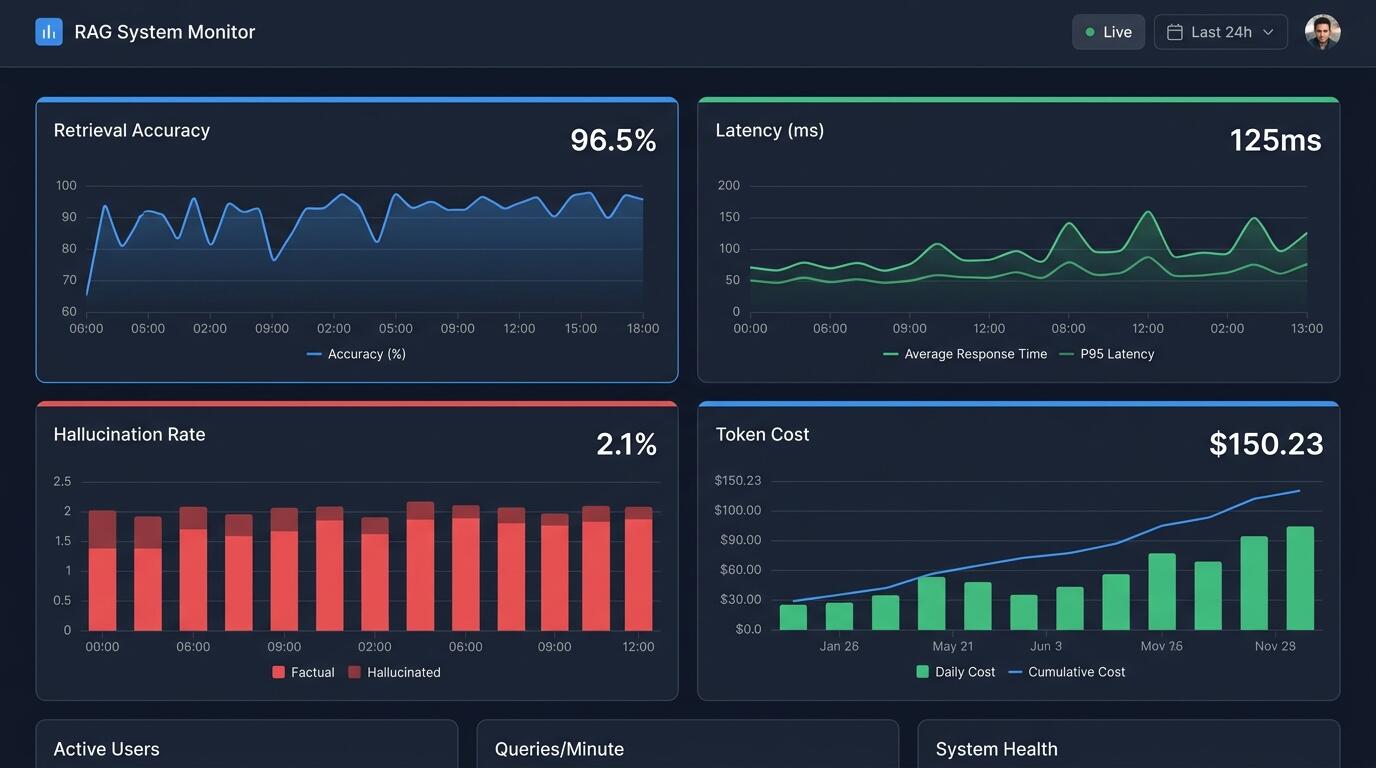
Deploy behind a feature flag or limited rollout so you can observe real user query patterns before full launch, since real usage almost always reveals question types your evaluation set missed. Set up dashboards tracking answer quality signals, user feedback (thumbs up or down, for example), and system health metrics side by side. Treat the first weeks after launch as an extended evaluation phase, feeding new failure cases back into your evaluation set continuously.
- Roll out to a small user segment before full deployment
- Collect explicit user feedback signals wherever your interface allows it
- Review a sample of real production queries weekly and feed failures back into retraining or prompt updates
Tip: The system that ships is never the final version — production RAG systems that actually work are the ones with a tight, continuous feedback loop between real usage and pipeline refinement, not the ones that were "finished" before launch.
Common Mistakes & Troubleshooting
| Symptom | Likely Cause | How to Fix |
|---|---|---|
| Answers are confidently wrong or invented (hallucinations) | Model is filling gaps when retrieved context is weak or missing, without being instructed to decline | Add explicit instructions to answer only from context and to say "I don't know" when retrieval is insufficient; strengthen retrieval coverage |
| Retrieval returns irrelevant chunks for exact-match queries | Relying on vector similarity alone, which struggles with names, codes, or numeric identifiers | Add hybrid search combining keyword and vector retrieval, as covered in Step 3 |
| System works in testing but slows down dramatically under real traffic | Latency was never profiled per pipeline stage or benchmarked under concurrent load | Benchmark each stage independently and set per-stage latency budgets, as outlined in Step 6 |
| Answer quality degrades after a prompt or model update | No regression testing against a stable evaluation set | Maintain a version-controlled evaluation set and run it against every pipeline change before deployment |
| Users ask questions the system was never designed to answer | Retrieval scope and success criteria were never clearly defined at the start | Revisit Step 1 and explicitly document and communicate system boundaries to users |
ALT: Dashboard tracking retrieval accuracy, latency, and hallucination rate for a production RAG system
Pro Tips for Better Results
A common misconception is that a production RAG system is simply a demo with a bigger vector database attached — in reality, the gap between demo and production lies almost entirely in evaluation, observability, and edge-case handling, not in swapping to a larger index. Teams that treat RAG as a single retrieval-plus-generation call, rather than an integrated system with feedback loops, consistently underperform once real users arrive.
- Separate retrieval evaluation from generation evaluation from day one; conflating them hides which layer is actually failing.
- Version every component — chunking logic, prompt templates, and retrieval configuration — so you can roll back precisely when quality regresses.
- Build a "cannot answer" path deliberately; a system that gracefully declines is far more trustworthy than one that always produces something.
- Invest in metadata filtering (by date, source, or document type) alongside semantic search, since real queries often need both.
- Treat your RAG system as native infrastructure integrated into your product, not a plugin — this is a philosophy we apply consistently in AI-native product design, where retrieval and generation are woven into the core workflow rather than layered on top as an afterthought.
Common Questions
Q1: How is a production RAG system different from a basic RAG demo?
A production RAG system differs from a demo primarily in its evaluation rigor, observability, and handling of messy real-world data. Demos typically use clean, small document sets and a handful of test queries, while production systems must handle inconsistent formatting, edge-case questions, concurrent load, and continuous monitoring for hallucinations and drift over time.
Q2: Is hybrid search always necessary for a production RAG pipeline?
Hybrid search is not strictly mandatory, but it is strongly recommended for most real-world use cases. Pure vector search struggles with exact-match terms like product codes or proper names, so combining it with keyword-based retrieval, as discussed in Step 3, typically produces more consistent results across varied query types than either method alone.
Q3: How long does it typically take to move a RAG prototype into production?
The timeline varies significantly based on data complexity and evaluation requirements, but moving from prototype to production reliably takes meaningfully longer than the initial demo build. Most of that additional time goes into ingestion pipeline hardening, evaluation dataset creation, and iterative tuning rather than the core retrieval-and-generation logic itself.
Key Takeaways
- A production RAG system succeeds or fails based on ingestion quality, retrieval strategy, and continuous evaluation — not just the choice of language model.
- Hybrid search, combining dense vector retrieval with keyword search, consistently outperforms vector-only approaches for real-world query diversity.
- Explicit guardrails that let the model decline to answer are essential for trustworthiness and are far better than allowing confident, unsupported guesses.
- Evaluation must run continuously after launch, not just once before deployment, since real usage patterns reveal gaps no test set fully anticipates.
- Treating RAG as a deeply integrated, native part of your product architecture — rather than a bolt-on feature — is what separates systems that actually work from those that stall in pilot.
Building a RAG system that survives real users requires the same engineering discipline as any other production system: clear scope, rigorous testing, and continuous iteration. If you want to see how these principles come to life in real AI-native products, visit Darius at the Darius website to explore hands-on insights from an Engineering Director and AI Architect, along with practical tools like an AI cloud drive, AI mock interview platform, and AI creator cockpit designed to help you work smarter. Start your journey toward building or leveraging truly AI-native solutions today.
References
- Gautam Vhavle. "Building RAG Systems: From Zero to Hero".
https://dev.to/gautamvhavle/building-production-rag-systems-from-zero-to-hero-2f1i - Madhuranjan. "Building RAG Systems That Actually Work: A Complete Guide from Naive to Production".
https://medium.com/@madhuranjan763/building-rag-systems-that-actually-work-a-complete-guide-from-naive-to-production-e7e38690e8a0 - The Neural Maze. "How to build production-ready RAG systems".
https://theneuralmaze.substack.com/p/how-to-build-production-ready-rag - IEEE. Institute of Electrical and Electronics Engineers.
https://www.ieee.org/
Note: Standards may be updated; please check the latest official documents or consult professional advisors.