Full-Stack Considerations When Extending a Web Product to Mobile in 2026

ALT: Full-stack engineer planning mobile extension of a web product with architecture diagrams in 2026
Bridging Web to Mobile: The Full-Stack Questions That Actually Matter in 2026
What is the single most important question a technical team faces when extending a web product to mobile? It is not "should we build native or cross-platform?" — that decision comes later. The real question is: "How much of what we already built can we trust, and where does the seam between web and mobile introduce systemic risk?" Getting that answer wrong costs teams months of rework, technical debt that compounds quietly, and user experiences that feel subtly broken in ways that are hard to diagnose.
This article lays out the full-stack considerations that consistently surface when bringing a web product to mobile in 2026. These are not theoretical — they reflect patterns observed across real product build cycles, from early architecture decisions through live deployment. Each item has been selected because it represents a genuine decision point with non-obvious trade-offs, not a surface-level checklist entry. Whether you are a CTO evaluating your expansion roadmap, an engineering lead about to staff up, or a founder stress-testing a technical plan, these considerations are designed to sharpen your thinking before you commit resources.
The Core Full-Stack Considerations for Taking Your Web Product to Mobile
Start With Your API Layer: It Probably Is Not Mobile-Ready
The API layer is the single most leveraged asset when extending a web product to mobile, and it is almost never as ready as teams assume. Web APIs are often shaped around the rendering patterns of the frontend that consumed them first — returning large payloads, assuming persistent connections, or bundling data in ways that make sense for a browser session but become expensive on a cellular network. Before writing a single line of mobile UI code, audit every API surface for payload size, endpoint granularity, and authentication flow.
In practice, we consistently see teams discover that their REST endpoints return far more fields than a mobile screen will ever render. A pattern that works well here is the Backend for Frontend (BFF) approach — a thin intermediary layer that shapes API responses specifically for mobile consumption, decouples mobile release cycles from backend changes, and gives you a controlled place to implement mobile-specific concerns like aggressive caching headers and reduced response schemas.
Best for: Teams with mature web backends that have accumulated API surface area organically over time, or products where mobile and web UX diverge significantly in data requirements.
Watch out: A BFF layer adds an operational surface to maintain. If your team is small, weigh the maintenance cost against simply versioning your existing endpoints with mobile-optimized query parameters.
Authentication and Session Management Across Platforms
Authentication is a full-stack concern that behaves fundamentally differently on mobile than on the web. On the web, session cookies and same-origin browser storage are well-understood; on mobile, token-based authentication using short-lived access tokens and long-lived refresh tokens stored in platform-secure enclaves (such as the iOS Keychain or Android Keystore) is the correct architecture. Mapping your existing web auth flow onto mobile without rethinking this can introduce security vulnerabilities or UX friction — for example, aggressive session expiry that forces frequent re-authentication on a mobile app feels far more disruptive than it does on a browser.
OAuth 2.0 with PKCE (Proof Key for Code Exchange) has become the documented standard for mobile authentication flows, endorsed by the Internet Engineering Task Force (IETF) in RFC 7636. If your web product relies on server-side sessions rather than JWTs or OAuth tokens, this is a migration you need to plan before, not during, the mobile build.
Best for: Any product where user accounts, personalization, or access-controlled content exist — which is to say, essentially every SaaS or consumer app extending to mobile.
Watch out: Biometric authentication (Face ID, fingerprint) adds significant UX value on mobile but requires careful integration with your token refresh logic. Do not bolt it on as an afterthought.
Shared Business Logic: Where Code Reuse Actually Makes Sense
The promise of cross-platform frameworks — React Native, Flutter, Kotlin Multiplatform — is code reuse, but the reuse that matters most is not UI code; it is business logic. Validation rules, pricing calculations, state machine definitions, data transformation functions — these are the pieces of logic that, when duplicated across a web codebase and a mobile codebase, create divergence bugs that are among the most expensive to diagnose and fix.
A pattern that delivers consistent value is extracting core business logic into a shared module — a TypeScript package, a Kotlin Multiplatform module, or a Dart package — that both web and mobile consume as a dependency. This does not require committing to a single cross-platform UI framework. You can run a React web frontend and a React Native mobile app, sharing a TypeScript domain logic package between them, while still writing platform-optimized UI components for each target.
As noted in the WeWeb guide to building full-stack web applications, the separation of data layer from presentation layer is one of the foundational practices that makes applications extensible across surfaces — a principle that applies directly to cross-platform expansion.
Best for: Products with complex business rules, multi-step workflows, or compliance requirements where logic drift between platforms creates real risk.
Watch out: Shared logic packages introduce a coordination overhead. Teams need clear ownership, versioning discipline, and CI pipelines that test the shared package against both consumers before merging.
Offline-First Architecture and Data Synchronization
Mobile users expect applications to work under degraded or absent network conditions. Web products, even progressive web apps, rarely implement true offline-first behavior because browser caching and service workers cover most web use cases adequately. Native mobile applications, however, operate in environments — subways, elevators, rural areas — where connectivity can drop for extended periods, and users expect reads (and often writes) to work regardless.
Extending to mobile without an offline strategy is a product decision with technical consequences. At minimum, you need to define which data domains require offline access, how local mutations are queued and synchronized when connectivity returns, and how conflict resolution is handled when the same record has been modified both locally and on the server. Libraries such as WatermelonDB (for React Native) and Room with WorkManager (for Android native) provide well-established local persistence and sync primitives, but the synchronization protocol — particularly conflict resolution — must be designed at the API layer, not just the client layer.
Best for: Productivity apps, field-service tools, content consumption apps, or any product where the user's workflow must continue without connectivity.
Watch out: Offline-first architecture significantly increases the complexity of your data layer. Do not implement it speculatively — validate through user research whether your specific user base actually encounters offline scenarios before investing in full offline support.
Push Notifications: Infrastructure and Permission UX
Push notifications are a mobile-native capability that has no true equivalent in the web product you are extending from. Implementing them requires backend infrastructure (a push notification service such as Firebase Cloud Messaging or Apple Push Notification service), device token management stored server-side, and a notification payload design that works across iOS and Android rendering differences.
The full-stack consideration here that teams most often underestimate is permission UX. Both iOS and Android have become progressively more restrictive about notification permissions, and the moment and framing in which you request permission directly determines your opt-in rate. If you ask for notification permission on first launch, before the user has experienced any value from the app, you will receive low opt-in rates and high churn. This is not a backend problem; it is a product architecture decision that involves frontend timing logic, backend event triggering, and user journey design.
Best for: Apps with time-sensitive content, transactional events (payments, bookings, messages), or engagement loops that benefit from re-engagement triggers.
Watch out: Notification infrastructure requires ongoing maintenance — token refresh handling, delivery failure retry logic, and analytics on open rates. Budget for this as a persistent operational cost, not a one-time implementation.
Performance Budgets and Platform-Specific Rendering Constraints
Web performance optimization and mobile performance optimization share principles but diverge significantly in implementation. On the web, the critical rendering path, JavaScript bundle size, and network waterfall are the primary levers. On mobile, the concerns shift to main-thread blocking, memory pressure, frame rate consistency (targeting 60fps or 120fps on high-refresh-rate devices), and startup time — particularly the time from app launch to interactive state.
A pattern we consistently see is teams applying web performance thinking — optimizing image delivery, reducing HTTP requests — to mobile without addressing the mobile-specific constraints. The result is an app that passes performance audits but feels sluggish in use, because list scrolling is not optimized for virtualization, or because JavaScript-heavy cross-platform frameworks are doing unnecessary reconciliation work on the main thread.
Define explicit performance budgets — maximum startup time, minimum sustained frame rate, maximum memory footprint — before development begins, and instrument against them in CI. According to research published by the IEEE on mobile application quality, user retention is disproportionately sensitive to perceived performance in the first session, making early instrumentation more cost-effective than post-launch optimization.
Best for: All mobile products, but especially consumer-facing apps where competitive alternatives are one tap away.
Watch out: Performance budgets are only useful if they are enforced. Without automated performance regression testing in your CI pipeline, budgets become aspirational documents rather than engineering constraints.
State Management Architecture at Scale
State management on mobile is a more constrained problem than on the web, but it is also less forgiving. On the web, a user refreshing the page resets application state — a natural escape hatch that masks state management bugs. On mobile, applications run continuously in the background, state persists across sessions, and users expect to resume exactly where they left off. This means that state management bugs — memory leaks, stale closures, unhandled async transitions — manifest as real production problems rather than being silently cleared by a page reload.
If your web product uses a well-structured state management approach — Redux, Zustand, MobX for React-based stacks — there is meaningful portability to React Native. But the persistence layer, the background process handling, and the lifecycle events (app backgrounding, foreground re-entry, low-memory warnings) require mobile-specific handling that does not exist in the web version. Designing your state architecture with these lifecycle events as first-class concerns — not as edge cases handled with event listeners bolted on later — is the difference between a stable mobile app and one that has mysterious state corruption after the user switches apps and returns.
Best for: Apps with complex user workflows, multi-step forms, shopping carts, or any state that must survive app backgrounding.
Watch out: Do not assume that what works in your web state management layer will behave identically in a React Native context. Test state persistence, rehydration, and lifecycle transitions explicitly and early.
Deployment, Versioning, and the App Store Release Cycle
Web deployment is continuous — you push a change and every user is on the new version within minutes. Mobile deployment is governed by platform review cycles and user update adoption rates. This is one of the most operationally significant differences between web and mobile, and it has upstream architectural consequences. Critical bug fixes that would take minutes to ship on web can take days to reach users on mobile, filtered through App Store or Google Play review and then through user update behavior.
This constraint demands architectural decisions that are rarely necessary for pure web products: feature flags that can be toggled server-side without a new app release, API versioning that can support multiple client versions simultaneously (because you cannot force-update users), and a hotfix strategy that distinguishes between what can be addressed server-side versus what requires a new binary submission.
For teams evaluating their broader technical strategy, validating your product direction before committing to a mobile build is a discipline that applies equally here — understanding which features need to ship in the initial release versus which can be gated behind server-controlled flags determines how much risk you carry through each app store review cycle.
Best for: All mobile products — this is not optional. Every team extending to mobile must understand and plan around the release cycle constraint.
Watch out: Over-relying on server-side feature flags can create a false sense of deployment agility. Flags still require testing, documentation, and eventual cleanup; treat them as a tool, not a substitute for architectural discipline.
Analytics, Observability, and Crash Reporting
A web product typically has mature analytics and error monitoring in place — Google Analytics or Amplitude for product analytics, Sentry or Datadog for error tracking. These tools have mobile SDKs, but instrumenting a mobile app requires re-thinking what you measure and how. Mobile crash reporting is more complex than web error tracking because crashes can occur at the native layer, the JavaScript bridge layer (in cross-platform frameworks), or the OS level — and each requires different tooling and different triage skills.
Beyond crash reporting, mobile product analytics requires tracking session patterns that differ from web: background/foreground transitions as session boundaries, screen view events instead of page views, and gesture-based interactions that have no web equivalent. Defining your instrumentation plan as part of your architecture phase — not as a post-launch task — ensures that the data you need to make product decisions is available from the first release.
Best for: Any team that uses data to drive product decisions — which in 2026 means every serious product organization.
Watch out: Mobile analytics SDKs add to app binary size and can introduce performance overhead if poorly configured. Evaluate and benchmark SDK choices before committing, and implement them with lazy initialization where possible.
Quick Comparison at a Glance
| Consideration | Best For | Key Strength | Limitation |
|---|---|---|---|
| API Layer Readiness | All teams with existing web backends | Prevents payload bloat and auth friction on mobile | BFF layer adds maintenance overhead |
| Auth and Session Management | Any product with user accounts | Aligns with platform security standards (OAuth 2.0 / PKCE) | Requires migration if web uses server-side sessions |
| Shared Business Logic | Products with complex domain rules | Eliminates cross-platform logic drift | Requires versioning discipline and shared ownership |
| Offline-First Architecture | Productivity, field, and content apps | Robust user experience under poor connectivity | Significantly increases data layer complexity |
| Push Notifications | Transactional and engagement-driven apps | Direct mobile re-engagement capability | Permission UX and token management require ongoing care |
| Performance Budgets | Consumer-facing and competitive apps | Protects user retention from day one | Only effective if enforced via CI automation |
| State Management at Scale | Complex workflow and multi-step apps | Prevents state corruption across app lifecycle events | Mobile lifecycle handling differs significantly from web |
| Deployment and Versioning | All mobile products | Forces disciplined API versioning and hotfix planning | Review cycles cannot be bypassed for critical fixes |
| Analytics and Observability | All data-driven product teams | Enables informed product decisions from first release | SDK overhead requires careful performance benchmarking |
How to Choose Where to Focus First
The right starting point depends on the maturity of your web product and the nature of your mobile ambition. For teams with a well-established web backend, the API layer audit is the highest-leverage first investment — it surfaces the most consequential architectural gaps before any mobile code is written. For teams where user trust and security are the product's core value proposition, the authentication rearchitecture should happen in parallel and cannot be deferred.
If your mobile extension is a companion experience — a read-focused or notification-driven supplement to the web product — you can defer offline-first architecture and invest instead in performance optimization and push notification infrastructure. If your mobile app is intended to be a primary usage surface, offline-first and state management architecture demand early attention because retrofitting them is expensive.
A common misconception is that choosing a cross-platform framework resolves most of these considerations. It does not. React Native, Flutter, and Kotlin Multiplatform each offer meaningful code-sharing benefits, but they do not automatically solve API readiness, auth rearchitecture, deployment discipline, or observability instrumentation. The framework choice is one decision within a much larger set of full-stack decisions. As documented in resources like the Coderio analysis of full-stack development in 2026, the business case for full-stack thinking rests on architectural coherence — not on any single technology choice.
For teams that are still validating whether the mobile extension is the right next move, the discipline of validating a new product idea with real customers before building applies directly — mobile is a significant engineering investment, and customer signal should precede architectural commitment.
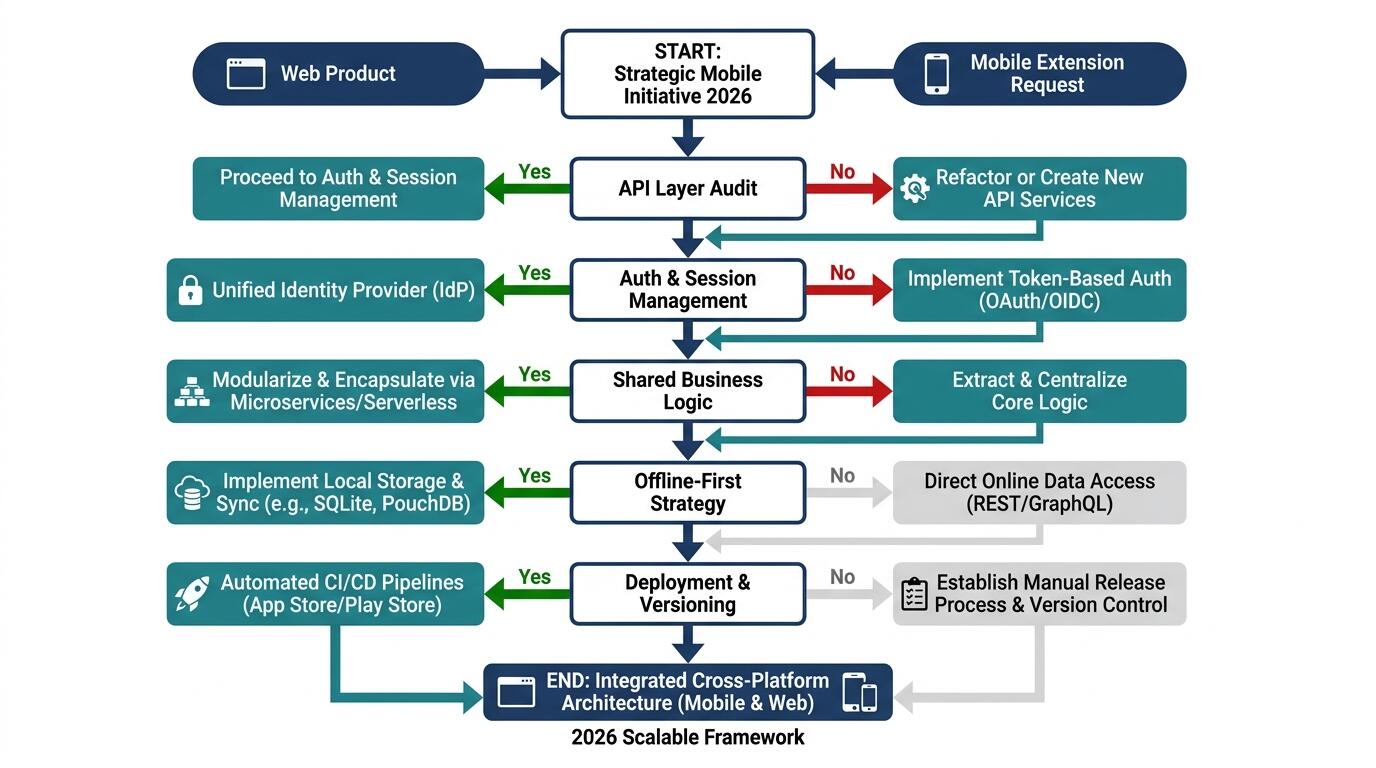
ALT: Full-stack architecture decision flowchart for extending a web product to mobile, showing API, auth, and deployment considerations for engineering teams in 2026
People Also Ask
Q1: How do you decide between native mobile development and a cross-platform framework when extending a web product?
The decision hinges on three factors: your existing technology stack, the platform-specific features your mobile app requires, and your team's existing expertise. Teams with a React-based web stack frequently find React Native a lower-friction entry point because JavaScript and component mental models carry over. If your app requires deep platform integration — advanced camera APIs, background audio processing, or Bluetooth peripherals — native development offers fewer abstraction-layer constraints. For most SaaS and content products, a well-implemented cross-platform framework delivers sufficient performance with faster time to market.
Q2: Is it necessary to build a separate backend for mobile, or can you reuse the existing web API?
Reusing the existing web API is entirely viable, but it typically requires modification rather than wholesale reuse. The most practical approach is API versioning combined with mobile-optimized endpoint variants or a thin Backend for Frontend (BFF) layer that shapes responses for mobile consumption. The IETF's documented best practices for API design emphasize consumer-driven contracts — designing API responses around what the consuming client actually needs — which is the principle that makes mobile API readiness an explicit audit item rather than an assumption.
Q3: How long does it typically take to extend an established web product to a production-ready mobile app?
Timeline varies significantly based on feature scope, API readiness, and team composition, so any specific figure should be treated with caution. In practice, teams consistently underestimate the time required for platform-specific concerns: app store submission and review, certificate management, device testing across OS versions, and the auth rearchitecture work. A useful rule of thumb from experienced mobile engineering teams is to treat your initial estimate as a floor, not a ceiling, and to phase the rollout — launching a focused v1 with the highest-value mobile use cases first rather than attempting a full feature parity release.
Final Thoughts
Extending a web product to mobile in 2026 is not a frontend project with some backend implications — it is a full-stack architectural undertaking that surfaces systemic assumptions baked into your existing system. The teams that navigate it well do so by treating mobile not as a port of the web experience but as a distinct delivery surface with its own constraints, user expectations, and operational characteristics.
Key Takeaways:
- Audit your API layer before writing mobile UI code — payload size, auth flow, and endpoint granularity are the highest-impact starting points.
- Authentication requires explicit rearchitecture for mobile; OAuth 2.0 with PKCE is the documented standard for mobile auth flows.
- Code reuse is most valuable at the business logic layer, not the UI layer — share domain logic, write platform-optimized interfaces.
- The app store release cycle is an architectural constraint, not just an operational inconvenience — it demands API versioning and server-side feature flag discipline.
- Observability and crash reporting must be planned at the architecture phase; post-launch instrumentation leaves you flying blind through the most critical period of user adoption.
The next step is a structured technical audit of your existing web product against these nine dimensions. That audit will tell you which investments are genuinely blocking, which can be phased, and where your team's existing capabilities close the gap without additional tooling.
Ready to take your product from web to mobile without accumulating the technical debt that slows most teams down? Explore real shipped projects, architectural insights, and more at the Darius website — and get in touch to bring experienced full-stack and AI architecture leadership to your next build.
Sources & Further Reading
- Coderio. "Full-Stack Web Development: The Business Case for 2026."
https://www.coderio.com/blog/software-development/full-stack-web-development-business/ - WeWeb. "How to Build a Full Stack Web Application in 2026."
https://www.weweb.io/blog/how-to-build-a-full-stack-web-application - Internet Engineering Task Force (IETF). RFC 7636: Proof Key for Code Exchange by OAuth Public Clients.
https://www.ietf.org/ - IEEE. Standards and Research on Mobile Application Quality and Performance.
https://www.ieee.org/ - W3C (World Wide Web Consortium). Mobile Web Application Best Practices and Progressive Web App Standards.
https://www.w3.org/
Note: Standards and best practices may be updated; please check the latest official documents or consult professional advisors.