How to Build an Agentic Workflow That Actually Ships to Production
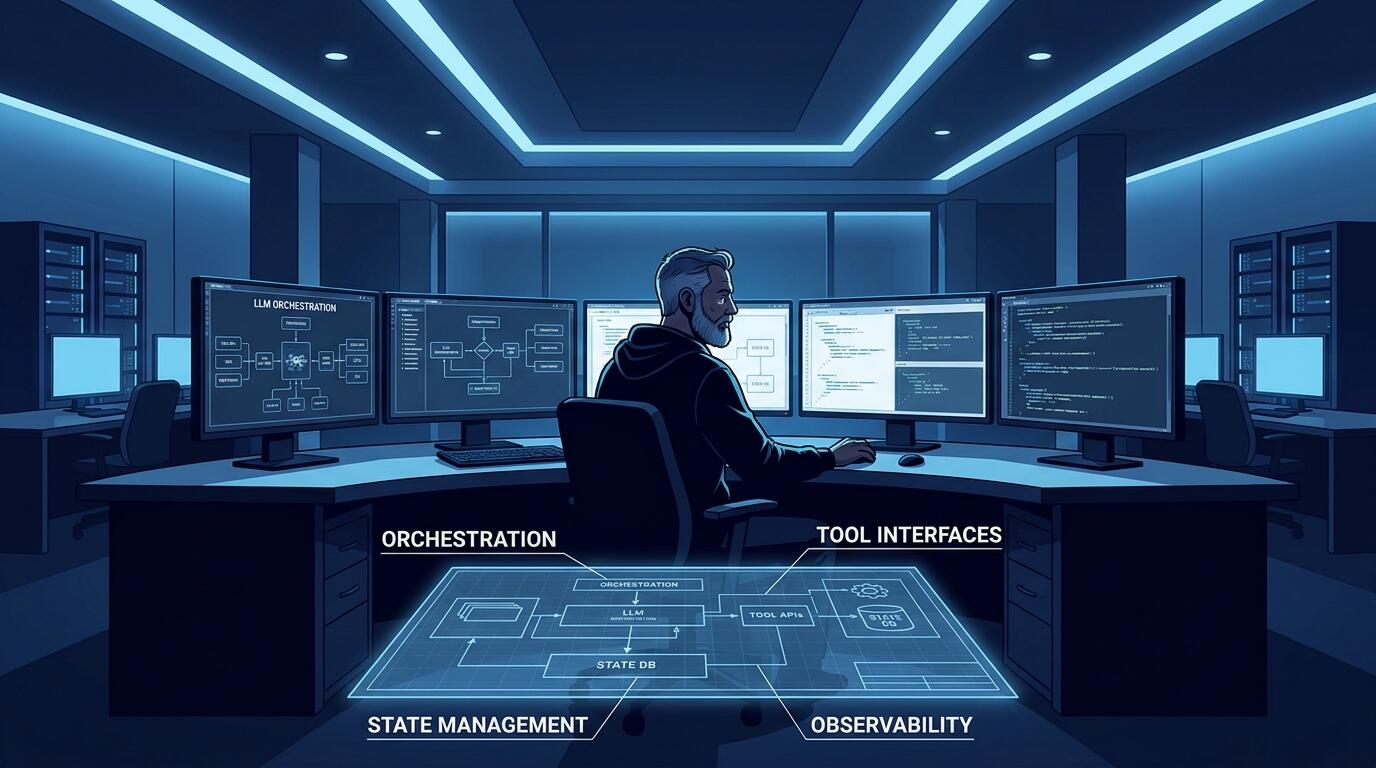
ALT: Engineer building agentic workflow architecture for production deployment with AI system design
What You Will Actually Build: A Production-Ready Agentic Workflow
Key Conclusion: Building an agentic workflow that ships to production requires more than connecting a few LLM calls. This guide walks through the architectural decisions, orchestration patterns, failure-handling strategies, and operational practices that separate a working demo from a reliable, deployed system — covering every layer from agent design to monitoring, so your agentic application can handle real users and real workloads.
Most agentic workflow projects start with a compelling demo. An LLM reasons through a task, calls a tool, loops back on itself, and produces a result that feels almost magical. Then someone asks, "Can we put this in production?" — and the real work begins.
This guide is for engineers, technical leads, and founders who have moved past the curiosity phase and need to ship. It draws on patterns consistently seen when designing and deploying AI-driven systems end to end: what breaks, what scales, and what decisions made early will haunt you later if you get them wrong.
Before You Start: Prerequisites and What You Need to Prepare
An agentic workflow is a system in which one or more AI agents — software components that perceive inputs, reason over them, and take actions — execute multi-step tasks autonomously, often by calling external tools, APIs, or other agents in a dynamic sequence. Unlike a simple prompt-response pipeline, an agentic workflow involves branching logic, memory, and the potential for self-correction. Understanding this distinction up front will shape every architectural decision you make.
Before writing a single line of orchestration code, you need certain foundations in place. Skipping this preparation is the single most common reason agentic projects stall before they ever reach a staging environment.
What you need to know beforehand:
You should be comfortable with REST APIs, asynchronous programming patterns, and at least one LLM provider's API (such as OpenAI, Anthropic, or a self-hosted model). Familiarity with basic software architecture concepts — particularly the difference between stateless and stateful services — will serve you well. You do not need a research background in machine learning, but you do need to think like a systems engineer: in terms of interfaces, failure modes, and observability.
What you need to have in place:
- A clearly scoped task that justifies agentic behavior. Not every automation needs an agent. If the task has a fixed, predictable sequence of steps, a standard pipeline is simpler and more reliable.
- A chosen orchestration approach. Options range from lightweight frameworks to full workflow engines. Your choice here has long-term consequences for reliability and debuggability.
- Defined tool contracts. Every external capability your agent can invoke — a web search, a database query, a code executor — should have a documented input/output schema before you begin wiring things together.
- An observability plan. Logging, tracing, and alerting infrastructure should be decided before deployment, not bolted on afterward.
- A clear definition of what "done" looks like for any given task. Agents without termination conditions will loop, hallucinate, or run up costs.
Checklist before starting:
- Confirm the task genuinely requires dynamic, multi-step reasoning (not just a fixed pipeline)
- Select and configure your LLM provider with appropriate rate limits and cost controls
- Define all tool interfaces with explicit input/output schemas
- Choose your orchestration layer (lightweight library vs. full workflow engine)
- Stand up basic logging and tracing infrastructure
- Define task completion criteria and maximum iteration limits
- Establish a rollback or graceful degradation strategy for when the agent fails
Time and effort will vary by complexity, but treat the preparation phase as at least as significant as the coding itself. Rushing it creates technical debt that compounds quickly once the system is live.
The Step-by-Step Process for Shipping an Agentic Workflow
Step 1: Define the Agent's Scope and Decision Boundaries
The first step is not to pick a framework — it is to define what your agent is allowed to do and what it is not. A production agent without clearly bounded authority is a liability.
Start by mapping out the task domain. What inputs does the agent receive? What actions can it take? What is the acceptable range of outcomes? Write this down explicitly, treating it like a service contract. For each tool or action the agent can invoke, document who or what owns that tool, whether it is reversible, and what the cost or side effect of calling it is.
Irreversible and high-cost actions — sending an email, writing to a database, making a payment — should require explicit confirmation logic or human-in-the-loop checkpoints at this early design stage. According to research published by Orkes on agentic workflow architecture, a key production challenge is constraining agent autonomy so that systems remain auditable and recoverable when something goes wrong.
Tip: Treat your agent's scope definition as a formal document, not a mental model. If you cannot describe the agent's authority in writing, you cannot validate it in code.
Step 2: Choose the Right Orchestration Architecture
Orchestration is the mechanism that controls how agents are invoked, how their outputs route to tools or other agents, and how state is maintained across steps. Choosing the wrong orchestration layer is one of the most expensive architectural mistakes you can make, because it touches everything downstream.
At one end of the spectrum, you have lightweight orchestration: frameworks that let you chain LLM calls and tool invocations in Python or TypeScript with minimal overhead. This works well for prototypes and relatively simple workflows. At the other end, you have durable workflow engines — systems designed for long-running, stateful processes that need to survive crashes, retries, and network failures. As Temporal's engineering team has documented, building an agentic system that is actually production-ready requires treating agent execution as a durable workflow, not a single-threaded script, because real production environments involve timeouts, partial failures, and the need to resume interrupted tasks.
For short, bounded tasks, a lighter orchestration layer is defensible. For any workflow that could run for minutes or hours, that calls external APIs with variable reliability, or that needs an audit trail, a durable workflow engine is the right default. Make this decision explicitly — do not let it happen by accident as you iterate on a prototype.
Tip: Evaluate your orchestration choice against your worst-case failure scenario, not your happy path. Ask: "If this agent is halfway through a task and the server restarts, what happens?"
Step 3: Implement Tool Interfaces as Hardened Contracts
Every tool your agent calls is an integration point that can fail. In production, integrations fail regularly. The way you design tool interfaces determines whether those failures are recoverable errors or catastrophic outages.
Define each tool as a typed function with explicit input validation, error handling, and a documented maximum latency. Do not pass raw LLM output directly to a tool call without parsing and validation. A common pattern we see in work with early-stage AI products is that the LLM is trusted too implicitly as the sole source of well-formed inputs — and when it produces a slightly malformed tool call, the entire workflow fails ungracefully.
Each tool interface should enforce input schemas (using something like JSON Schema or Pydantic), return structured error types (not just exceptions), and log both the request and response for observability. Tools that perform irreversible side effects should require idempotency keys where possible, so that retries do not cause duplicate actions.
Tip: Test each tool integration in isolation before testing it inside the agent loop. If the tool is unreliable on its own, the agent will amplify that unreliability.
Step 4: Build State Management and Memory Deliberately
An agentic workflow is inherently stateful: the agent needs to remember what it has done, what it has learned, and what remains. How you manage that state determines whether your system can scale, recover from failures, and support concurrent users.
There are three types of memory to design for explicitly. Working memory is the context within a single task execution — typically what you pass in and out of the LLM context window. Episodic memory refers to persistent records of past interactions or task outcomes that the agent can retrieve. Semantic memory is structured knowledge the agent can query, often backed by a vector database or retrieval system.
For most production applications, you do not need all three. Start with working memory only, and add persistence when a concrete use case demands it. Overengineering memory early is a pattern that consistently delays shipping. When you do add persistent memory, treat it like a database: define schemas, enforce access patterns, and plan for data retention and deletion.
Tip: Audit what actually lands in the agent's context window at each step. Context bloat — stuffing too much history into every prompt — is a quiet but significant cost driver and a reliability risk.
Step 5: Design for Failure, Not Just the Happy Path
Production agentic systems fail in ways that differ from traditional software. The failure modes are less deterministic: an LLM might produce output that is structurally valid but semantically wrong, causing downstream tool calls to behave unexpectedly. An external API might return a response that the agent interprets as success when it is actually a soft failure.
Design your failure handling at three levels. At the tool level, implement retries with exponential backoff and clear error categorization (transient vs. permanent failures). At the agent level, define maximum iteration limits to prevent infinite loops, and implement output validation before any side-effecting action. At the workflow level, build explicit compensation logic: if a task fails midway, what state needs to be rolled back or flagged for human review?
Per Vellum's analysis of deploying agentic capabilities in production, many teams underestimate the importance of graceful degradation — specifically, the difference between an agent that fails loudly (producing a clear error) and one that fails silently (producing a plausible but incorrect result that goes undetected). Silent failures are the more dangerous class in production, and defending against them requires output validation and confidence thresholds, not just error catching.
Tip: Build a "human escalation path" from the start. When the agent cannot proceed confidently, it should surface the task to a human rather than guess. This is not a weakness in the design — it is a safety property.
Step 6: Instrument Observability Before You Launch
Observability means the ability to understand what your system is doing from the outside by examining its outputs. For agentic workflows, standard application logging is insufficient. You need trace-level visibility into every decision the agent makes, every tool it calls, and every point where it branches.
Implement structured logging that captures: the task input, the agent's reasoning steps (or tool call sequence), each tool request and response, the final output, and the total cost (tokens consumed, API calls made, wall time). This data is essential not just for debugging but for iterative improvement. Without it, you cannot tell whether a bad outcome was caused by a poor prompt, a flawed tool, or a bad decision by the orchestration logic.
At a minimum, use distributed tracing to correlate all the steps of a single task execution into a single trace. This allows you to reconstruct exactly what happened when a user reports a problem, rather than triangulating from disconnected logs.
Tip: Define your observability schema before you write the agent code. Adding structured logging to an already-written system is significantly harder than building it in from the start.
Step 7: Validate with Staged Rollout and Human Review
Before any agentic workflow touches real users, run it through a staged validation process. This is different from unit testing: you are evaluating the agent's behavior across a range of realistic inputs, looking for both technical failures and quality issues in the outputs.
Build an evaluation harness with a representative set of test cases covering your expected input distribution. For each case, define what a good output looks like, and run the agent against all of them before each deployment. Track quality metrics — not just pass/fail, but output quality ratings, tool call accuracy, and task completion rate — and treat regressions seriously.
Roll out in stages: start with internal users, then a limited external cohort, then broader availability. At each stage, monitor the metrics you defined in your observability layer and set explicit thresholds for rollback. A pattern consistently observed in the work of shipping AI products is that teams who skip staged rollout discover their most impactful bugs from real users — which is both costly and avoidable.
Tip: Build your eval harness before you build the agent. Define success criteria early, and you will make better architectural decisions throughout development.
Common Mistakes and Troubleshooting for Agentic Workflows
| Symptom | Likely Cause | How to Fix |
|---|---|---|
| Agent loops indefinitely without producing output | No maximum iteration limit defined; termination condition is ambiguous | Add a hard cap on reasoning steps and define explicit success/failure exit conditions in the workflow logic |
| Tool calls fail intermittently in production but not in testing | External APIs have production-specific rate limits or latency variance not replicated locally | Add retries with exponential backoff; mock realistic failure conditions in your test environment |
| Agent produces plausible but wrong outputs that go undetected | No output validation layer; confidence thresholds not defined | Implement schema validation on agent outputs before they trigger side effects; add output quality checks |
| Context window fills up mid-task, causing truncated reasoning | Working memory is not managed — full history is appended to every prompt | Implement a context management strategy: summarize older steps, prune irrelevant history, use retrieval for long-term context |
| Costs spike unexpectedly in production | Token usage is not tracked per task; no budget guardrails | Instrument token consumption per task execution; set per-task cost limits and alert on anomalies |
| Debugging a failed task takes excessive time | Insufficient tracing; logs are not correlated to a single task execution | Implement distributed tracing with a unique trace ID per task; log every tool call request and response with that ID |
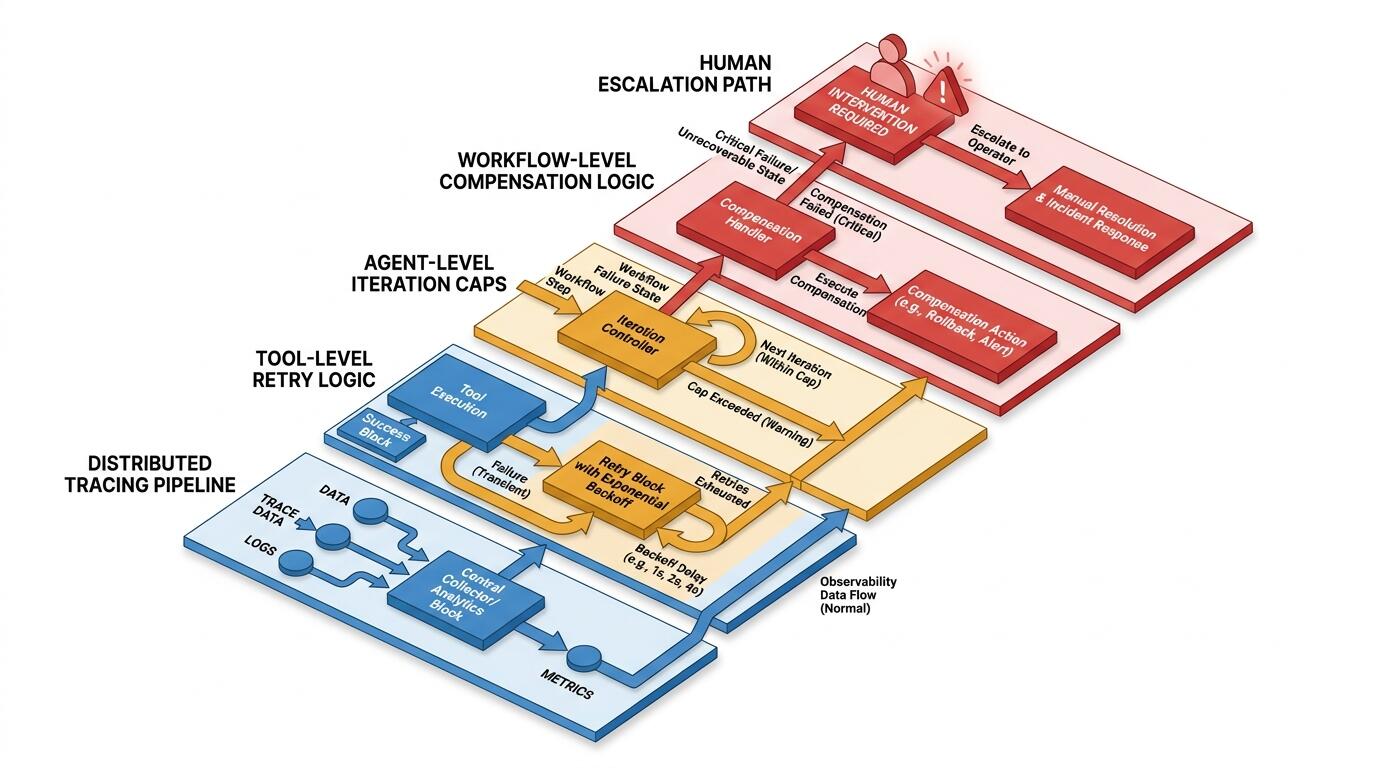
ALT: Diagram of agentic workflow observability and failure handling architecture for production AI systems
Pro Tips for Getting Better Results from Your Agentic System
Treat your prompts as versioned code artifacts. Prompt changes can dramatically alter agent behavior, and without version control on your prompts, debugging regressions becomes guesswork. Store prompts in source control, tag them with the model version they were written for, and run your eval harness on every prompt change before deploying.
Separate the reasoning layer from the execution layer. A pattern that consistently improves system reliability is keeping the LLM's role focused on reasoning and decision-making, while execution (API calls, database writes, side effects) is handled by deterministic code. The LLM decides what to do; your code does it. This separation makes the system easier to test, debug, and audit.
Design for model swaps from the start. LLM providers iterate quickly, and the model you build on today may not be the best choice in six months. Abstract your LLM calls behind a consistent interface layer so that swapping the underlying model is a configuration change, not a code rewrite. This is infrastructure hygiene that pays dividends repeatedly.
Use human-in-the-loop checkpoints strategically, not sparingly. A common misconception is that adding human checkpoints to an agentic workflow is a sign of incomplete automation — something to be removed once the system matures. In practice, the most robust production agentic systems use human review at high-stakes decision points as a permanent architectural feature, not a temporary scaffold. The goal is not to remove humans from the loop; it is to put them at exactly the right points in the loop.
Invest in an evaluation dataset that grows over time. Every real production failure and every edge case you encounter should be added to your eval suite. Teams that treat their evaluation dataset as a living document build systems that improve measurably over time. Teams that treat testing as a one-time gate before launch find themselves continuously surprised by new failure modes.
Frequently Asked Questions FAQ
Q1: How do you decide when a task needs an agentic workflow versus a simpler pipeline?
An agentic workflow is justified when the task requires dynamic, context-dependent decision-making that cannot be predetermined — for example, when the sequence of steps depends on intermediate results, or when the system needs to recover from tool failures by trying alternative approaches. If you can write out the full step sequence in advance, a standard pipeline is simpler and more reliable. Reserve agentic patterns for tasks where the branching logic genuinely cannot be hardcoded without losing significant capability.
Q2: Are current LLMs reliable enough to run agentic workflows in production without human oversight?
Current large language models are capable enough to drive useful agentic workflows in production, but they are not yet reliable enough to operate without any oversight on high-stakes or irreversible actions. The most effective production deployments use LLMs for reasoning and decision-making while applying deterministic validation on outputs before executing side effects. Human-in-the-loop escalation paths remain an important safety layer for consequential actions, and output monitoring should be treated as a permanent operational responsibility rather than a temporary measure.
Q3: How long does it typically take to move an agentic workflow from prototype to production?
The time depends heavily on task complexity, the maturity of your tooling ecosystem, and how thoroughly you address observability and failure handling. Simpler, well-scoped agentic tasks with clean tool interfaces can reach production relatively quickly. Complex multi-agent systems with rich memory requirements and high reliability targets require substantially more investment in orchestration, evaluation, and operational infrastructure. In practice, the teams who move fastest are those who invest in evaluation harnesses and observability early — they identify and fix issues before they compound, rather than discovering them from production incidents.
The Bottom Line
Building an agentic workflow that ships to production is fundamentally an engineering discipline, not a research exercise. The patterns that determine success are the same ones that have always governed reliable software: clear contracts, explicit failure handling, observable systems, and staged validation.
Key Takeaways:
- Define agent scope and decision boundaries before writing code — unbounded authority creates unbounded risk
- Choose orchestration architecture based on your failure scenarios, not your happy path
- Harden tool interfaces with typed schemas, error categorization, and idempotency
- Manage state deliberately, starting minimal and adding persistence only when a concrete use case demands it
- Design for silent failures as well as loud ones — output validation is not optional in production
- Instrument observability from day one, at the trace level, not just application logs
- Stage rollouts with an evaluation harness; treat quality regressions as seriously as error regressions
The teams that ship reliable agentic systems are not the ones with the most sophisticated AI models — they are the ones who treat agentic development with the same rigor they would apply to any production system.
If you are ready to move from architecture decisions to a live, shipped product, exploring real-world implementations is the fastest way to close the gap between theory and practice. Visit the Darius website to see shipped AI projects, technical insights, and what end-to-end engineering leadership looks like in practice — and get in touch if you need a technical partner who builds, not just advises.
Sources & Further Reading
- Orkes. "What are Agentic Workflows? Architecture, Use Cases, and Best Practices".
https://orkes.io/blog/what-are-agentic-workflows - Temporal. "Building an agentic system that's actually production-ready".
https://temporal.io/blog/building-an-agentic-system-thats-actually-production-ready - Vellum. "How can agentic capabilities be deployed in production today?".
https://www.vellum.ai/blog/how-can-agentic-capabilities-be-deployed-in-production-today - IEEE. IEEE Standards Association — standards and technical resources for AI and software systems engineering.
https://www.ieee.org/
Note: Standards and technical guidance may be updated; please check the latest official documents or consult professional advisors for current best practices.